cancel
Showing results for 
Search instead for 
Did you mean: 

The Power BI Data Visualization World Championships is back! It's time to submit your entry. Live now!

Reply
Anonymous
Not applicable

Issues with Multiple OPD Gateways

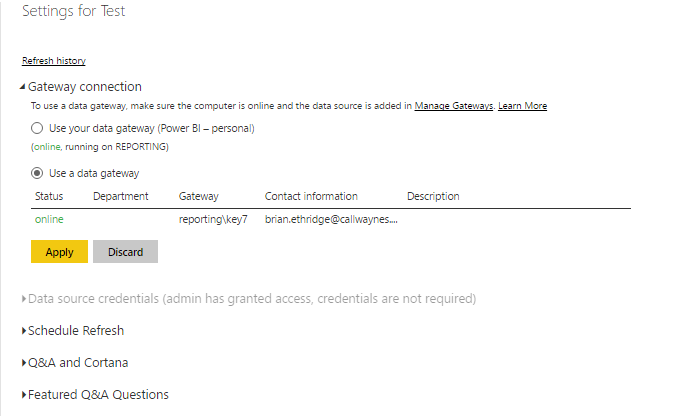
I have ODP gateways installed on two servers. One is a SQL database and the other is a file server. I am trying to access sources from both gateways in one query. One source is a table from the the SQL database and the other source is an excel workbook from the file server. Both gateways and sources are functioning on my PBi site. If I load them in seperate queries and publish independent of each, OPD Gateway is available and refreshes. If I try to add the other source and publish it as one dataset the option for OPD Gateway goes grey and is unavailable.  I was able to make it work if I loaded the workbook first but that is not ideal as i will be adding more workbooks and tables later. It makes no sense why it would work seperately and not together.


Any ideas what may be causing this to occur?


Thanks


OPD Gateway Connected.PNGOPD Gateway Combined Sources Not Connected.PNG


1 ACCEPTED SOLUTION
Anonymous
Not applicable

@Anonymous If I read what you said correctly, you got the refresh to work if you loaded the Excel data source first?... That would be new, I was always under the impression (and why I think you are having the problem) that all the datasources for a dataset had to belong to the same gateway in order for you to be able to refresh. I'm not aware of any "split gateway" scenerio working for a single dataset.

View solution in original post

2 REPLIES 2
Anonymous
Not applicable

@Anonymous If I read what you said correctly, you got the refresh to work if you loaded the Excel data source first?... That would be new, I was always under the impression (and why I think you are having the problem) that all the datasources for a dataset had to belong to the same gateway in order for you to be able to refresh. I'm not aware of any "split gateway" scenerio working for a single dataset.

Anonymous
Not applicable

 @Anonymous you are correct. The issue was really a result of the data source using a copied file path instead of using UNC to create the file path. After I switched to UNC (Universal Naming Convention - \\servername\sharename\path\filename)  the datasource was recognized by the gateway installed on my SQL server and became available.

Helpful resources

Announcements
Power BI DataViz World Championships

Power BI Dataviz World Championships

The Power BI Data Visualization World Championships is back! It's time to submit your entry.

January Power BI Update Carousel

Power BI Monthly Update - January 2026

Check out the January 2026 Power BI update to learn about new features.

FabCon Atlanta 2026 carousel

FabCon Atlanta 2026

Join us at FabCon Atlanta, March 16-20, for the ultimate Fabric, Power BI, AI and SQL community-led event. Save $200 with code FABCOMM.