Hi,
I am struggling to correctly pull information from a restaurant reservations API which uses cursor pagination. Calling the API directly produces the below result

Accessing the "data" record provides the cursor to access the next page of data as well as the booking records themselves

The API paginates until cursor = null
I have attempted to use List.Generate to access all of the pages of data, using the below posts as reference, but I have been unsuccessful in my attempts to adadpt them to my API requirements:
https://community.powerbi.com/t5/Power-Query/Need-Help-with-Stripe-REST-API-Pagination-in-Power-Quer...
https://datachant.com/2016/06/27/cursor-based-pagination-power-query/
https://community.powerbi.com/t5/Power-Query/Web-based-cursor-pagination-issue/m-p/2786453#M86457
I have attempted to modify the code to work for my scenario. However, when using the below code, it appears to continually loop, creating a huge dataset. For reference, I know that the call I am making has c. 1000 records, which means with a limit of 400 imposed by the API, there should be three pages of data.
let // Get the API Token api_url = "https://api.sevenrooms.com/2_4/reservations/export?venue_id" &venue_id&"&limit=400&from_date="&from_date&"&to_date="&to_date, from_date = "2023-01-01", to_date = "2023-01-31", venue_id = "XXXXXXXXXX", APICall = List.Generate ( () => [APIData = Json.Document(Web.Contents (api_url, [ Headers = [#"Content-Type"="application/x-www-form-urlencoded", #"Authorization"=Token ] ] ))[data] , MoreData = APIData[cursor], results = APIData[results]], each [results] <> null, each [ APIData = Json.Document(Web.Contents(api_url&"&cursor="&(try Text.From([MoreData]) otherwise null), [ Headers = [#"Content-Type"="application/x-www-form-urlencoded", #"Authorization"=Token ] ] ))[data], MoreData = [APIData][cursor], results = [APIData][results]], each [APIData] ), #"Converted to Table" = Table.FromList(APICall, Splitter.SplitByNothing(), null, null, ExtraValues.Error), #"Expanded Column1" = Table.ExpandRecordColumn(#"Converted to Table", "Column1", {"cursor", "limit", "results"}, {"cursor", "limit", "results"}), #"Expanded results" = Table.ExpandListColumn(#"Expanded Column1", "results") in #"Expanded results" |
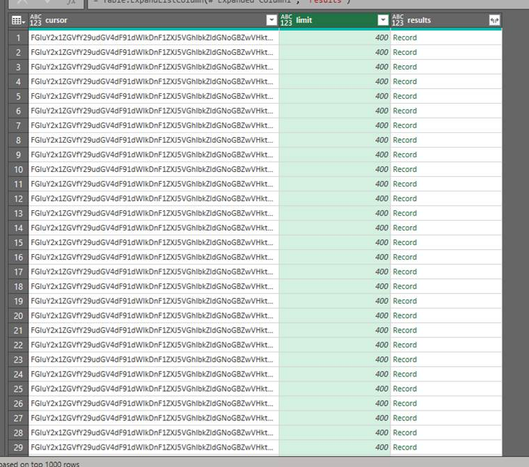
This leaves me with thousands of rows of data (I assume because it is continually looping) rather than three cursors worth that should be generated:
Could someone please help me out with refining the request to avoid this looping?
I am new to M langauge so any help would be hugely appreciated.
Thanks


