
cancel
Showing results for 
Search instead for 
Did you mean: 

The Power BI Data Visualization World Championships is back! Get ahead of the game and start preparing now! Learn more

Reply
LillyLegenda
Helper III
Helper III

Invoke R-Script function to all fieles in Folder

Good morning, 

I am using an R-Script to do a market basket analysis. The code is working fine and I managed to create a function call Apri.


let Apri = (Quelle) =>
    Quelle = Report,
    #"R-Skript ausführen" = R.Execute("# 'dataset' enthält die Eingabedaten für dieses Skript.#(lf)library(methods)#(lf)library(arules)#(lf)#(lf)transactions <- 
    as(split(dataset[,""Artikel""], dataset[,""Rechnungsnummer""]), ""transactions"")#(lf)rules <- apriori(transactions, parameter = list(support = 0.01, confidence = 0.01), 
    control = list(verbose = FALSE))#(lf)rules_df <- data.frame( lhs = labels( lhs(rules) ), rhs = labels( rhs(rules) ), quality(rules))",[dataset=Quelle]),
    #"""rules_df""" = #"R-Skript ausführen"{[Name="rules_df"]}[Value]
in Apri


I would like to :

1. apply the function to each .xlsx file in a folder

2. add the filename as an additional column to each result

3. combine all results into one big report.


Here I have my example file: Download


Unfortunately, I am struggeling with the first step for hours now. I would really apprechiate your help 🙂

Thanks!


1 ACCEPTED SOLUTION
ImkeF
Community Champion
Community Champion

Hi @LillyLegenda ,

didn't pay attention to the function itself.
Problem with your function is that it ignores the function parameter and itself always takes table "Report" to work upon.

Changed it to this:


image.png

and its working now (see attachment).

But it's a bad practice to name the function parameter the same as a step/variable in the query itself.
So it would be better (and less confusing) to name it like so:


ImkeF_0-1610284555835.png


Imke Feldmann (The BIccountant)

If you liked my solution, please give it a thumbs up. And if I did answer your question, please mark this post as a solution. Thanks!

How to integrate M-code into your solution -- How to get your questions answered quickly -- How to provide sample data -- Check out more PBI- learning resources here -- Performance Tipps for M-queries

View solution in original post

4 REPLIES 4
ImkeF
Community Champion
Community Champion

Hi @LillyLegenda ,

didn't pay attention to the function itself.
Problem with your function is that it ignores the function parameter and itself always takes table "Report" to work upon.

Changed it to this:


image.png

and its working now (see attachment).

But it's a bad practice to name the function parameter the same as a step/variable in the query itself.
So it would be better (and less confusing) to name it like so:


ImkeF_0-1610284555835.png


Imke Feldmann (The BIccountant)

If you liked my solution, please give it a thumbs up. And if I did answer your question, please mark this post as a solution. Thanks!

How to integrate M-code into your solution -- How to get your questions answered quickly -- How to provide sample data -- Check out more PBI- learning resources here -- Performance Tipps for M-queries

Thank you very much @ImkeF 🙂 Now it is working fine.

ImkeF
Community Champion
Community Champion

Hi @LillyLegenda ,

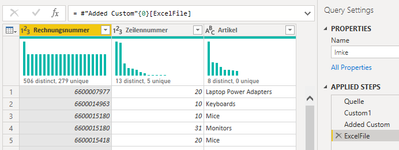
you have to apply your function in an add-column-step like I've done in the sample file (see query "Imke")
The following sources might help you understanding what's going on there: 

Web Scraping 1: Combine multiple tables from one page in Power BI and Power Query – The BIccountant

Transform a query into a function in Power Query and Power BI – (thebiccountant.com)


Imke Feldmann (The BIccountant)

If you liked my solution, please give it a thumbs up. And if I did answer your question, please mark this post as a solution. Thanks!

How to integrate M-code into your solution -- How to get your questions answered quickly -- How to provide sample data -- Check out more PBI- learning resources here -- Performance Tipps for M-queries

Hi @ImkeF , Thank you very much for your answer and time.

I read the links you provided and looked at the file, but I am still confused.

I would expect the function to run, when I click on one of the Tables in the column ExcelFile but it is only showing the source table. Why is it not applying the function?

LillyLegenda_0-1610281978003.png

Maybe the function is not recognizing the table as Source (Quelle)?

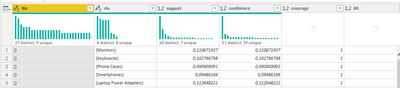
The result of the function should look like the Apriori Query

LillyLegenda_1-1610282022126.png


Helpful resources

Announcements
Power BI DataViz World Championships

Power BI Dataviz World Championships

The Power BI Data Visualization World Championships is back! Get ahead of the game and start preparing now!

December 2025 Power BI Update Carousel

Power BI Monthly Update - December 2025

Check out the December 2025 Power BI Holiday Recap!

FabCon Atlanta 2026 carousel

FabCon Atlanta 2026

Join us at FabCon Atlanta, March 16-20, for the ultimate Fabric, Power BI, AI and SQL community-led event. Save $200 with code FABCOMM.