Get certified for free when you join Fabric Data Days 2026 and dive into Fabric, Power BI, SQL, AI, and other essential data skills.
Join nowData Days is here! Join us now for 60+ days of learning, challenges, and connection. Learn more
Hello Everyone,
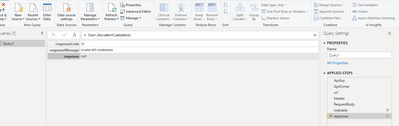
I am using REST API to fetch the data from 3rd party using POST method, I have used the same parameters in Header, Body in postman and it is giving me the data in json format, but when I am using the same thing in power query of power bi, it is giving me an error: Response Msg: Invalid APi credentials, Response code:11 & response : NULL, Please have a look in my power query below and tell me what's is wrong in this :-
let
ApiOwner= "________",
ApiKey="________",
url = "https://dentalkart.vineretail.com/RestWS/api/eretail/v3/sku/inventoryStatus",
header= [#"Authorization" = ApiKey & ApiOwner,
#"Content-Type" = "application/x-www-form-urlencoded"],
RequestBody=
"{
""skuCodes"":""[]"",
""fromDate"":""18/06/2021 15:40:30"",
""toDate"":""23/06/2021 15:40:30"",
""pageNumber"":""1"",
""dropShipFlag"":""no"",
""locCode"":""
}",
webdata = Web.Contents(url, [Content = Text.ToBinary(RequestBody), Headers=header]),
response = Json.Document(webdata)
in
response
Any kind of help would really be appreciated ! API Call Credentials Invalid
Hi @akashgera ,
Seems that there are extra quotes in your RequestBody,check example below:
https://help.tableau.com/current/api/rest_api/en-us/REST/rest_api_concepts_example_requests.htm
Best Regards,
Kelly
Did I answer your question? Mark my post as a solution!
Thanks for the response, let me check my request body part and revert to you.
Hi @akashgera ,
Is your issue solved now?
Best Regards,
Kelly
Did I answer your question? Mark my post as a solution!
Hi Kelly,
Still facing the same issue, I don't know what is wrong in this code (No Syntax error detected)
Error: Invalid API Credentials.
Used postman to fetch the data using same parameters and it is giving data without any error.
I think something is wrong in this part:
webdata = Web.Contents(url, [Content = Text.ToBinary(RequestBody), Headers=header])
Pls help !
Don't miss out on Data Days, June 15 through August 7. Learn Fabric, Power BI, SQL, AI and more.
Check out the May 2026 Power BI update to learn about new features.
| User | Count |
|---|---|
| 4 | |
| 4 | |
| 2 | |
| 2 | |
| 1 |
| User | Count |
|---|---|
| 11 | |
| 11 | |
| 5 | |
| 4 | |
| 4 |