cancel
Showing results for 
Search instead for 
Did you mean: 

Level up your Power BI skills this month - build one visual each week and tell better stories with data! Get started

Reply
Anonymous
Not applicable

Inser Column values into API

Hi,

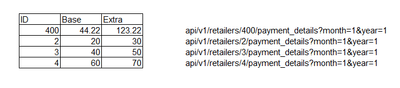
I have API Query like this:

Galat198_0-1613557793388.png

where 400 this id number

After Pivot I get Table :

Galat198_1-1613557843714.png


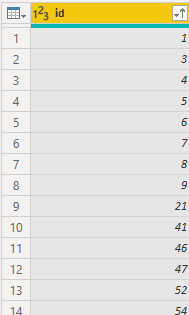
I have Other Table with IDs:

Galat198_2-1613557946065.png

10 / 5000
 

Translation results

Number of rows with ID is dynamically 

I need make API with all IDs from Table with APIs

That is, each time place a different ID from a table in the API

And to get finally table like this:

Galat198_0-1613563152063.png


(After, the result for each ID in the API, there will be different...)

How can this be done?

Thanks

7 REPLIES 7
Icey
Community Support
Community Support

Hi @Anonymous ,


You can refer to this blog: Use Column as Parameter for Custom Function in Pow... - Microsoft Power BI Community.


This blog is not the same with your scenario, but the method could be used.


Best regards

Icey


If this post helps, then consider Accepting it as the solution to help other members find it faster.

Anonymous
Not applicable

@mahoneypat @JW_van_Holst 
Friends,
I changed the data type of ID to text and then added a custom column an API
Json.Document(Web.Contents(" https://xxxxxx/api/v1/retailers/"&[id]&"/payment_details?month=1&year=1"))
Where [id] will be changed by value in each row id column.....
And that opened a link for me for each line...lol
It seems to me that it works .. or I was wrong somewhere?

That looks good.  Glad you got it working.

Pat


Did I answer your question? Mark my post as a solution! Kudos are also appreciated!

To learn more about Power BI, follow me on Twitter or subscribe on YouTube.


@mahoneypa HoosierBI on YouTube


JW_van_Holst
Resolver IV
Resolver IV

I'm not sure if I understand the problem you are facing, but combining the two table is straight forward:

let
    Source = Table.FromRows(Json.Document(Binary.Decompress(Binary.FromText("i45WMlSK1YlWMgKTxmDSRCk2FgA=", BinaryEncoding.Base64), Compression.Deflate)), let _t = ((type nullable text) meta [Serialized.Text = true]) in type table [ID = _t]),
    #"Changed Type" = Table.TransformColumnTypes(Source,{{"ID", Int64.Type}}),
    #"Added Custom" = Table.AddColumn(#"Changed Type", "Custom", each #"API table"),
    #"Expanded Custom" = Table.ExpandTableColumn(#"Added Custom", "Custom", {"base", "extra"}, {"base", "extra"})
in
    #"Expanded Custom"
Anonymous
Not applicable

Thanks, @JW_van_Holst 
I didn't quite understand the answer...🙂 The task is to replace "400" within the API and replace it with each ID from a second table

Galat198_1-1613563098262.png


Please see if this video helps.

Power BI - Tales From The Front - REST APIs - YouTube

Pat


Did I answer your question? Mark my post as a solution! Kudos are also appreciated!

To learn more about Power BI, follow me on Twitter or subscribe on YouTube.


@mahoneypa HoosierBI on YouTube


Anonymous
Not applicable

It's not like,
Originally I get one value for each static API and not a list as in the example
*** Maybe need to run each API individually and place a different number dynamically from column and then unify them .... something like a loop...🤔🙄

Helpful resources

Announcements
April Power BI Update Carousel

Power BI Monthly Update - April 2026

Check out the April 2026 Power BI update to learn about new features.

Fabric SQL PBI Data Days

Data Days 2026 coming soon!

Sign up to receive a private message when registration opens and key events begin.

New to Fabric survey Carousel

New to Fabric Survey

If you have recently started exploring Fabric, we'd love to hear how it's going. Your feedback can help with product improvements.

Power BI DataViz World Championships carousel

Power BI DataViz World Championships - June 2026

A new Power BI DataViz World Championship is coming this June! Don't miss out on submitting your entry.

Top Solution Authors
Top Kudoed Authors