This time we’re going bigger than ever. Fabric, Power BI, SQL, AI and more. We're covering it all. You won't want to miss it.
Learn moreDid you hear? There's a new SQL AI Developer certification (DP-800). Start preparing now and be one of the first to get certified. Register now
Hi everyone,
I've recently installed the on prem data gateway but it's not showing on my power apps dashboard.
I then read an article that said the region has to match your region set in your Power Platform Enviroment.
For me, our environment is United Kingdom. So, I tried to re-install the Gateway again and the only UK option was UK South. Is that correct please?!
Any advice gratefully received 🙂
Solved! Go to Solution.
Hi @kchinnock ,
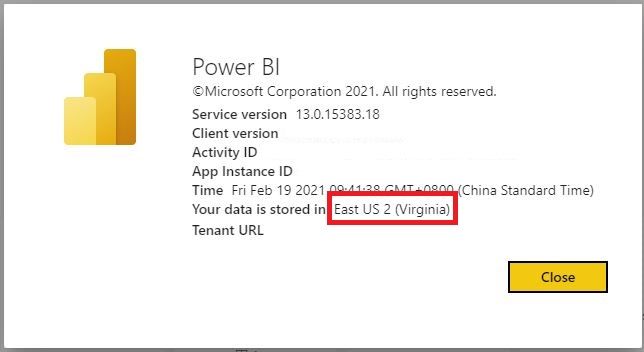
Please check the environment of your Power BI here:
In my situation, the data is stored in East US 2. In other words, my tenant region or my PBI environment is East US 2. Therefore, my gateway is needed to install in East US 2.
Best Regards,
Icey
If this post helps, then please consider Accept it as the solution to help the other members find it more quickly.
Thank you Icey. I can now see the Gateway in Power BI!
I thought (maybe naively) that once installed, I would be able to see the Gateway in Power Automate, but under Data > Gateways it says I don't have any?
I am trying to use a flow to run a Powershell script on Prem. Maybe I am barking up the wrong tree! 🤔
Hi @kchinnock ,
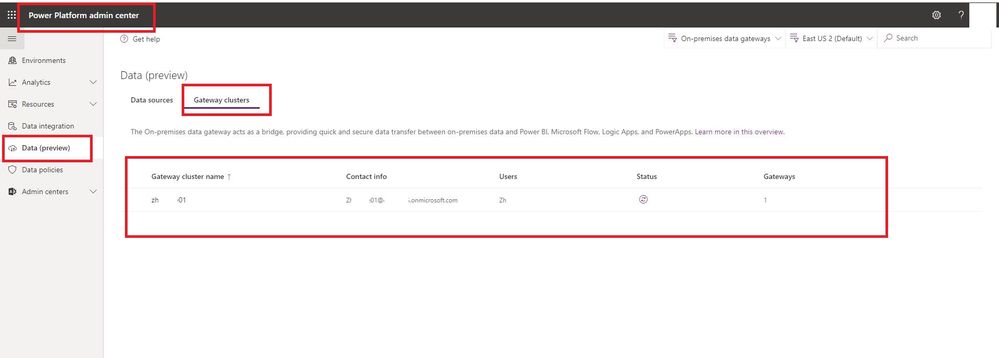
When I use the same account to sign in Power Platform admin center, I can find my gateway under "Data (preview)" -> "Gateway clusters". Can you find your gateway there?
Best regards
Icey
If this post helps, then consider Accepting it as the solution to help other members find it faster.
Hi @kchinnock ,
Please check the environment of your Power BI here:
In my situation, the data is stored in East US 2. In other words, my tenant region or my PBI environment is East US 2. Therefore, my gateway is needed to install in East US 2.
Best Regards,
Icey
If this post helps, then please consider Accept it as the solution to help the other members find it more quickly.
Check out the April 2026 Power BI update to learn about new features.
Sign up to receive a private message when registration opens and key events begin.
If you have recently started exploring Fabric, we'd love to hear how it's going. Your feedback can help with product improvements.