This time we’re going bigger than ever. Fabric, Power BI, SQL, AI and more. We're covering it all. You won't want to miss it.
Learn moreDid you hear? There's a new SQL AI Developer certification (DP-800). Start preparing now and be one of the first to get certified. Register now
Hi,
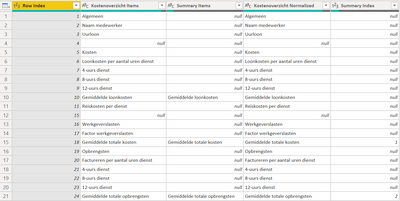
I try to add a Excel-template with a hiërarchie for a "Cost-overview". But when I try to load the template in Power BI, the indentation is gone (I know about switching off "Word Wrap").
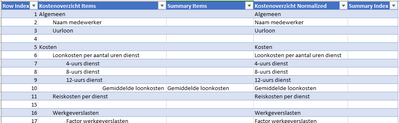
It should be like the (Excel-) picture below. See my files here: PBIX and Excel-template
Solved! Go to Solution.
Hi @kram1234,
I can't load your files, but I guess the identation is not space-generated, this is rather formatting in Excel?
I just had to sort the same issue. The problem is that PBI does not care about cells meta-data (including formatting) and only take the actual value of the cell.
I worked around it with a macro that would analise the identation and create a separate column to record the identation level, which then can be used in PBI.
Kind regards,
John
Hi @jbwtp ,
You are right. The indentation is not space-generated. I changed it to space-generated instead of using "Increase Indent" in Excel, now it's fine.
Thanks for this pretty easy solution 🙂
Hi @kram1234,
I can't load your files, but I guess the identation is not space-generated, this is rather formatting in Excel?
I just had to sort the same issue. The problem is that PBI does not care about cells meta-data (including formatting) and only take the actual value of the cell.
I worked around it with a macro that would analise the identation and create a separate column to record the identation level, which then can be used in PBI.
Kind regards,
John
Check out the April 2026 Power BI update to learn about new features.
Sign up to receive a private message when registration opens and key events begin.
If you have recently started exploring Fabric, we'd love to hear how it's going. Your feedback can help with product improvements.