cancel
Showing results for 
Search instead for 
Did you mean: 

The Power BI Data Visualization World Championships is back! It's time to submit your entry. Live now!

Reply
prinuce
Helper I
Helper I

Importing date column while getting issue

Hi Team, 

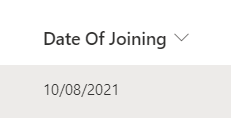
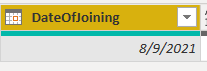
I m getting issue while importing data from sharepoint. issue is there is one Date column (ex- 10/08/2021) while importing in power bi it is showing 08/09/2021. Please help.

Data source:- 

prinuce_0-1631786161550.png

Power BI

prinuce_1-1631786221648.png


1 ACCEPTED SOLUTION

Thank you @mahoneypat my issue has been, resolved! Thank you again

View solution in original post

6 REPLIES 6
mahoneypat
Microsoft Employee
Microsoft Employee

Actually, you can add a custom column with this formula instead.

= Date.From(DateTimeZone.RemoveZone([DateTimeZoneColumn])


Or,  you can add a transform column step on that column and update the function part in the formula bar to this 


each Date.From(DateTimeZone.RemoveZone(_)


Pat


Did I answer your question? Mark my post as a solution! Kudos are also appreciated!

To learn more about Power BI, follow me on Twitter or subscribe on YouTube.


@mahoneypa HoosierBI on YouTube


mahoneypat
Microsoft Employee
Microsoft Employee

That is likely due to SharePoint date columns being UTC format, and it is getting converted to your local timezone.  So that date is probably correct.  If you do want to make them match, you can just keep the date component from that column.  One way to do that is to first convert it to a text column, extract text before delimiter (use a space), and then convert it to a Date column.


Pat


Did I answer your question? Mark my post as a solution! Kudos are also appreciated!

To learn more about Power BI, follow me on Twitter or subscribe on YouTube.


@mahoneypa HoosierBI on YouTube


I tried but getting error
Expression.Error: We cannot convert the value "8/9/2021 6:30:00 PM" to type DateTimeZone.
Details:
Value=8/9/2021 6:30:00 PM
Type=[Type]


Please help!

That value doesn't have the timezone component.  Has the type already been changed at this point?  Or is this the value from the source?  Without the timezone component, I wouldn't expect you to see that behavior (date doesn't match value in SP list).


Pat


Did I answer your question? Mark my post as a solution! Kudos are also appreciated!

To learn more about Power BI, follow me on Twitter or subscribe on YouTube.


@mahoneypa HoosierBI on YouTube


@mahoneypat

I am facing some issue its fixed in Power Bi query editor but once i published to power bi service again showing the previous date

Thank you @mahoneypat my issue has been, resolved! Thank you again

Helpful resources

Announcements
Power BI DataViz World Championships

Power BI Dataviz World Championships

The Power BI Data Visualization World Championships is back! It's time to submit your entry.

December 2025 Power BI Update Carousel

Power BI Monthly Update - December 2025

Check out the December 2025 Power BI Holiday Recap!

FabCon Atlanta 2026 carousel

FabCon Atlanta 2026

Join us at FabCon Atlanta, March 16-20, for the ultimate Fabric, Power BI, AI and SQL community-led event. Save $200 with code FABCOMM.

Top Solution Authors