Get certified for free when you join Fabric Data Days 2026 and dive into Fabric, Power BI, SQL, AI, and other essential data skills.
Join nowJuly 7 - July 17 | Round 2 of the Power BI Dataviz World Championships. Don't miss your chance! Learn more
Hello,
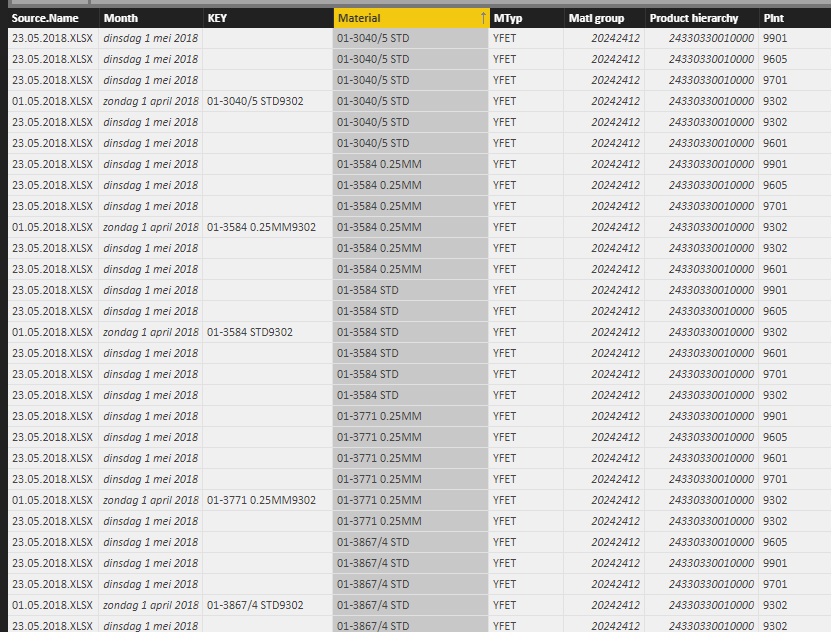
I imported data from 2 excel files in the same folder, both identical in data format and column headers (it's the same SAP export created a few weeks apart). All columns are imported correctly except for 1: the "KEY" column I use to create unique identifiers (a part number can exist in different plants, but only on pn-plant combination exists in each file).
The query imports the key values for one of the files, but the cells are blank for the other file.
However, if I copy-paste the data in one excel file and import that one it's okay.
Anyone an idea of what might be the issue?
Many thanks
KR,
Marlies
Solved! Go to Solution.
Hi @Anonymous,
I restarted the entire thing and it's working now, thanks.
Marlies
@MHelmer,
Is there any possibility that you share us the Excel files? I will test them in my Desktop and you can share the file through online service such as OneDrive.
Regards,
Lydia
Hi @Anonymous,
I restarted the entire thing and it's working now, thanks.
Marlies
Hi @MHelmer
instead of importing them separatly you can import from folder
https://powerbi.tips/2016/06/loading-data-from-folder/
If the files are the same, the problem will disappear
- Quentin
Join us in Barcelona for FabCon and SQLCon, the Fabric, Power BI, SQL, and AI community event. Save €200 with code FABCMTY200.
Check out the July 2026 Power BI update to learn about new features.
Join Data Days 2026: 60 days of free live/on-demand sessions, challenges, study groups, and certification opportunities.