This time we’re going bigger than ever. Fabric, Power BI, SQL, AI and more. We're covering it all. You won't want to miss it.
Learn moreLevel up your Power BI skills this month - build one visual each week and tell better stories with data! Get started
Hello,
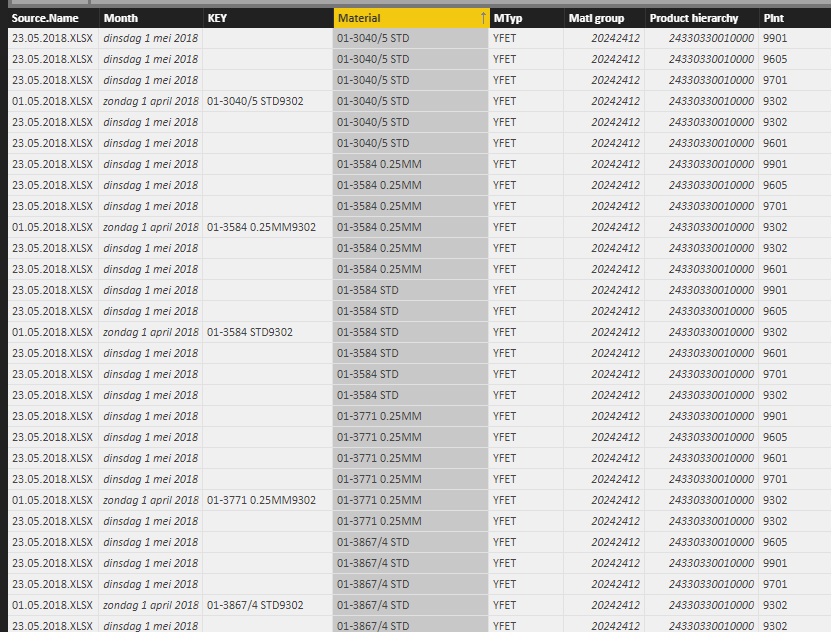
I imported data from 2 excel files in the same folder, both identical in data format and column headers (it's the same SAP export created a few weeks apart). All columns are imported correctly except for 1: the "KEY" column I use to create unique identifiers (a part number can exist in different plants, but only on pn-plant combination exists in each file).
The query imports the key values for one of the files, but the cells are blank for the other file.
However, if I copy-paste the data in one excel file and import that one it's okay.
Anyone an idea of what might be the issue?
Many thanks
KR,
Marlies
Solved! Go to Solution.
Hi @Anonymous,
I restarted the entire thing and it's working now, thanks.
Marlies
@MHelmer,
Is there any possibility that you share us the Excel files? I will test them in my Desktop and you can share the file through online service such as OneDrive.
Regards,
Lydia
Hi @Anonymous,
I restarted the entire thing and it's working now, thanks.
Marlies
Hi @MHelmer
instead of importing them separatly you can import from folder
https://powerbi.tips/2016/06/loading-data-from-folder/
If the files are the same, the problem will disappear
- Quentin
Check out the April 2026 Power BI update to learn about new features.
Sign up to receive a private message when registration opens and key events begin.
If you have recently started exploring Fabric, we'd love to hear how it's going. Your feedback can help with product improvements.