cancel
Showing results for 
Search instead for 
Did you mean: 

July 7 - July 17 | Round 2 of the Power BI Dataviz World Championships. Don't miss your chance! Learn more

Reply
MHelmer
New Member

Importing data from multiple excel files

Hello,


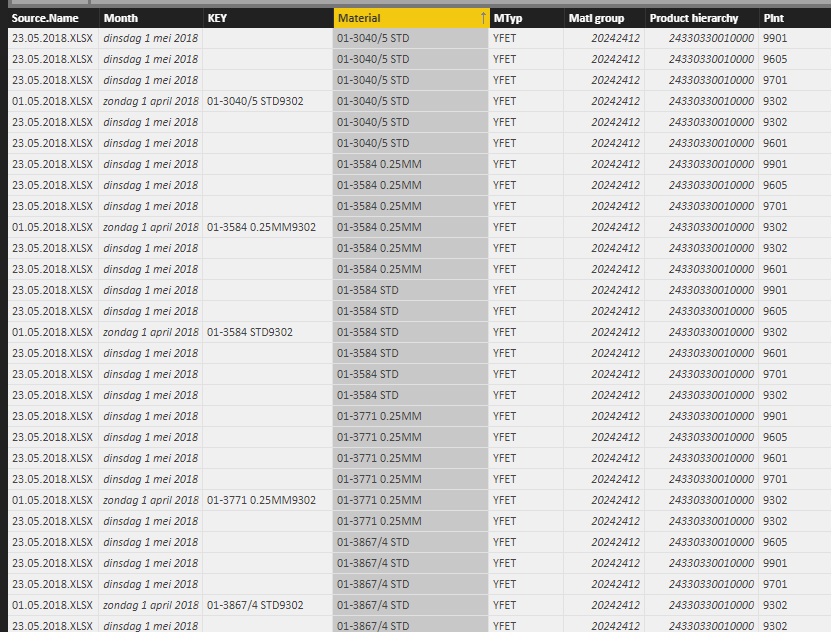
I imported data from 2 excel files in the same folder, both identical in data format and column headers (it's the same SAP export created a few weeks apart). All columns are imported correctly except for 1: the "KEY" column I use to create unique identifiers (a part number can exist in different plants, but only on pn-plant combination exists in each file). 


The query imports the key values for one of the files, but the cells are blank for the other file. 

Capture 1.PNG


However, if I copy-paste the data in one excel file and import that one it's okay. 


Anyone an idea of what might be the issue?


Many thanks

KR,

Marlies

1 ACCEPTED SOLUTION

Hi @Anonymous,


I restarted the entire thing and it's working now, thanks. 


Marlies

View solution in original post

4 REPLIES 4
Anonymous
Not applicable

@MHelmer,

Is there any possibility that you share us the Excel files? I will test them in my Desktop and you can share the file through online service such as OneDrive.

Regards,
Lydia

Hi @Anonymous,


I restarted the entire thing and it's working now, thanks. 


Marlies

quentin_vigne
Solution Sage
Solution Sage

Hi @MHelmer


instead of importing them separatly you can import from folder

https://powerbi.tips/2016/06/loading-data-from-folder/


If the files are the same, the problem will disappear


- Quentin

Hi @quentin_vigne


I am importing them from the same folder...

Helpful resources

Announcements
FabCon and SQLCon Barcelona 2026

FabCon & SQLCon – Barcelona 2026

Join us in Barcelona for FabCon and SQLCon, the Fabric, Power BI, SQL, and AI community event. Save €200 with code FABCMTY200.

July Power BI Update Carousel

Power BI Monthly Update - July 2026

Check out the July 2026 Power BI update to learn about new features.

60 days of Data Days Carousel

Data Days 2026

Join Data Days 2026: 60 days of free live/on-demand sessions, challenges, study groups, and certification opportunities.

Power BI DataViz World Championships carousel

Power BI DataViz World Championships - June 2026

A new Power BI DataViz World Championship is coming this June! Don't miss out on submitting your entry.

Top Solution Authors