I am having a very strange problem with an Imported Data Table not matching the Power Query results.
I am building a table of 10 dates which are the distinct date values occurring in a "Pull Dates" column of a much larger table.
I need to label those 10 distinct dates with sensible descriptive names that include the date itself for reporting slicing.
The Transformation is working as expected, as the results of the final step are what I want and expect.
When I "Close and Apply", and then go to the "Data" tab and select that imported table, the table is slightly wrong - different from the trasformation results.
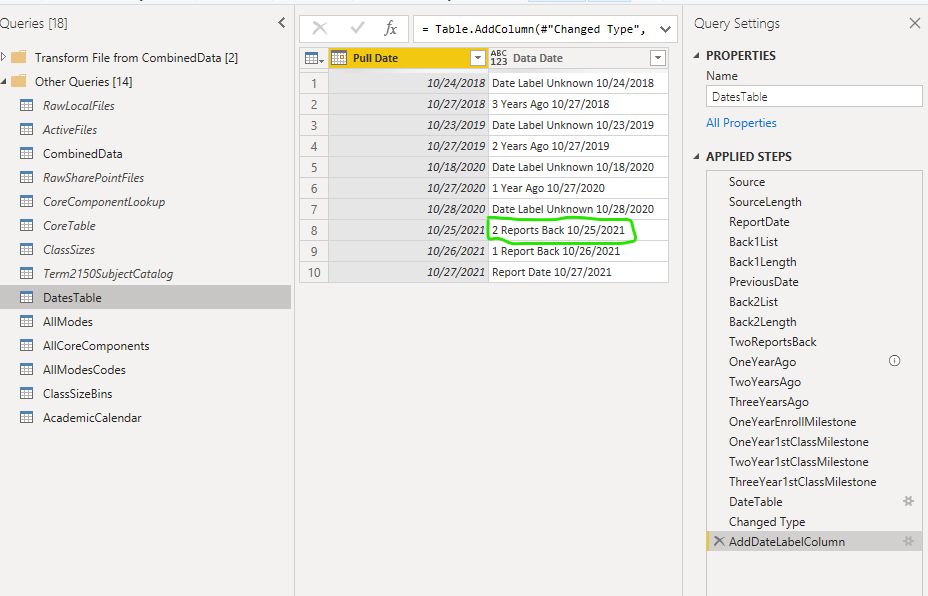
Transformation Results: 10/25/2021 has the correct label (enclosed in green)
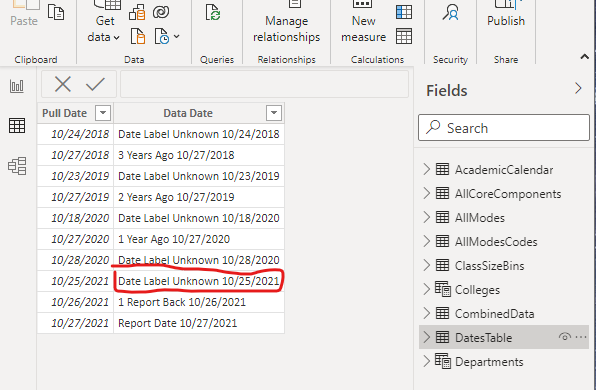
Imported Data Table: 10/25/2021 has the wrong label (enclosed in red)
The M code from the Advanced Editor is here:
let
Source = List.Sort(List.Distinct(Table.Column(CombinedData,"Pull Date")), Order.Ascending),
//
SourceLength = List.Count(Source),
ReportDate = List.Last(Source),
//
Back1List = List.FirstN(Source, SourceLength-1),
Back1Length = List.Count(Back1List),
PreviousDate = List.Last(Back1List),
//
Back2List = List.FirstN(Back1List, Back1Length-1),
Back2Length = List.Count(Back2List),
TwoReportsBack = List.Last(Back2List),
// Calculate "ReportDate" one year ago.
OneYearAgo = Date.AddYears(ReportDate,-1),
TwoYearsAgo = Date.AddYears(ReportDate,-2),
ThreeYearsAgo = Date.AddYears(ReportDate,-3),
OneYearEnrollMilestone = "",
OneYear1stClassMilestone = "",
TwoYear1stClassMilestone = "",
ThreeYear1stClassMilestone = "",
//
DateTable = Table.FromList(Source, Splitter.SplitByNothing(), {"Pull Date"}, null, ExtraValues.Error),
#"Changed Type" = Table.TransformColumnTypes(DateTable,{{"Pull Date", type date}}),
AddDateLabelColumn = Table.AddColumn(#"Changed Type", "Data Date",
each
if [Pull Date] = ReportDate then "Report Date" & " " & Date.ToText([Pull Date])
else if [Pull Date] = PreviousDate then "1 Report Back" & " " & Date.ToText([Pull Date])
else if [Pull Date] = TwoReportsBack then "2 Reports Back" & " " & Date.ToText([Pull Date])
else if [Pull Date] = OneYearAgo then "1 Year Ago" & " " & Date.ToText([Pull Date])
else if [Pull Date] = TwoYearsAgo then "2 Years Ago" & " " & Date.ToText([Pull Date])
else if [Pull Date] = ThreeYearsAgo then "3 Years Ago" & " " & Date.ToText([Pull Date])
else if [Pull Date] = OneYearEnrollMilestone then "1 Yr Rel. Enroll Open" & " " & Date.ToText([Pull Date])
else if [Pull Date] = OneYear1stClassMilestone then "1 Yr Rel. 1st Day" & " " & Date.ToText([Pull Date])
else if [Pull Date] = TwoYear1stClassMilestone then "2 Yr Rel. 1st Day" & " " & Date.ToText([Pull Date])
else if [Pull Date] = ThreeYear1stClassMilestone then "3 Yr Rel. 1st Day" & " " & Date.ToText([Pull Date])
else "Date Label Unknown" & " " & Date.ToText([Pull Date]))
in
AddDateLabelColumn
Any clues why the two are different?


