
This time we’re going bigger than ever. Fabric, Power BI, SQL, AI and more. We're covering it all. You won't want to miss it.
Learn moreDid you hear? There's a new SQL AI Developer certification (DP-800). Start preparing now and be one of the first to get certified. Register now
Hi PowerBI Community,
I am loading data from my cloud-based invoice software (https://invoiceocean.com/). I use Web as the data source and paste XML url with token provided by software. Unfortunately, the software has limitation. It allows fetching max up to 100 rows at once in one link (max_rows =100)
My solution is as follows:
Every time when I reach next hundred rows I need to make copy of table, change xml string and append the final table.
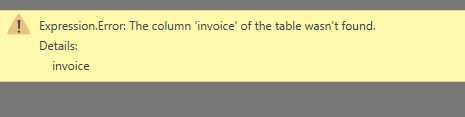
Additionally, I am not able to create the table when at least one document is not created. I.e. I created table 601 -700. Total rows in software is 550, so I receive the error message:
Questions:
1. Is there any solution (maybe advanced editor) to combine multiple XML links into one table without creating Data Warehouse or other additional storage?
2. Is it possible to use the condition which checks if XML link is empty? If yes it stops, else it loads data?
Thanks,
Radek
@RADEK,
You can use List.Generate() function in Power Query to load the full data from your web page. For more details, please review the following blogs and Lukasz's reply in the similar thread below.
Iterate over dynamic Web API Pages with Power Query – How to resolve Cursor-Based Pagination
Power BI Using List.Generate to Reduce API Calls with Pagination
Get data from web error: A web API key can only be specified when a web API key name is provided
Regards,
Check out the April 2026 Power BI update to learn about new features.
Sign up to receive a private message when registration opens and key events begin.
If you have recently started exploring Fabric, we'd love to hear how it's going. Your feedback can help with product improvements.