Get certified for free when you join Fabric Data Days 2026 and dive into Fabric, Power BI, SQL, AI, and other essential data skills.
Join nowData Days is here! Join us now for 60+ days of learning, challenges, and connection. Learn more
Hi,
When I am trying to import some pdf files into Power BI, I see an option of only importing selected tables or pages. However, I want to import the whole pdf as a single dataset. How can I do that?
I would really appreciate any help. Thanks!
Solved! Go to Solution.
Hi @anshpalash ,
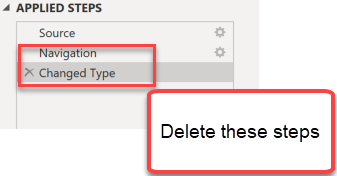
just import 1 page with the user interface. Then delete the last 2 steps of the query that will have been created Automatically so that just the step "Source" remains:
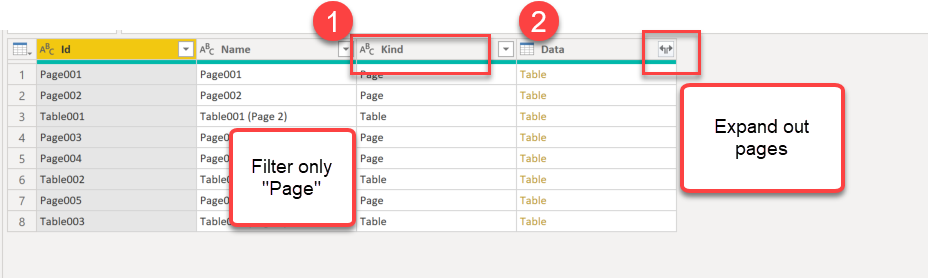
That will create a table with all tables and pages from your pdf:
Filter only "Tables" in columnn "Kind" and then expand the column "Data".
That will create 1 consolidated table with the whole pdf-content in one query/dataset:
Imke Feldmann (The BIccountant)
If you liked my solution, please give it a thumbs up. And if I did answer your question, please mark this post as a solution. Thanks!
How to integrate M-code into your solution -- How to get your questions answered quickly -- How to provide sample data -- Check out more PBI- learning resources here -- Performance Tipps for M-queries
Hi @anshpalash ,
Is the solution provided by @ImkeF helpful to you?
You can also specify the Start page and End Page as optional parameters for your PDF connection. You can also specify these parameters in the M formula language, using the following format:
Pdf.Tables(File.Contents("c:\sample.pdf"), [StartPage=10, EndPage=11])
Best Regards,
Stephen Tao
If this post helps, then please consider Accept it as the solution to help the other members find it more quickly.
Hi @anshpalash ,
just import 1 page with the user interface. Then delete the last 2 steps of the query that will have been created Automatically so that just the step "Source" remains:
That will create a table with all tables and pages from your pdf:
Filter only "Tables" in columnn "Kind" and then expand the column "Data".
That will create 1 consolidated table with the whole pdf-content in one query/dataset:
Hi @anshpalash ,
just import 1 page with the user interface. Then delete the last 2 steps of the query that will have been created Automatically so that just the step "Source" remains:
That will create a table with all tables and pages from your pdf:
Filter only "Tables" in columnn "Kind" and then expand the column "Data".
That will create 1 consolidated table with the whole pdf-content in one query/dataset:
Imke Feldmann (The BIccountant)
If you liked my solution, please give it a thumbs up. And if I did answer your question, please mark this post as a solution. Thanks!
How to integrate M-code into your solution -- How to get your questions answered quickly -- How to provide sample data -- Check out more PBI- learning resources here -- Performance Tipps for M-queries
Don't miss out on Data Days, June 15 through August 7. Learn Fabric, Power BI, SQL, AI and more.
Check out the May 2026 Power BI update to learn about new features.
| User | Count |
|---|---|
| 4 | |
| 4 | |
| 2 | |
| 2 | |
| 1 |
| User | Count |
|---|---|
| 11 | |
| 11 | |
| 5 | |
| 4 | |
| 4 |