We've captured the moments from FabCon & SQLCon that everyone is talking about, and we are bringing them to the community, live and on-demand. Starts on April 14th. Register now
Problem
I have been given a sql query which has two parameters called start_date and end_date, need to show the exact same data in power bi.
Current Methods to import data
I currently create a sql view and import it, don't have any experience using parameters.
Background
I am importing the previous 5 years of data using hardcoded values instead of parameters But as the query is really complicated as it is using unions, where in and where not in and the date filter is in multiple queries I know this method will not return the correct number of rows. Therefore my current method will not work instead need to use parameters.
With the limited information given even if someone can either guide me as to there process when dealing with parameters in sql and implementing the same in power query/power bi or even share a link etc.
Solved! Go to Solution.
Hi @akhaliq7
One idea: Create a table-valued function, then query this function using the Power Query interface.
Here's a table-valued function I created to test:
CREATE OR ALTER FUNCTION DateTable (
@StartDate DATE
,@EndDate DATE
)
RETURNS TABLE
AS
RETURN
SELECT [FullDateAlternateKey], [CalendarYear], [MonthNumberOfYear]
FROM [AdventureWorksDW].[dbo].[DimDate]
WHERE [FullDateAlternateKey] BETWEEN @StartDate AND @EndDate
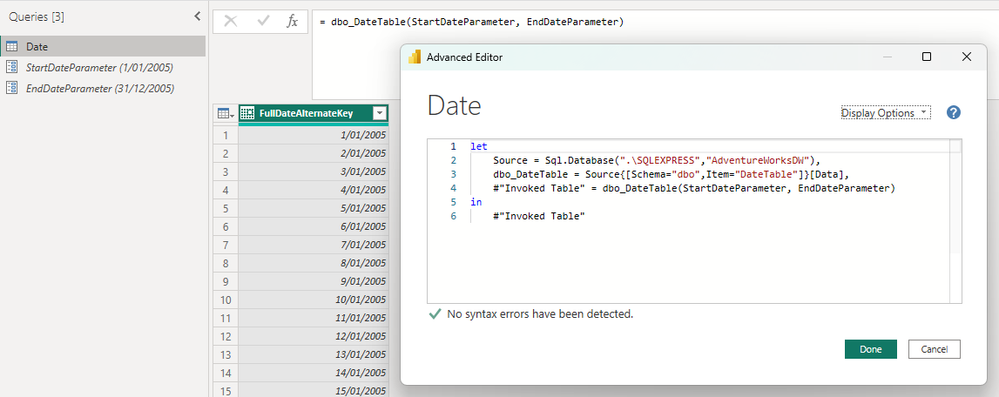
Then in Power Query, you connect to this function, which is exposed as a Power Query function, and populate the parameters using whatever means you like:
Would something like this work for you?
Regards
Hi @akhaliq7
One idea: Create a table-valued function, then query this function using the Power Query interface.
Here's a table-valued function I created to test:
CREATE OR ALTER FUNCTION DateTable (
@StartDate DATE
,@EndDate DATE
)
RETURNS TABLE
AS
RETURN
SELECT [FullDateAlternateKey], [CalendarYear], [MonthNumberOfYear]
FROM [AdventureWorksDW].[dbo].[DimDate]
WHERE [FullDateAlternateKey] BETWEEN @StartDate AND @EndDate
Then in Power Query, you connect to this function, which is exposed as a Power Query function, and populate the parameters using whatever means you like:
Would something like this work for you?
Regards
If you have recently started exploring Fabric, we'd love to hear how it's going. Your feedback can help with product improvements.
A new Power BI DataViz World Championship is coming this June! Don't miss out on submitting your entry.
Share feedback directly with Fabric product managers, participate in targeted research studies and influence the Fabric roadmap.
| User | Count |
|---|---|
| 5 | |
| 3 | |
| 3 | |
| 2 | |
| 2 |
| User | Count |
|---|---|
| 11 | |
| 10 | |
| 7 | |
| 6 | |
| 5 |