cancel
Showing results for 
Search instead for 
Did you mean: 

July 7 - July 17 | Round 2 of the Power BI Dataviz World Championships. Don't miss your chance! Learn more

Reply
syasmin25
Helper V
Helper V

If statement

Hello, 

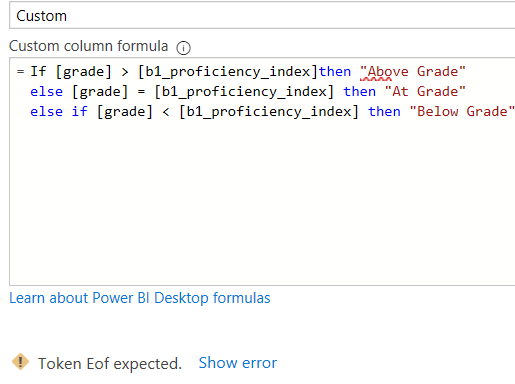
I have a pretty simple question. I am having some trouble trying to figure out what am I doing wrong here. I am providing the code here. I need a colmn that categorized the index. I am still learning power query so this is pretty silly.

If [grade] > [proficiency_index] then "Above Grade"
else if [grade] = [proficiency_index] then "At Grade"
else if [grade] < [proficiency_index] then "Below Grade"

The "grade" column in a decimal column and "proficiency_index" is a whole number column.
I am getting the following error:
tbruh.PNG


1 ACCEPTED SOLUTION
Greg_Deckler
Community Champion
Community Champion

Two issues, use lower case if and you have an extra else if:

if [grade] > [proficiency_index] then "Above Grade" else if [grade] = [proficiency_index] then "At Grade" else "Below Grade"


@syasmin25 


Follow on LinkedIn
@ me in replies or I'll lose your thread!!!
Instead of a Kudo, please vote for this idea
Become an expert!: Enterprise DNA
External Tools: MSHGQM
YouTube Channel!: Microsoft Hates Greg
Latest book!:
DAX For Humans

DAX is easy, CALCULATE makes DAX hard...

View solution in original post

6 REPLIES 6
Greg_Deckler
Community Champion
Community Champion

Two issues, use lower case if and you have an extra else if:

if [grade] > [proficiency_index] then "Above Grade" else if [grade] = [proficiency_index] then "At Grade" else "Below Grade"


@syasmin25 


Follow on LinkedIn
@ me in replies or I'll lose your thread!!!
Instead of a Kudo, please vote for this idea
Become an expert!: Enterprise DNA
External Tools: MSHGQM
YouTube Channel!: Microsoft Hates Greg
Latest book!:
DAX For Humans

DAX is easy, CALCULATE makes DAX hard...

It worked! Thank you

Anonymous
Not applicable

"Else" condition is missing in last "if" statement. 

Or delete the last "if" statement as below. 


If [grade] > [proficiency_index] then "Above Grade"
else if [grade] = [proficiency_index] then "At Grade"
else "Below Grade"

camargos88
Community Champion
Community Champion

@syasmin25 ,


I believe it's missing the last else:

If [grade] > [proficiency_index] then "Above Grade"
else
if [grade] = [proficiency_index] then "At Grade"
else
if [grade] < [proficiency_index] then "Below Grade"
else ????


Did I answer your question? Mark my post as a solution!

Proud to be a Super User!


What do you mean by last else here? I am sorry I am not getting you. This is all my column would show:
tbruh.PNG

It is still showing the same error, tbruh.PNG


Helpful resources

Announcements
FabCon and SQLCon Barcelona 2026

FabCon & SQLCon – Barcelona 2026

Join us in Barcelona for FabCon and SQLCon, the Fabric, Power BI, SQL, and AI community event. Save €200 with code FABCMTY200.

60 days of Data Days Carousel

Data Days 2026

Join Fabric Data Days 2026: 60 days of free live/on-demand sessions, challenges, study groups, and certification opportunities.

Power BI DataViz World Championships carousel

Power BI DataViz World Championships - June 2026

A new Power BI DataViz World Championship is coming this June! Don't miss out on submitting your entry.