cancel
Showing results for 
Search instead for 
Did you mean: 

Next up in the FabCon + SQLCon recap series: The roadmap for Microsoft SQL and Maximizing Developer experiences in Fabric. All sessions are available on-demand after the live show. Register now

Reply
GordyM1
Regular Visitor

If AND formula help

Hi,


I have some data where I want to identify a break in the sequence of the data. I show the Excel formula that does this but I would like to have this calculation in Power Query but not sure how to write it?


In this instance I have identified that for this Item that 2022 is missing, it goes from 2021 - 2022 when the MSQ is greater than zero.


ItemIDItem NumberFYMSQColumn1 
540COS-RAD77302021700  
540COS-RAD77302021525  
540COS-RAD77302023350xIFERROR(IF(AND(A6=A5,D5>0,(C6-C5)>1),"x",""),"")
540COS-RAD77302023350  


1 ACCEPTED SOLUTION
v-yanjiang-msft
Community Support
Community Support

Hi @GordyM1 ,

According to your description, here's my solution.

1.Create a index column.

2.Create a custom column.

Custom = if [Index]=0 then "" else if [ItemID]=Table.SelectRows(#"Added Index",(x)=>x[Index]=[Index]-1)[ItemID]{0} and Table.SelectRows(#"Added Index",(x)=>x[Index]=[Index]-1)[MSQ]{0}>0 and [FY]-Table.SelectRows(#"Added Index",(x)=>x[Index]=[Index]-1)[FY]{0}>1 then "x" else""

Or you can create a calculated column in DAX.

Column =
VAR _T =
    FILTER ( 'Table', 'Table'[Index] = EARLIER ( 'Table'[Index] ) - 1 )
RETURN
    IF (
        'Table'[ItemID] = MAXX ( _T, 'Table'[ItemID] )
            && MAXX ( _T, 'Table'[MSQ] ) > 0
            && 'Table'[FY] - MAXX ( _T, 'Table'[FY] ) > 1,
        "x",
        ""
    )

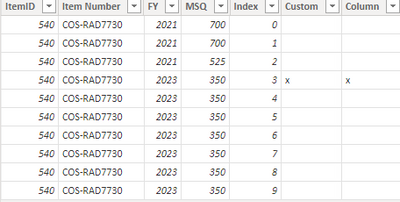
Both methods can get the expected result.

vkalyjmsft_0-1652954613223.png

I attach my sample below for reference.


Best Regards,
Community Support Team _ kalyj

If this post helps, then please consider Accept it as the solution to help the other members find it more quickly.


View solution in original post

3 REPLIES 3
v-yanjiang-msft
Community Support
Community Support

Hi @GordyM1 ,

According to your description, here's my solution.

1.Create a index column.

2.Create a custom column.

Custom = if [Index]=0 then "" else if [ItemID]=Table.SelectRows(#"Added Index",(x)=>x[Index]=[Index]-1)[ItemID]{0} and Table.SelectRows(#"Added Index",(x)=>x[Index]=[Index]-1)[MSQ]{0}>0 and [FY]-Table.SelectRows(#"Added Index",(x)=>x[Index]=[Index]-1)[FY]{0}>1 then "x" else""

Or you can create a calculated column in DAX.

Column =
VAR _T =
    FILTER ( 'Table', 'Table'[Index] = EARLIER ( 'Table'[Index] ) - 1 )
RETURN
    IF (
        'Table'[ItemID] = MAXX ( _T, 'Table'[ItemID] )
            && MAXX ( _T, 'Table'[MSQ] ) > 0
            && 'Table'[FY] - MAXX ( _T, 'Table'[FY] ) > 1,
        "x",
        ""
    )

Both methods can get the expected result.

vkalyjmsft_0-1652954613223.png

I attach my sample below for reference.


Best Regards,
Community Support Team _ kalyj

If this post helps, then please consider Accept it as the solution to help the other members find it more quickly.


mahoneypat
Microsoft Employee
Microsoft Employee

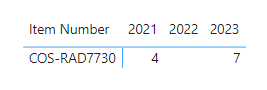
This is possible to do in Power Query, but what do you plan to do with it once you have it? It might be better to just write a DAX measure and/or create a visual with your existing data that shows the missing year for that item. In the example below, I connected your data table to a simple date table with year (for the column values) and did a simple count of Items with the option of "Show Items With No Data" selected.


mahoneypat_0-1652787409691.png

Pat


Did I answer your question? Mark my post as a solution! Kudos are also appreciated!

To learn more about Power BI, follow me on Twitter or subscribe on YouTube.


@mahoneypa HoosierBI on YouTube


Hi Pat,


Thanks for the reply. Once I have identified the Item and Row where the gap is I go to my source data and make a manual entry so that there is no gap in the sequence. I currently do this in the excel table but wanted it done in Power Query (I have about 50K lines of data in the table). Not sure how to do a Dax measure?


Gordon

Helpful resources

Announcements
New to Fabric survey Carousel

New to Fabric Survey

If you have recently started exploring Fabric, we'd love to hear how it's going. Your feedback can help with product improvements.

Power BI DataViz World Championships carousel

Power BI DataViz World Championships - June 2026

A new Power BI DataViz World Championship is coming this June! Don't miss out on submitting your entry.

Join our Fabric User Panel

Join our Fabric User Panel

Share feedback directly with Fabric product managers, participate in targeted research studies and influence the Fabric roadmap.

March Power BI Update Carousel

Power BI Community Update - March 2026

Check out the March 2026 Power BI update to learn about new features.