Join us at FabCon Atlanta from March 16 - 20, 2026, for the ultimate Fabric, Power BI, AI and SQL community-led event. Save $200 with code FABCOMM.
Register now!The Power BI Data Visualization World Championships is back! Get ahead of the game and start preparing now! Learn more
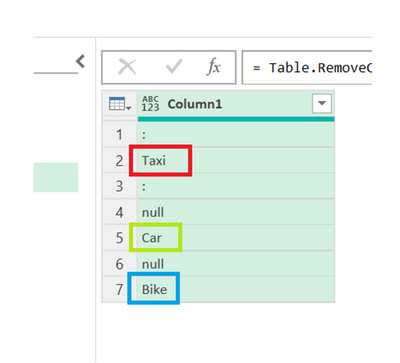
How to check duplicate values in a column1, create new adde column, if in case duplicate values present in the column1 display as well new added column ...
With out grouping, Is there any alternativies to fing the duplicates ?like IF condition like this,,
ex: i have tried somthing in statically : if ([Column1] <> "null") then Table.RowCount(Table.SelectRows(#"Changed Type5", each ([Column1] = "Bike"))) else ""
but is there in any altenativies.....
Ex :
hi @durgaraop21 try this
lst = List.Buffer(List.RemoveNulls(prev_step[Column1])),
next_step = Table.AddColumn(prev_step, "cnt", (x) => if x[Column1] = null then "" else List.Count(List.PositionOf(lst, x[Column1], Occurrence.All)))
Thanks for the reply, But not working above Logic, Use only Power query Editor only.....
The Power BI Data Visualization World Championships is back! Get ahead of the game and start preparing now!
| User | Count |
|---|---|
| 19 | |
| 9 | |
| 8 | |
| 7 | |
| 7 |