cancel
Showing results for 
Search instead for 
Did you mean: 

The Power BI Data Visualization World Championships is back! Get ahead of the game and start preparing now! Learn more

Reply
Anonymous
Not applicable

IFs Query

Hello PowerBI Community 😁,


I'm new with PowerBI, query, & Stuffs. & I need help with something.


So i've this kind of logic that i need to apply in my powerBI,

Incomplete means = the status is 'new' or 'in progress' & endDate < from today
 
i've tried with this,
IF(
'Productivity and Task Organization'[Status] = "In Progress"
&& 'Productivity and Task Organization'[Status] = "New"
&& 'Productivity and Task Organization'[End Date] < TODAY(),
"Incomplete", 'Productivity and Task Organization'[Status]) 

pbix1.png
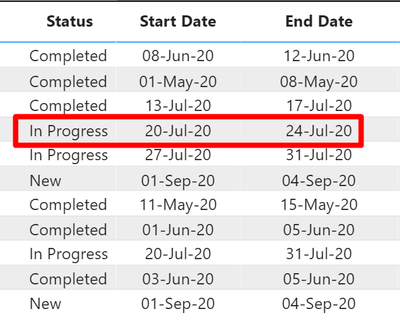
But it doesn't work. the status is still "In Progress" & it should be "In Complete" because the end date is already 24-jul
 
Any help will be appreciated 🙏
 
1 ACCEPTED SOLUTION
Fowmy
Super User
Super User

@Anonymous 

Can you try this Measure:

M = 
IF(
    (
        'Productivity and Task Organization'[Status] = "In Progress" || 'Productivity and Task Organization'[Status] = "New"
    )
    &&
    (
    'Productivity and Task Organization'[End Date] < TODAY()
    ),
    "Incomplete",
    'Productivity and Task Organization'[Status]
) 

________________________

Did I answer your question? Mark this post as a solution, this will help others!.

I accept KUDOS 🙂

YouTube, LinkedIn 

Did I answer your question? Mark my post as a solution! and hit thumbs up


Subscribe and learn Power BI from these videos

Website LinkedIn PBI User Group

View solution in original post

2 REPLIES 2
Fowmy
Super User
Super User

@Anonymous 

Can you try this Measure:

M = 
IF(
    (
        'Productivity and Task Organization'[Status] = "In Progress" || 'Productivity and Task Organization'[Status] = "New"
    )
    &&
    (
    'Productivity and Task Organization'[End Date] < TODAY()
    ),
    "Incomplete",
    'Productivity and Task Organization'[Status]
) 

________________________

Did I answer your question? Mark this post as a solution, this will help others!.

I accept KUDOS 🙂

YouTube, LinkedIn 

Did I answer your question? Mark my post as a solution! and hit thumbs up


Subscribe and learn Power BI from these videos

Website LinkedIn PBI User Group

Anonymous
Not applicable

It's worked, thanks for the help 😁

Helpful resources

Announcements
Power BI DataViz World Championships

Power BI Dataviz World Championships

The Power BI Data Visualization World Championships is back! Get ahead of the game and start preparing now!

December 2025 Power BI Update Carousel

Power BI Monthly Update - December 2025

Check out the December 2025 Power BI Holiday Recap!

FabCon Atlanta 2026 carousel

FabCon Atlanta 2026

Join us at FabCon Atlanta, March 16-20, for the ultimate Fabric, Power BI, AI and SQL community-led event. Save $200 with code FABCOMM.

Top Solution Authors