Don't miss your chance to take the Fabric Data Engineer (DP-600) exam for FREE! Find out how by attending the DP-600 session on April 23rd (pacific time), live or on-demand.
Learn moreNext up in the FabCon + SQLCon recap series: The roadmap for Microsoft SQL and Maximizing Developer experiences in Fabric. All sessions are available on-demand after the live show. Register now
Hello PowerBI Community 😁,
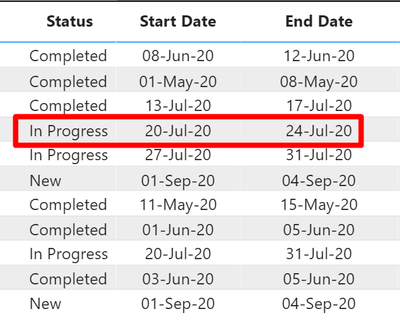
I'm new with PowerBI, query, & Stuffs. & I need help with something.
So i've this kind of logic that i need to apply in my powerBI,
Solved! Go to Solution.
@Anonymous
Can you try this Measure:
M =
IF(
(
'Productivity and Task Organization'[Status] = "In Progress" || 'Productivity and Task Organization'[Status] = "New"
)
&&
(
'Productivity and Task Organization'[End Date] < TODAY()
),
"Incomplete",
'Productivity and Task Organization'[Status]
) ________________________
Did I answer your question? Mark this post as a solution, this will help others!.
I accept KUDOS 🙂
⭕ Subscribe and learn Power BI from these videos
⚪ Website ⚪ LinkedIn ⚪ PBI User Group
@Anonymous
Can you try this Measure:
M =
IF(
(
'Productivity and Task Organization'[Status] = "In Progress" || 'Productivity and Task Organization'[Status] = "New"
)
&&
(
'Productivity and Task Organization'[End Date] < TODAY()
),
"Incomplete",
'Productivity and Task Organization'[Status]
) ________________________
Did I answer your question? Mark this post as a solution, this will help others!.
I accept KUDOS 🙂
⭕ Subscribe and learn Power BI from these videos
⚪ Website ⚪ LinkedIn ⚪ PBI User Group
It's worked, thanks for the help 😁
If you have recently started exploring Fabric, we'd love to hear how it's going. Your feedback can help with product improvements.
A new Power BI DataViz World Championship is coming this June! Don't miss out on submitting your entry.
| User | Count |
|---|---|
| 5 | |
| 3 | |
| 3 | |
| 3 | |
| 2 |
| User | Count |
|---|---|
| 7 | |
| 5 | |
| 5 | |
| 5 | |
| 4 |