Get certified for free when you join Fabric Data Days 2026 and dive into Fabric, Power BI, SQL, AI, and other essential data skills.
Join nowTry your skills in the Power BI Dataviz World Championship! Round one ends June 26. Join now
Hey All, I have "short description" column that list the descriptions of support tickets. I would like to create a new column based on a word or words that appear in the short description.
For example
Short_Description
Issues with Monitor
Issues with Display
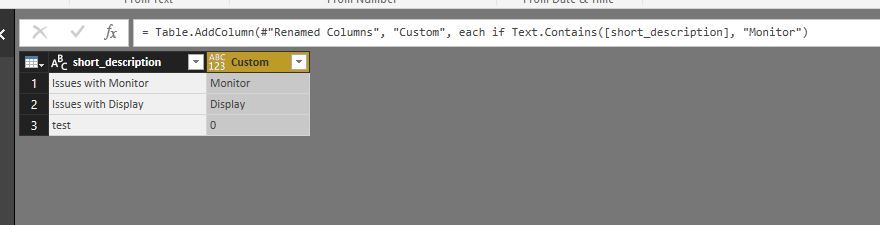
New column would return the word "Monitor" for any row that contains the words "Monitor" or "Display".
Now I can get this working with one specific word as follows:
if Text.Contains([short_description], "Monitor") then "Monitor" else "0")
I just am struggling getting it to work with mutiple words/ text values.
Thank you!
Solved! Go to Solution.
@EricC,
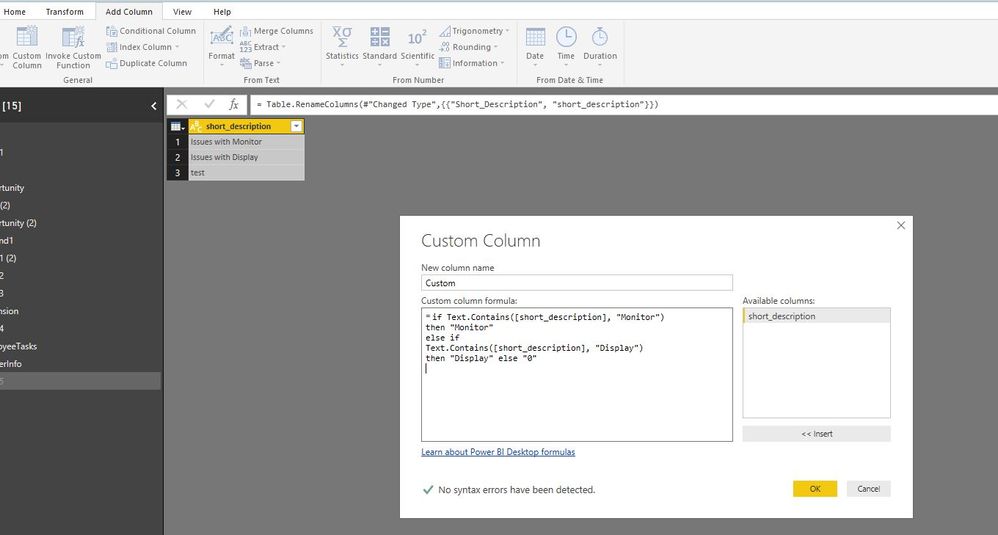
Add a custom column using the following code.
if Text.Contains([short_description], "Monitor") then "Monitor" else if Text.Contains([short_description], "Display") then "Display" else "0"
Regards,
Lydia
@EricC,
Add a custom column using the following code.
if Text.Contains([short_description], "Monitor") then "Monitor" else if Text.Contains([short_description], "Display") then "Display" else "0"
Regards,
Lydia
| User | Count |
|---|---|
| 12 | |
| 6 | |
| 5 | |
| 5 | |
| 5 |