Join us at FabCon Atlanta from March 16 - 20, 2026, for the ultimate Fabric, Power BI, AI and SQL community-led event. Save $200 with code FABCOMM.
Register now!The Power BI Data Visualization World Championships is back! Get ahead of the game and start preparing now! Learn more
Hi,
I am working with an excel sheet that has merged cells for column headers. But when I pull it in PowerBI, It treats it as data points in the dataset. Can unpivoting and transposing help to get back the structure when I put it in a matrix visual?
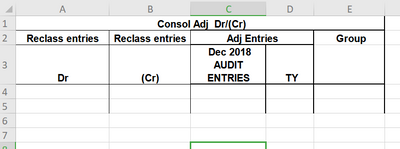
This what the source table looks like
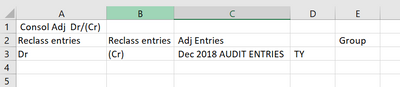
How PowerBI interprets it.
Solved! Go to Solution.
Hi @Sagejah9 ,
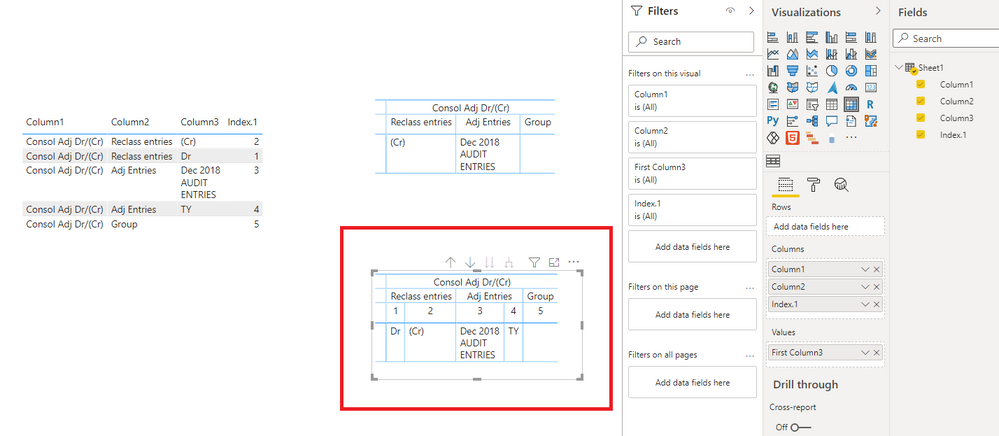
Based on my test, this is the result closest to your requirements:
Best Regards,
Icey
If this post helps, then please consider Accept it as the solution to help the other members find it more quickly.
The exact output will look like the first image in my post. Basically Row 1 (Consol Adj Dr/(Cr)) is a group column made up of Reclass Entries, Adj Entries and Group. I know in order to do this grouping is to have a column containing Consol Adj Dr/(Cr) being assign to those fields so that a hierarchy can be created. But is there a way to transform it to look that way without adjusting the excel sheet?
Hi @Sagejah9 ,
Based on my test, this is the result closest to your requirements:
Best Regards,
Icey
If this post helps, then please consider Accept it as the solution to help the other members find it more quickly.
Hi @Sagejah9,
Could you please let me know exact output, so that it will be more clear to understand.
Thanks,
Pooja Darbhe
The Power BI Data Visualization World Championships is back! Get ahead of the game and start preparing now!
Check out the November 2025 Power BI update to learn about new features.
| User | Count |
|---|---|
| 10 | |
| 6 | |
| 5 | |
| 5 | |
| 2 |