cancel
Showing results for 
Search instead for 
Did you mean: 

The Power BI Data Visualization World Championships is back! Get ahead of the game and start preparing now! Learn more

Reply
Anonymous
Not applicable

How to substract two dates (with h,m,s)

Hi all,


I need your help!


I have this situation:


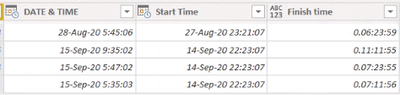
dbb95_0-1604666828949.png


I would like to substract both dates (DATE & TIME and Start Time).


In my mind appear this step: creates a new personalized column doing DATE&TIME - Start time. The result is something like Finish time column.


When I close and apply and take all the data to the desktop, the program isn ot reading well its type.


What should I do?


Thank you so much.


PS: this Finish Time colum will be used to substract with other date.


Note that all the result dates will last less than 24h, so the first number (day) will be 0 (0.07:25:52)


1 ACCEPTED SOLUTION
Icey
Community Support
Community Support

Hi @Anonymous ,


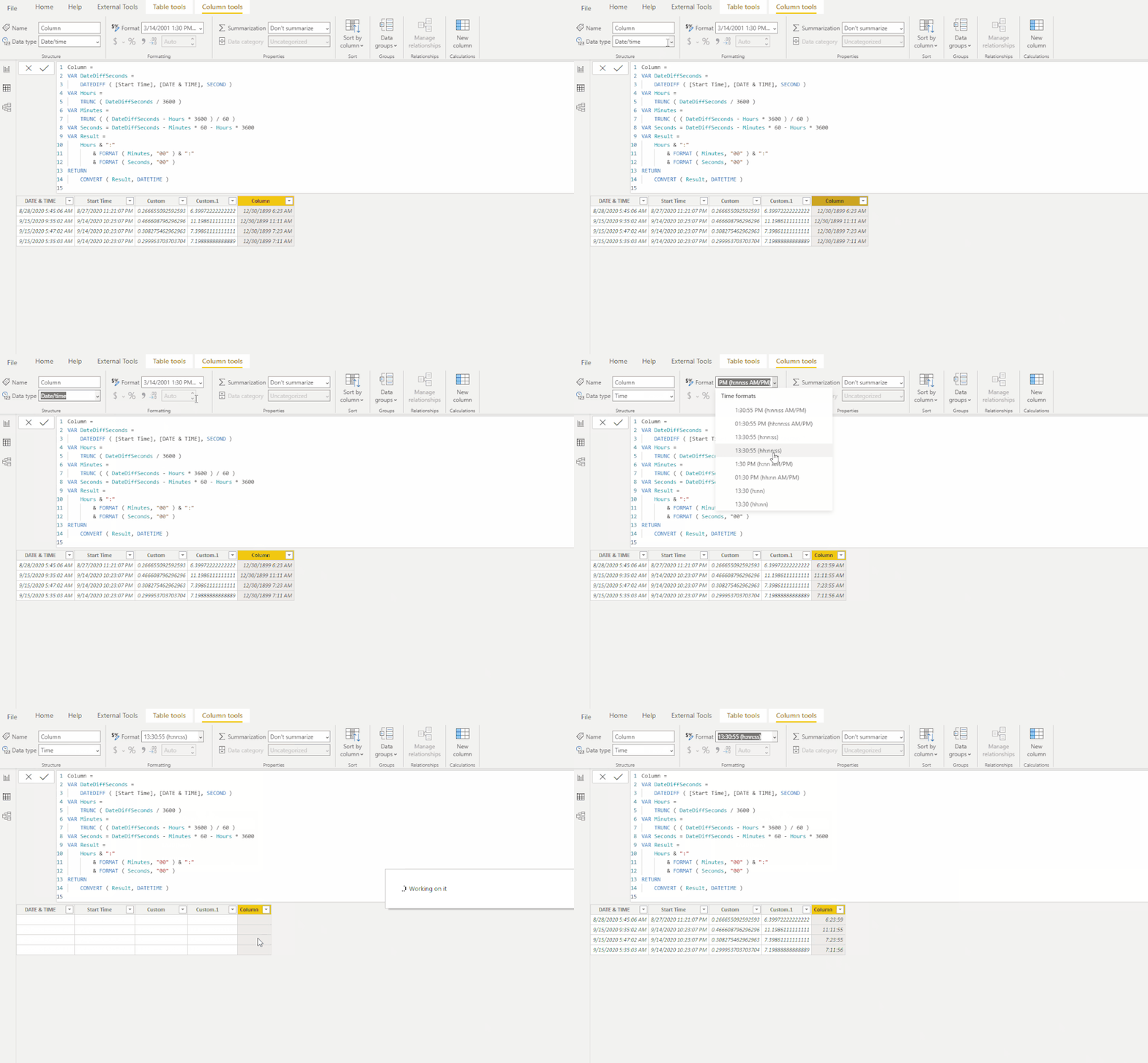
"Duration" type can't be passed to Data view. Since all the result dates will last less than 24h, it is suggested to create a calculated column like below:

Column =
VAR DateDiffSeconds =
    DATEDIFF ( [Start Time], [DATE & TIME], SECOND )
VAR Hours =
    TRUNC ( DateDiffSeconds / 3600 )
VAR Minutes =
    TRUNC ( ( DateDiffSeconds - Hours * 3600 ) / 60 )
VAR Seconds = DateDiffSeconds - Minutes * 60 - Hours * 3600
VAR Result =
    Hours & ":"
        & FORMAT ( Minutes, "00" ) & ":"
        & FORMAT ( Seconds, "00" )
RETURN
    CONVERT ( Result, DATETIME )

time.gif


Best Regards,

Icey


If this post helps, then please consider Accept it as the solution to help the other members find it more quickly.

View solution in original post

3 REPLIES 3
Icey
Community Support
Community Support

Hi @Anonymous ,


"Duration" type can't be passed to Data view. Since all the result dates will last less than 24h, it is suggested to create a calculated column like below:

Column =
VAR DateDiffSeconds =
    DATEDIFF ( [Start Time], [DATE & TIME], SECOND )
VAR Hours =
    TRUNC ( DateDiffSeconds / 3600 )
VAR Minutes =
    TRUNC ( ( DateDiffSeconds - Hours * 3600 ) / 60 )
VAR Seconds = DateDiffSeconds - Minutes * 60 - Hours * 3600
VAR Result =
    Hours & ":"
        & FORMAT ( Minutes, "00" ) & ":"
        & FORMAT ( Seconds, "00" )
RETURN
    CONVERT ( Result, DATETIME )

time.gif


Best Regards,

Icey


If this post helps, then please consider Accept it as the solution to help the other members find it more quickly.

mahoneypat
Microsoft Employee
Microsoft Employee

Subtracting two DateTime columns will give you a duration.  You likely need to wrap your calculation in one of the Duration functions to get a usable number.  For example, Duration.TotalHours([Date & Time] - [Start Time]) would get you the # of hours between them in decimal form.


Regards,

Pat


Did I answer your question? Mark my post as a solution! Kudos are also appreciated!

To learn more about Power BI, follow me on Twitter or subscribe on YouTube.


@mahoneypa HoosierBI on YouTube


camargos88
Community Champion
Community Champion

@Anonymous ,


If you substract it, you will have the duration data type. Is that what you want ?

Also, based on your image, it has the "any" data type, you need to convert it in order to do calculations.


Did I answer your question? Mark my post as a solution!

Proud to be a Super User!


Helpful resources

Announcements
November Power BI Update Carousel

Power BI Monthly Update - November 2025

Check out the November 2025 Power BI update to learn about new features.

Fabric Data Days Carousel

Fabric Data Days

Advance your Data & AI career with 50 days of live learning, contests, hands-on challenges, study groups & certifications and more!

FabCon Atlanta 2026 carousel

FabCon Atlanta 2026

Join us at FabCon Atlanta, March 16-20, for the ultimate Fabric, Power BI, AI and SQL community-led event. Save $200 with code FABCOMM.