cancel
Showing results for 
Search instead for 
Did you mean: 

The Power BI Data Visualization World Championships is back! Get ahead of the game and start preparing now! Learn more

Reply
Soog
Frequent Visitor

How to split multi-column having corresponding data

Hi,

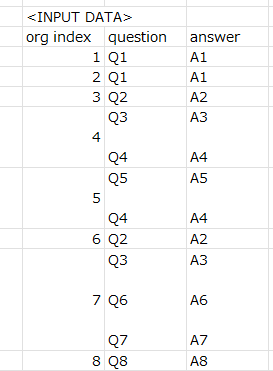
There are many files containing several sentences in a single excell cell.
This is simplified sample data.


Soog_1-1643607569869.png


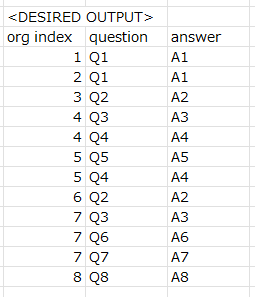
I'm wondering how to split them to the desired dataset.


Soog_0-1643607538082.png


In actual data, Q(x) & A(x) are sentences.

So I think doulbe line feed will be separator, but difficult to keep coordination of each Q&A.


Does anyone have a good idea??


1 ACCEPTED SOLUTION
AlexisOlson
Super User
Super User

  1.  Unpivot the non-index columns [question] and [answer]
  2. Split by delimiter (double linefeed) into new rows
  3. Filter Questions and Answers into separate tables
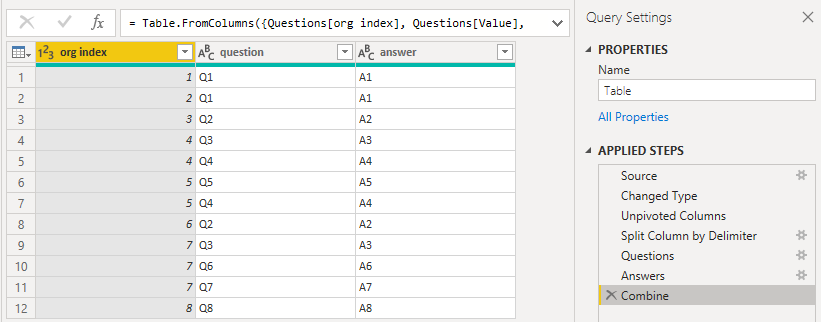
  4. Combine the separate tables using Table.FromColumns


let
    Source = Table.FromRows(Json.Document(Binary.Decompress(Binary.FromText("XYy7DQAhDEN3SU3DJ4Q2I1CHrMD+5clpcqKxbD/LZlSp0IZoJS9G7ckdGaW2yAO5n3vuhtWwOoIxGCfjH5vPj+TPDJV8i0Ildgs7iC5y/wA=", BinaryEncoding.Base64), Compression.Deflate)), let _t = ((type nullable text) meta [Serialized.Text = true]) in type table [#"org index" = _t, question = _t, answer = _t]),
    #"Changed Type" = Table.TransformColumnTypes(Source,{{"org index", Int64.Type}, {"question", type text}, {"answer", type text}}),
    #"Unpivoted Columns" = Table.UnpivotOtherColumns(#"Changed Type", {"org index"}, "Attribute", "Value"),
    #"Split Column by Delimiter" = Table.ExpandListColumn(Table.TransformColumns(#"Unpivoted Columns", {{"Value", Splitter.SplitTextByDelimiter("#(lf)#(lf)", QuoteStyle.Csv), let itemType = (type nullable text) meta [Serialized.Text = true] in type {itemType}}}), "Value"),
    Questions = Table.SelectRows(#"Split Column by Delimiter", each ([Attribute] = "question")),
    Answers = Table.SelectRows(#"Split Column by Delimiter", each ([Attribute] = "answer")),
    Combine = Table.FromColumns({Questions[org index], Questions[Value], Answers[Value]}, {"org index", "question", "answer"})
in
    Combine
 

AlexisOlson_0-1643648699448.png

View solution in original post

4 REPLIES 4
AlexisOlson
Super User
Super User

  1.  Unpivot the non-index columns [question] and [answer]
  2. Split by delimiter (double linefeed) into new rows
  3. Filter Questions and Answers into separate tables
  4. Combine the separate tables using Table.FromColumns


let
    Source = Table.FromRows(Json.Document(Binary.Decompress(Binary.FromText("XYy7DQAhDEN3SU3DJ4Q2I1CHrMD+5clpcqKxbD/LZlSp0IZoJS9G7ckdGaW2yAO5n3vuhtWwOoIxGCfjH5vPj+TPDJV8i0Ildgs7iC5y/wA=", BinaryEncoding.Base64), Compression.Deflate)), let _t = ((type nullable text) meta [Serialized.Text = true]) in type table [#"org index" = _t, question = _t, answer = _t]),
    #"Changed Type" = Table.TransformColumnTypes(Source,{{"org index", Int64.Type}, {"question", type text}, {"answer", type text}}),
    #"Unpivoted Columns" = Table.UnpivotOtherColumns(#"Changed Type", {"org index"}, "Attribute", "Value"),
    #"Split Column by Delimiter" = Table.ExpandListColumn(Table.TransformColumns(#"Unpivoted Columns", {{"Value", Splitter.SplitTextByDelimiter("#(lf)#(lf)", QuoteStyle.Csv), let itemType = (type nullable text) meta [Serialized.Text = true] in type {itemType}}}), "Value"),
    Questions = Table.SelectRows(#"Split Column by Delimiter", each ([Attribute] = "question")),
    Answers = Table.SelectRows(#"Split Column by Delimiter", each ([Attribute] = "answer")),
    Combine = Table.FromColumns({Questions[org index], Questions[Value], Answers[Value]}, {"org index", "question", "answer"})
in
    Combine
 

AlexisOlson_0-1643648699448.png

Very beautiful!


I was thinking to split to 2 queries and merge them.
Your solution perfectly works without making unneccesary query.


Thank you for sophisticated idea.

Anonymous
Not applicable

Hey, 

Agree with previous suggested answer, that you should split Answers and Questions.
Step one is to make two tables one would be [Org Index] & [Question] and another [Org Index ] & [Answer].
Then Split by delimeter.
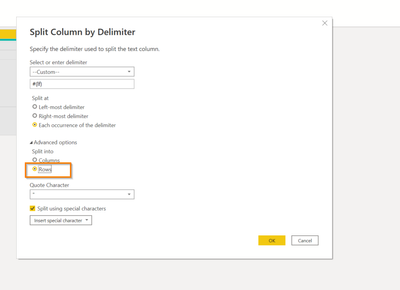
Important point, when you split by delimeter column go to into advanced options
Select Rows

MargaritaG_0-1643628409191.png

Then add index to both tables and merge on index.
Then it will split into rows your answers.
Then add index.

serpiva64
Solution Sage
Solution Sage

Hi, 

you can import the file to power query (before doing it i have cleaned the useless column and row but you can do it in power query),

remove the column of the answer (we get it back later),

clean text on column question then split column by numer of characters (SplitTextByRepeatedLengths(2)).

Select the org index column and unpivot other columns.

Now duplicate the value column you have obtained and, in the duplicated column, replace values Q with A.

Remove the column attribute, change names and it's done.

Helpful resources

Announcements
Power BI DataViz World Championships

Power BI Dataviz World Championships

The Power BI Data Visualization World Championships is back! Get ahead of the game and start preparing now!

December 2025 Power BI Update Carousel

Power BI Monthly Update - December 2025

Check out the December 2025 Power BI Holiday Recap!

FabCon Atlanta 2026 carousel

FabCon Atlanta 2026

Join us at FabCon Atlanta, March 16-20, for the ultimate Fabric, Power BI, AI and SQL community-led event. Save $200 with code FABCOMM.

Top Solution Authors