FabCon is coming to Atlanta
Join us at FabCon Atlanta from March 16 - 20, 2026, for the ultimate Fabric, Power BI, AI and SQL community-led event. Save $200 with code FABCOMM.
Register now!- Power BI forums
- Get Help with Power BI
- Desktop
- Service
- Report Server
- Power Query
- Mobile Apps
- Developer
- DAX Commands and Tips
- Custom Visuals Development Discussion
- Health and Life Sciences
- Power BI Spanish forums
- Translated Spanish Desktop
- Training and Consulting
- Instructor Led Training
- Dashboard in a Day for Women, by Women
- Galleries
- Data Stories Gallery
- Themes Gallery
- Contests Gallery
- QuickViz Gallery
- Quick Measures Gallery
- Visual Calculations Gallery
- Notebook Gallery
- Translytical Task Flow Gallery
- TMDL Gallery
- R Script Showcase
- Webinars and Video Gallery
- Ideas
- Custom Visuals Ideas (read-only)
- Issues
- Issues
- Events
- Upcoming Events
The Power BI Data Visualization World Championships is back! Get ahead of the game and start preparing now! Learn more
- Power BI forums
- Forums
- Get Help with Power BI
- Power Query
- Re: How to split a CSV file into tables based on b...
- Subscribe to RSS Feed
- Mark Topic as New
- Mark Topic as Read
- Float this Topic for Current User
- Bookmark
- Subscribe
- Printer Friendly Page


- Mark as New
- Bookmark
- Subscribe
- Mute
- Subscribe to RSS Feed
- Permalink
- Report Inappropriate Content
How to split a CSV file into tables based on blank rows
I have a CSV file that has multiple tables in that are seperated vertically. I want to know how to import these into tables (preferrably in 1 or 2 steps) based on a blank (or multiple blank) row/s.
So the following:
csv.csv
| 2021-05-01 | 2021-05-02 | 2021-05-03 | 2021-05-04 |
| Apples | Banana | Orange | Apple |
| Banana | Apple | Mango | Watermelon |
| 01-04-2021 | 02-04-2021 | 03-04-2021 | 04-04-2021 |
| Sunflower | Poppy | Rose | Daffodil |
| Lilly | Sunflower | Cornflower | Poppy |
Would end up like:
Table1
| 2021-05-01 | 2021-05-02 | 2021-05-03 | 2021-05-04 |
| Apples | Banana | Orange | Apple |
| Banana | Apple | Mango | Watermelon |
Table2
| 01-04-2021 | 02-04-2021 | 03-04-2021 | 04-04-2021 |
| Sunflower | Poppy | Rose | Daffodil |
| Lilly | Sunflower | Cornflower | Poppy |
Solved! Go to Solution.


- Mark as New
- Bookmark
- Subscribe
- Mute
- Subscribe to RSS Feed
- Permalink
- Report Inappropriate Content
I missed that multiple tables...you need to group the rows into different tables, another way of increasing index, you can take from here
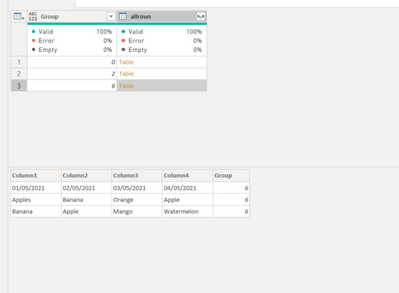
let
    Source = Csv.Document(File.Contents("C:\Users\----\Book1.csv"),[Delimiter=",", Encoding=1252, QuoteStyle=QuoteStyle.None]),
    checkBlank = Table.CombineColumns(Source, Table.ColumnNames(Source), (x)=> if List.MatchesAll(x,each _ = "") then 1 else 0,"check"),
    #"Added Index" = Table.AddIndexColumn(checkBlank, "Index", 0, 1, Int64.Type),
    #"Added Custom" = Table.AddColumn(#"Added Index", "Group", each if [Index]=0 then 0
else if [check] = 0 then List.Sum(List.FirstN( checkBlank[check], [Index]))
else -1),
    SouceIndex = Table.AddIndexColumn(Source, "Index", 0,1),
    #"Merged Queries" = Table.NestedJoin(SouceIndex, {"Index"}, #"Added Custom", {"Index"}, "Group", JoinKind.LeftOuter),
    #"Expanded Group" = Table.ExpandTableColumn(#"Merged Queries", "Group", {"check", "Group"}, {"check", "Group"}),
    #"Filtered Rows" = Table.SelectRows(#"Expanded Group", each ([check] = 0)),
    #"Removed Columns" = Table.RemoveColumns(#"Filtered Rows",{"Index", "check"}),
    #"Grouped Rows" = Table.Group(#"Removed Columns", {"Group"}, {{"allrows", each _, type table }})
in
    #"Grouped Rows"


- Mark as New
- Bookmark
- Subscribe
- Mute
- Subscribe to RSS Feed
- Permalink
- Report Inappropriate Content
Your two resulting tables are very similar (date headers with 1+ rows of category values). It would probably be better to unpivot and append them to result in one table. That will likely make your visualization/analysis easier. Would that work? If so, the community could suggest a specific query solution given your data.
Pat
Did I answer your question? Mark my post as a solution! Kudos are also appreciated!
To learn more about Power BI, follow me on Twitter or subscribe on YouTube.
@mahoneypa HoosierBI on YouTube
- Mark as New
- Bookmark
- Subscribe
- Mute
- Subscribe to RSS Feed
- Permalink
- Report Inappropriate Content
I see what you mean, though unfortunately the info is unrelated and I need them all in seperate tables.
- Mark as New
- Bookmark
- Subscribe
- Mute
- Subscribe to RSS Feed
- Permalink
- Report Inappropriate Content
So you have no idea how many blank rows, I have tried one way
first table
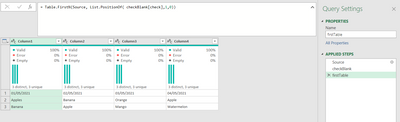
let
    Source = Csv.Document(File.Contents("C:\Users\----\Book1.csv"),[Delimiter=",", Encoding=1252, QuoteStyle=QuoteStyle.None]),
    checkBlank = Table.CombineColumns( Source, Table.ColumnNames(Source), (x)=> if List.MatchesAll(x,each _ = "") then 1 else 0,"check"),
    firstTable = Table.FirstN(Source, List.PositionOf( checkBlank[check],1,0))
in
    firstTable
second table
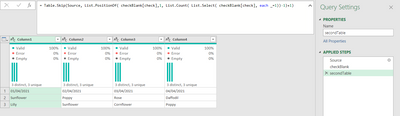
let
    Source = Csv.Document(File.Contents("C:\Users\----\Book1.csv"),[Delimiter=",", Encoding=1252, QuoteStyle=QuoteStyle.None]),
    checkBlank = Table.CombineColumns( Source, Table.ColumnNames(Source), (x)=> if List.MatchesAll(x,each _ = "") then 1 else 0,"check"),
    secondTable = Table.Skip(Source, List.PositionOf( checkBlank[check],1, List.Count( List.Select( checkBlank[check], each _=1))-1)+1)
in
secondTable- Mark as New
- Bookmark
- Subscribe
- Mute
- Subscribe to RSS Feed
- Permalink
- Report Inappropriate Content
Yes that looks like it would work, however I don't know how many blank rows and hence how many tables there will be. I have tried to index each none blank section and increment them here: How-to-increment-a-number-variable-if-column-value-equals thinking that I could somehow use this info to create indexed tables, but so far no luck. This is a common csv output format from many of the tools we use at work so I thought there would be some sort of standardised way to do this.
- Mark as New
- Bookmark
- Subscribe
- Mute
- Subscribe to RSS Feed
- Permalink
- Report Inappropriate Content
I missed that multiple tables...you need to group the rows into different tables, another way of increasing index, you can take from here
let
    Source = Csv.Document(File.Contents("C:\Users\----\Book1.csv"),[Delimiter=",", Encoding=1252, QuoteStyle=QuoteStyle.None]),
    checkBlank = Table.CombineColumns(Source, Table.ColumnNames(Source), (x)=> if List.MatchesAll(x,each _ = "") then 1 else 0,"check"),
    #"Added Index" = Table.AddIndexColumn(checkBlank, "Index", 0, 1, Int64.Type),
    #"Added Custom" = Table.AddColumn(#"Added Index", "Group", each if [Index]=0 then 0
else if [check] = 0 then List.Sum(List.FirstN( checkBlank[check], [Index]))
else -1),
    SouceIndex = Table.AddIndexColumn(Source, "Index", 0,1),
    #"Merged Queries" = Table.NestedJoin(SouceIndex, {"Index"}, #"Added Custom", {"Index"}, "Group", JoinKind.LeftOuter),
    #"Expanded Group" = Table.ExpandTableColumn(#"Merged Queries", "Group", {"check", "Group"}, {"check", "Group"}),
    #"Filtered Rows" = Table.SelectRows(#"Expanded Group", each ([check] = 0)),
    #"Removed Columns" = Table.RemoveColumns(#"Filtered Rows",{"Index", "check"}),
    #"Grouped Rows" = Table.Group(#"Removed Columns", {"Group"}, {{"allrows", each _, type table }})
in
    #"Grouped Rows"
- Mark as New
- Bookmark
- Subscribe
- Mute
- Subscribe to RSS Feed
- Permalink
- Report Inappropriate Content
Perfect, thank you so much!
I just had one last question on this, do you know how I promote the headers of all the tables when they are grouped (from the very last step) without having to open each?
EDIT: All good, got this one worked out:
#"Promote Headers" = Table.TransformColumns(#"Grouped Rows", {{"allrows", each Table.PromoteHeaders(_, [PromoteAllScalars = true])}})
in
Helpful resources

Power BI Dataviz World Championships
The Power BI Data Visualization World Championships is back! Get ahead of the game and start preparing now!

Power BI Monthly Update - December 2025
Check out the December 2025 Power BI Holiday Recap!

FabCon Atlanta 2026
Join us at FabCon Atlanta, March 16-20, for the ultimate Fabric, Power BI, AI and SQL community-led event. Save $200 with code FABCOMM.


