
cancel
Showing results for 
Search instead for 
Did you mean: 

The Power BI Data Visualization World Championships is back! Get ahead of the game and start preparing now! Learn more

Reply
Amar-Agnihotri
Resolver I
Resolver I

How to map column names of one table to the value of attributes (Same Column Names in other table)?

Hi,

I have almost 400+ custom columns in a table as customfield_10750, customfield_10890 and so on. 

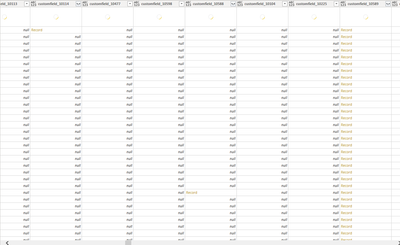
Table 1

AmarAgnihotri_0-1665214629934.png


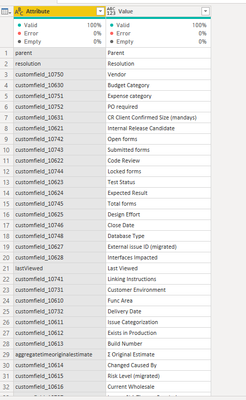
and i created another table with same column nams as attributes and their values as 

Table 2

AmarAgnihotri_1-1665214695648.png


Now i want to replace all the column names in table 1 with the values of the attributes in table two.


Can anybody suggest how can i achieve this in Power query 


Thanks 


1 ACCEPTED SOLUTION
wdx223_Daniel
Super User
Super User

if there is no missing value between Attributes values and comlumn names of Table1, then this code may work

NewStep=Table.RenameColumns(Table1,Table.ToRows(Table2))

otherwise, try this code

=Table.RenameColumns(Table1,List.Select(Table.ToRows(Table2),each List.Contains(Table.ColumnNames(Table1),_{0},(x,y)=>x{0}=y)))

View solution in original post

6 REPLIES 6
wdx223_Daniel
Super User
Super User

if there is no missing value between Attributes values and comlumn names of Table1, then this code may work

NewStep=Table.RenameColumns(Table1,Table.ToRows(Table2))

otherwise, try this code

=Table.RenameColumns(Table1,List.Select(Table.ToRows(Table2),each List.Contains(Table.ColumnNames(Table1),_{0},(x,y)=>x{0}=y)))

HI @wdx223_Daniel 

I tried this but getting this error

AmarAgnihotri_0-1665387900382.png  

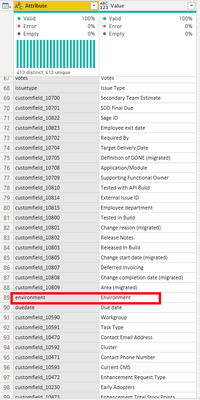
This is my Custom_Fields table 

AmarAgnihotri_1-1665388270251.png


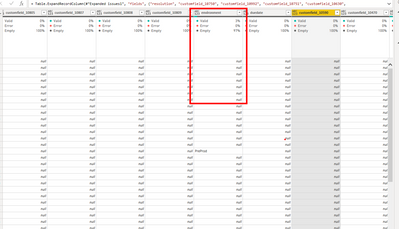
and this is my Actual Table in which i want to replace column names 

AmarAgnihotri_2-1665388411582.png

I am not able to understand why it is throwing this error. 


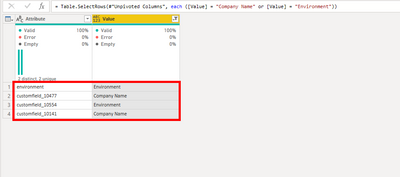
is it possible that there two or more "Enviroment" in the second column of Custom_Fields?

Yes Exactly this is happening. See this 
Some values are repeating for same custom field

AmarAgnihotri_0-1665394039936.png


Hi @wdx223_Daniel ,

I think there is something bad with the data in Custom_Fields. For now i have remove duplicates from the Custom_Fields second column and now everything is fine 😊. Out of 413 rows 408 values left after removing duplicates so i need to check for those 5 duplicate values again.  Thanks for your help and i am accepting your answer as solution 👍

@wdx223_Daniel 

thanks for the reply. I will check this and wll tell you about the result 😊

Helpful resources

Announcements
Power BI DataViz World Championships

Power BI Dataviz World Championships

The Power BI Data Visualization World Championships is back! Get ahead of the game and start preparing now!

November Power BI Update Carousel

Power BI Monthly Update - November 2025

Check out the November 2025 Power BI update to learn about new features.

FabCon Atlanta 2026 carousel

FabCon Atlanta 2026

Join us at FabCon Atlanta, March 16-20, for the ultimate Fabric, Power BI, AI and SQL community-led event. Save $200 with code FABCOMM.