
Don't miss your chance to take the Fabric Data Engineer (DP-600) exam for FREE! Find out how by watching the DP-600 session on-demand now through April 28th.
Learn moreJoin the FabCon + SQLCon recap series. Up next: Power BI, Real-Time Intelligence, IQ and AI, and Data Factory take center stage. All sessions are available on-demand after the live show. Register now
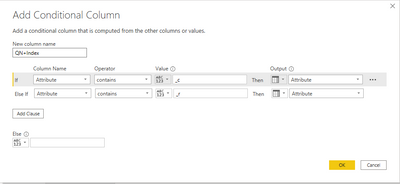
I add a custom column in Power Query using Query Editor. This is a conditional column. However when I go back to edit it, it opens the conditional column guide (below) instead of the editor. How can I get back to Query Editor to make changes?
Thanks for any suggestions!
Solved! Go to Solution.
@sfmike99
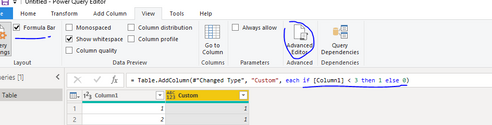
Because you have used if function in the formula, which is recognized as a condition column by default. In this case, you can edit the formula in the formula far or in the advanced editor.
Paul Zheng _ Community Support Team
If this post helps, please Accept it as the solution to help the other members find it more quickly.
Here's what I have as a workaround for your problem.
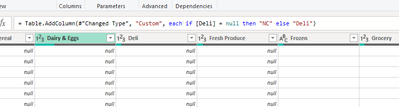
Original formula as below and it will not take me to the custom column editor window if I have any changes.
For the time being, I change the else output.
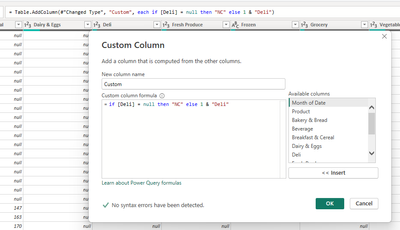
I just added "1 & ", which I will remove once I go to the editor window.
And now it takes me to the Custom Column editor as I wanted.
Please let me know if you have any other solution.
@sfmike99
Because you have used if function in the formula, which is recognized as a condition column by default. In this case, you can edit the formula in the formula far or in the advanced editor.
Paul Zheng _ Community Support Team
If this post helps, please Accept it as the solution to help the other members find it more quickly.
No I created it using "Add Column-Custom Column" which puts me into the Query Editor. When I click on it next time to edit, it takes me into the "Add Conditional Column" tool which I don't want. Here's how to reproduce:
Create a custom column like "if [Index] = 1 then [Index] else [Value]"
Save it and then clidk on the gear icon.
It takes me into the Conditional Column helper and I can't get back to the Query Editor.
Did you make that step using the filter pull down on that column? In any case, you can get to the M code either in the Formula Bar or the Advanced Editor. You can also pull down the same arrow on that column and modify that step that way too.
Regards,
Pat
To learn more about Power BI, follow me on Twitter or subscribe on YouTube.
The issue is when clicking on the gear the condition editor window starts to open (youc an see the frame of the popup box) but it is transparent and now the application is stuck. Clicking anywhere causes a "ding" sound. I can work outside of excel/powerquery but not inside. No options to cancel/close. Only can kill the process. Any ideas?
Check out the April 2026 Power BI update to learn about new features.
If you have recently started exploring Fabric, we'd love to hear how it's going. Your feedback can help with product improvements.
A new Power BI DataViz World Championship is coming this June! Don't miss out on submitting your entry.
| User | Count |
|---|---|
| 5 | |
| 5 | |
| 4 | |
| 4 | |
| 4 |