Don't miss your chance to take the Fabric Data Engineer (DP-700) exam on us!
Learn moreWe've captured the moments from FabCon & SQLCon that everyone is talking about, and we are bringing them to the community, live and on-demand. Starts on April 14th. Register now
Hi Team,
What would be best way to find the percentage with duplcate Target values.
There are duplicate values in Target column hence causing issue to me
My Data is as below:
SupplierPeriodValueTarget
| S1 | P1 | 20 | 200 |
| S1 | P2 | 30 | 200 |
| S2 | P1 | 40 | 250 |
| S2 | P2 | 50 | 250 |
| S3 | P1 | 10 | 100 |
I Need to find percentage of work completed for selected suppliers in filter in terms of Value against the Target.
Regards
Deepak
Solved! Go to Solution.
If the objective is to sum the values of the two periodes and keep the target consistent. You can do a group by
on Supplier with the UI group by function. Choose advanced.
Sum the value column
Max the Target column.
You then get de value per supplier and the target without the duplicate rows. You could then just add a custom column with the needed calculation to get to the desired percentage.
Here are some DAX methods for your reference. If you want to add a calculated column in the original table, you can try below column code.
Column =
DIVIDE (
CALCULATE ( SUM ( 'Table'[Value] ), ALLEXCEPT ( 'Table', 'Table'[Supplier] ) ),
CALCULATE ( MAX ( 'Table'[Target] ), ALLEXCEPT ( 'Table', 'Table'[Supplier] ) )
)
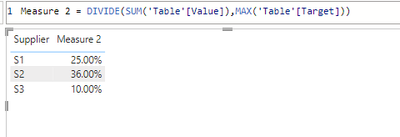
If you want to use a measure, you can try below measure and add it to a visual along with Supplier column.
Measure 2 = DIVIDE(SUM('Table'[Value]),MAX('Table'[Target]))
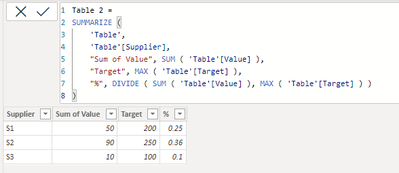
If you want a new table with DAX, you can try
Best Regards,
Community Support Team _ Jing
If this post helps, please Accept it as Solution to help other members find it.
If the objective is to sum the values of the two periodes and keep the target consistent. You can do a group by
on Supplier with the UI group by function. Choose advanced.
Sum the value column
Max the Target column.
You then get de value per supplier and the target without the duplicate rows. You could then just add a custom column with the needed calculation to get to the desired percentage.
If you have recently started exploring Fabric, we'd love to hear how it's going. Your feedback can help with product improvements.
A new Power BI DataViz World Championship is coming this June! Don't miss out on submitting your entry.
Share feedback directly with Fabric product managers, participate in targeted research studies and influence the Fabric roadmap.
| User | Count |
|---|---|
| 5 | |
| 4 | |
| 3 | |
| 2 | |
| 2 |
| User | Count |
|---|---|
| 8 | |
| 7 | |
| 6 | |
| 6 | |
| 5 |