Join us at FabCon Atlanta from March 16 - 20, 2026, for the ultimate Fabric, Power BI, AI and SQL community-led event. Save $200 with code FABCOMM.
Register now!The Power BI Data Visualization World Championships is back! It's time to submit your entry. Live now!
Hello,
I'm new in DAX and I'm trying to create a report that shows the total amount of cost good solds of the stock that I have in a location.
I have the next entries: (Current day 05/11/2019)
Quantity | Unit Price | Date | No. Product | Bin |
3 | 2 | 20/10/2019 | X1 | ZZ |
7 | 5 | 15/06/2019 | X1 | ZY |
4 | 1 | 12/07/2019 | X1 | ZZ |
Notice that the first and the third line has the same product and bin, so my report has to look like this:
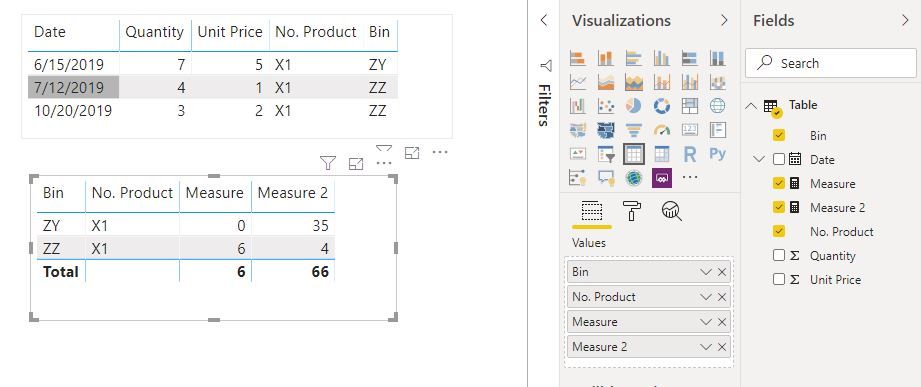
Where "less than a month" is 6 in the first line of the report because for product X1 and bin ZZ I have quantity = 3 * unit price = 2, so the amount is 6, and so on.
No. Product | Bin | Less than a month | 3 to 6 month ago |
X1 | ZZ | 6 | 4 |
X1 | ZY | 0 | 35 |
What I need is to find the formula that let me calculate the amount in the column "Less than a month" and "3 to 6 month ago".
I have tried with something like this without sucess:
Less than a month = CALCULATE( SUM( 'TABLE' [QUANTITY] * 'TABLE' [UNIT PRICE] ); DATESBETWEEN( 'DATE' [DATE]; DATEADD( 'DATE' [DATE];-1;MONTH); 'DATE' [DATE]))
What I really need is the formula, because that's not only for 3 to 6 month but also for 6 to 9 and 9 to 12 months.
I'd really appreciate your help.
Thank you!
Solved! Go to Solution.
Hi @Anonymous
Create measures
Measure =
VAR v =
CALCULATE (
SUM ( 'Table'[Quantity] ) * SUM ( 'Table'[Unit Price] ),
FILTER (
ALLEXCEPT ( 'Table', 'Table'[Bin] ),
DATEDIFF ( 'Table'[Date], TODAY (), MONTH ) = 1
)
)
RETURN
IF ( v = BLANK (), 0, v )
Measure 2 =
VAR v =
CALCULATE (
SUM ( 'Table'[Quantity] ) * SUM ( 'Table'[Unit Price] ),
FILTER (
ALLEXCEPT ( 'Table', 'Table'[Bin] ),
DATEDIFF ( 'Table'[Date], TODAY (), MONTH ) <= 6
&& DATEDIFF ( 'Table'[Date], TODAY (), MONTH ) >= 3
)
)
RETURN
IF ( v = BLANK (), 0, v )
Hi @Anonymous
Create measures
Measure =
VAR v =
CALCULATE (
SUM ( 'Table'[Quantity] ) * SUM ( 'Table'[Unit Price] ),
FILTER (
ALLEXCEPT ( 'Table', 'Table'[Bin] ),
DATEDIFF ( 'Table'[Date], TODAY (), MONTH ) = 1
)
)
RETURN
IF ( v = BLANK (), 0, v )
Measure 2 =
VAR v =
CALCULATE (
SUM ( 'Table'[Quantity] ) * SUM ( 'Table'[Unit Price] ),
FILTER (
ALLEXCEPT ( 'Table', 'Table'[Bin] ),
DATEDIFF ( 'Table'[Date], TODAY (), MONTH ) <= 6
&& DATEDIFF ( 'Table'[Date], TODAY (), MONTH ) >= 3
)
)
RETURN
IF ( v = BLANK (), 0, v )
Amazing. THANK YOU!
The Power BI Data Visualization World Championships is back! It's time to submit your entry.
Check out the January 2026 Power BI update to learn about new features.
| User | Count |
|---|---|
| 11 | |
| 10 | |
| 8 | |
| 7 | |
| 7 |