cancel
Showing results for 
Search instead for 
Did you mean: 

The Power BI Data Visualization World Championships is back! Get ahead of the game and start preparing now! Learn more

Reply
Anonymous
Not applicable

How to export NA strings to CSV using R Script?

I'm exporting country codes from Power Query through R Script using write.csv().

Problem is that I have correct text NA in dataset column which refers to country Namibia. I want to keep its semantic during export and at the same time export Nulls as empty cells to CSV/Excel. 

Unfortunately, each time R treats NA in dataset as N/A and nulls in dataset as N/A too. That's why I either get everything set to NA or, if using features like "export NA as empty string", get empty cell instead of NA (Namibia), which I want to keep in...

Please, advise a solution. It seems I have to say R somehow that it does not have to treat NA as N/A if it appears in dataset. 

PS: I also tried packages like readr, openxlsx, xlsx and so on. The result is the same. 

2 REPLIES 2
dax
Community Support
Community Support

Hi @Anonymous , 

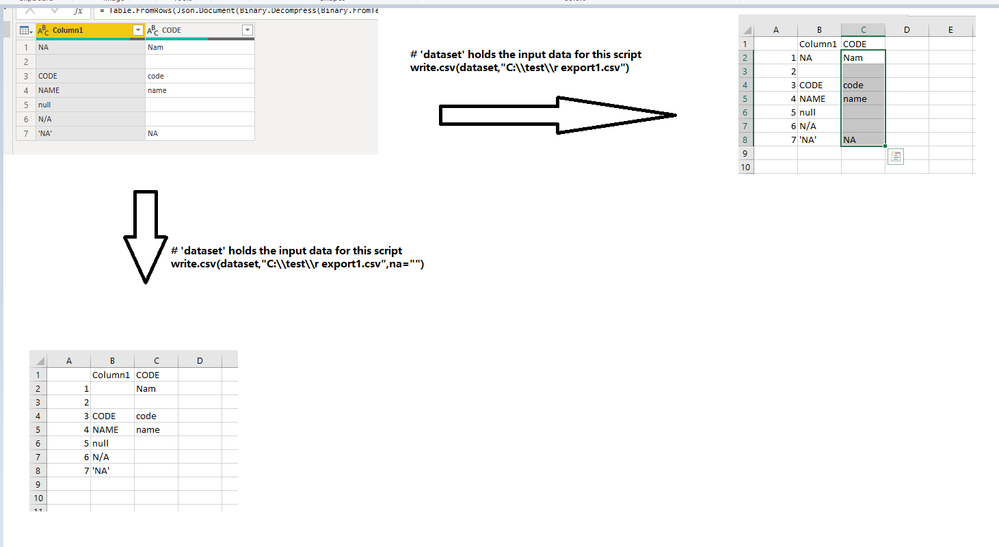
I test this in my environment, I find that when I use write.csv directly in R, it will export data directly without missing data. When I use "write.csv(dataset,"C:\\test\\r export1.csv",na="")", it will convert NA to null, but you could add '' on NA to treat it as string.

735.PNG

Or you also could provide your simple sample data and your R script, then I will test this in my envrironment.

Please do mask sensitive data before uploading.

Thanks for your understanding and support.
Best Regards,
Zoe Zhi

If this post helps, then please consider Accept it as the solution to help the other members find it more quickly.


Anonymous
Not applicable

I have the following script

let
Source = Table.FromRecords({
[country_code = "NA", country_name = "Namibia"],
[country_code = null, country_name = "Undefined code"]
}),
#"Changed Type" = Table.TransformColumnTypes(Source,{{"country_code", type text}, {"country_name", type text}}),
CSVWrite = R.Execute("write.csv(dataset, file = ""C:\\Temp\\write_csv_test.csv"", quote = TRUE, na="""")#(lf)output <- dataset",[dataset=#"Changed Type"]),
#"Expanded Value" = Table.ExpandTableColumn(Table.SelectColumns(CSVWrite,{"Value"}), "Value", {"country_code", "country_name"}, {"country_code", "country_name"})
in
#"Expanded Value"

Output file looks like:

"","country_code","country_name"
"1",,"Namibia"
"2",,"Undefined code"
 

"Expanded Value" also looks like:

country_code country_name
null Namibia
null Undefined code

It differs from your. I havePBi Version: 2.81.5831.821 64-bit  and R Open  3.5.3 .

Helpful resources

Announcements
Power BI DataViz World Championships

Power BI Dataviz World Championships

The Power BI Data Visualization World Championships is back! Get ahead of the game and start preparing now!

November Power BI Update Carousel

Power BI Monthly Update - November 2025

Check out the November 2025 Power BI update to learn about new features.

FabCon Atlanta 2026 carousel

FabCon Atlanta 2026

Join us at FabCon Atlanta, March 16-20, for the ultimate Fabric, Power BI, AI and SQL community-led event. Save $200 with code FABCOMM.