Join us at FabCon Atlanta from March 16 - 20, 2026, for the ultimate Fabric, Power BI, AI and SQL community-led event. Save $200 with code FABCOMM.
Register now!The Power BI Data Visualization World Championships is back! Get ahead of the game and start preparing now! Learn more
Hi
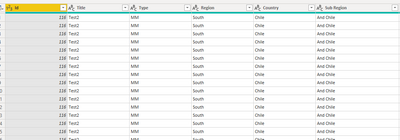
I have gone from
to
Would it be possible in the second image to include the Region and Country in separated columns?
I try the code:
#"Grouped Rows" = Table.Group(#"Changed Type", {"Id"}, {{"Count", each Text.Combine(List.Distinct([Sub Region],[Region],[Country]),", "), type text}}),
#"Renamed Columns" = Table.RenameColumns(#"Grouped Rows",{{"Count", "Sub Region","Region","Country"}})
in
#"Renamed Columns"
But I get an error.
Is it possible to have this in M code?
Thanks.
Solved! Go to Solution.
Hi @o59393
I think you probably want to do it
#"Grouped Rows" = Table.Group(#"Changed Type", {"ID"}, {
{"Sub Region", each Text.Combine(List.Distinct([Sub Region]),", "), type text}
,{"Region", each Text.Combine(List.Distinct([Region]),", "), type text}
,{"Country", each Text.Combine(List.Distinct([Country]),", "), type text}
})
in
#"Grouped Rows"
Hi @o59393
I think you probably want to do it
#"Grouped Rows" = Table.Group(#"Changed Type", {"ID"}, {
{"Sub Region", each Text.Combine(List.Distinct([Sub Region]),", "), type text}
,{"Region", each Text.Combine(List.Distinct([Region]),", "), type text}
,{"Country", each Text.Combine(List.Distinct([Country]),", "), type text}
})
in
#"Grouped Rows"
The Power BI Data Visualization World Championships is back! Get ahead of the game and start preparing now!