cancel
Showing results for 
Search instead for 
Did you mean: 

The Power BI Data Visualization World Championships is back! Get ahead of the game and start preparing now! Learn more

Reply
3xc3l
New Member

How to change several columns names using a formula?

I have a table in power query with several columns, among which are dates columns that follow the format YYYYDDMM##. I would like to rename all the dates columns using a formula, so that I change them for example to DD/MM/YYYY or MonYYYY (e.g. Jan2022). How can I do this? It is a huge number of columns, so doing it manually is not an option.


Thanks in advance for your help!

1 ACCEPTED SOLUTION
edhans
Super User
Super User

Hi @3xc3l - this will do what you want.


let
    Source = Table.FromRows(Json.Document(Binary.Decompress(Binary.FromText("i45WSlTSUTKE41idaKUkIMsIiI1BtBFYKBnINIEKmyjFxgIA", BinaryEncoding.Base64), Compression.Deflate)), let _t = ((type nullable text) meta [Serialized.Text = true]) in type table [Test = _t, #"20210101" = _t, #"20210201" = _t, #"20210301" = _t]),
    ColumnNamesToList = Table.ColumnNames(Source),
    NewNames = 
        List.Transform(
            ColumnNamesToList, 
            each 
                if Text.Start(_,2) = "20" 
                then Text.End(_, 2) & "/" & Text.Middle(_, 4, 2) & "/" & Text.Start(_,4)
                else _
            ),
    CombinedLists = List.Zip({ColumnNamesToList,NewNames}),
    RenameColumns = Table.RenameColumns(Source, CombinedLists)
in
    RenameColumns


It turns this:

edhans_0-1641483522392.png

Into this fully dynamically. It looks for columns that start with a 20 assuming those are the years.
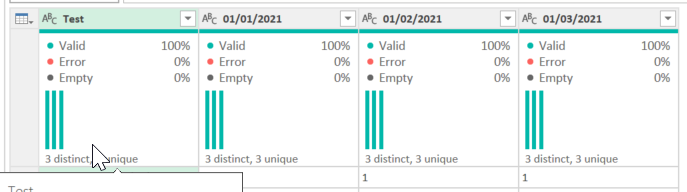
edhans_1-1641483557548.png


However, I am not convinced this is the best approach, but I don't know your data needs. Power BI will work MUCH better if that data is in a single column:
In my original data, I selected the TEST column and then Unpivot Other Columns.

edhans_2-1641483677157.png


Now just do normal data manipulation (like above with the Text.* functions) to convert that attribute to a date, the value types, then it doesn't matter if you have 2 columns or 200, all of your values are in one column and dates in another, and it will make your measures much easier.


How to use M code provided in a blank query:
1) In Power Query, select New Source, then Blank Query
2) On the Home ribbon, select "Advanced Editor" button
3) Remove everything you see, then paste the M code I've given you in that box.
4) Press Done
5) See this article if you need help using this M code in your model.


Did I answer your question? Mark my post as a solution!
Did my answers help arrive at a solution? Give it a kudos by clicking the Thumbs Up!

DAX is for Analysis. Power Query is for Data Modeling


Proud to be a Super User!

MCSA: BI Reporting

View solution in original post

2 REPLIES 2
edhans
Super User
Super User

Hi @3xc3l - this will do what you want.


let
    Source = Table.FromRows(Json.Document(Binary.Decompress(Binary.FromText("i45WSlTSUTKE41idaKUkIMsIiI1BtBFYKBnINIEKmyjFxgIA", BinaryEncoding.Base64), Compression.Deflate)), let _t = ((type nullable text) meta [Serialized.Text = true]) in type table [Test = _t, #"20210101" = _t, #"20210201" = _t, #"20210301" = _t]),
    ColumnNamesToList = Table.ColumnNames(Source),
    NewNames = 
        List.Transform(
            ColumnNamesToList, 
            each 
                if Text.Start(_,2) = "20" 
                then Text.End(_, 2) & "/" & Text.Middle(_, 4, 2) & "/" & Text.Start(_,4)
                else _
            ),
    CombinedLists = List.Zip({ColumnNamesToList,NewNames}),
    RenameColumns = Table.RenameColumns(Source, CombinedLists)
in
    RenameColumns


It turns this:

edhans_0-1641483522392.png

Into this fully dynamically. It looks for columns that start with a 20 assuming those are the years.

edhans_1-1641483557548.png


However, I am not convinced this is the best approach, but I don't know your data needs. Power BI will work MUCH better if that data is in a single column:
In my original data, I selected the TEST column and then Unpivot Other Columns.

edhans_2-1641483677157.png


Now just do normal data manipulation (like above with the Text.* functions) to convert that attribute to a date, the value types, then it doesn't matter if you have 2 columns or 200, all of your values are in one column and dates in another, and it will make your measures much easier.


How to use M code provided in a blank query:
1) In Power Query, select New Source, then Blank Query
2) On the Home ribbon, select "Advanced Editor" button
3) Remove everything you see, then paste the M code I've given you in that box.
4) Press Done
5) See this article if you need help using this M code in your model.


Did I answer your question? Mark my post as a solution!
Did my answers help arrive at a solution? Give it a kudos by clicking the Thumbs Up!

DAX is for Analysis. Power Query is for Data Modeling


Proud to be a Super User!

MCSA: BI Reporting
jennratten
Super User
Super User

Should the new column names be assigned incrementally, like Date1, Date2, Date3, etc?  Or do you have a list of the current names and what you'd like the new names to be?  There are a few different ways to handle this, but choosing which one will be based on the expected outcome.

Helpful resources

Announcements
Power BI DataViz World Championships

Power BI Dataviz World Championships

The Power BI Data Visualization World Championships is back! Get ahead of the game and start preparing now!

December 2025 Power BI Update Carousel

Power BI Monthly Update - December 2025

Check out the December 2025 Power BI Holiday Recap!

FabCon Atlanta 2026 carousel

FabCon Atlanta 2026

Join us at FabCon Atlanta, March 16-20, for the ultimate Fabric, Power BI, AI and SQL community-led event. Save $200 with code FABCOMM.