Join us at FabCon Atlanta from March 16 - 20, 2026, for the ultimate Fabric, Power BI, AI and SQL community-led event. Save $200 with code FABCOMM.
Register now!The Power BI Data Visualization World Championships is back! Get ahead of the game and start preparing now! Learn more
HI everyone,
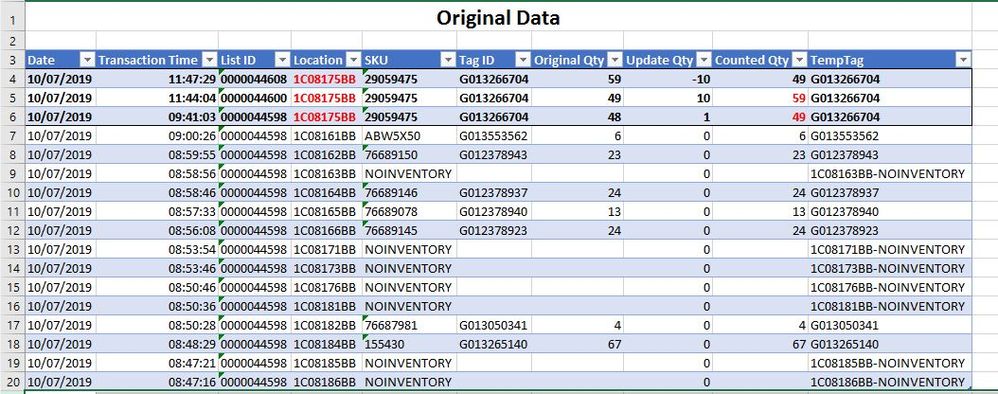
i'm kinda stuck. Just to let u know, i'm fairly new to Power Query. I want to add new columns (in pic.2 its "CT1" and "CT3") which contains the values of Colum "Counted Qty" from all following records with the same value in Column "Location". I cant get it to work. Tried searching and googling but couldnt find a solution. I guess that can be achieved in M-Code, but i really cant work it out.
Would be very nice if someone could give me a hint (or even a solution)...
Original
result ?
Sample Data:
| Date | Transaction Time | List ID | Location | SKU | Tag ID | Original Qty | Update Qty | Counted Qty | TempTag |
| 10/07/2019 | 0.491308 | 0000044608 | 1C08175BB | 29059475 | G013266704 | 59 | -10 | 49 | G013266704 |
| 10/07/2019 | 0.488935 | 0000044600 | 1C08175BB | 29059475 | G013266704 | 49 | 10 | 59 | G013266704 |
| 10/07/2019 | 0.403507 | 0000044598 | 1C08175BB | 29059475 | G013266704 | 48 | 1 | 49 | G013266704 |
| 10/07/2019 | 0.375301 | 0000044598 | 1C08161BB | ABW5X50 | G013553562 | 6 | 0 | 6 | G013553562 |
| 10/07/2019 | 0.374942 | 0000044598 | 1C08162BB | 76689150 | G012378943 | 23 | 0 | 23 | G012378943 |
| 10/07/2019 | 0.374259 | 0000044598 | 1C08163BB | NOINVENTORY | 0 | 1C08163BB-NOINVENTORY | |||
| 10/07/2019 | 0.374144 | 0000044598 | 1C08164BB | 76689146 | G012378937 | 24 | 0 | 24 | G012378937 |
| 10/07/2019 | 0.373299 | 0000044598 | 1C08165BB | 76689078 | G012378940 | 13 | 0 | 13 | G012378940 |
| 10/07/2019 | 0.372315 | 0000044598 | 1C08166BB | 76689145 | G012378923 | 24 | 0 | 24 | G012378923 |
| 10/07/2019 | 0.370764 | 0000044598 | 1C08171BB | NOINVENTORY | 0 | 1C08171BB-NOINVENTORY | |||
| 10/07/2019 | 0.370671 | 0000044598 | 1C08173BB | NOINVENTORY | 0 | 1C08173BB-NOINVENTORY | |||
| 10/07/2019 | 0.368588 | 0000044598 | 1C08176BB | NOINVENTORY | 0 | 1C08176BB-NOINVENTORY | |||
| 10/07/2019 | 0.368472 | 0000044598 | 1C08181BB | NOINVENTORY | 0 | 1C08181BB-NOINVENTORY | |||
| 10/07/2019 | 0.36838 | 0000044598 | 1C08182BB | 76687981 | G013050341 | 4 | 0 | 4 | G013050341 |
| 10/07/2019 | 0.367002 | 0000044598 | 1C08184BB | 155430 | G013265140 | 67 | 0 | 67 | G013265140 |
| 10/07/2019 | 0.366215 | 0000044598 | 1C08185BB | NOINVENTORY | 0 | 1C08185BB-NOINVENTORY | |||
| 10/07/2019 | 0.366157 | 0000044598 | 1C08186BB | NOINVENTORY | 0 | 1C08186BB-NOINVENTORY |
Solved! Go to Solution.
Hi @msoehnchen
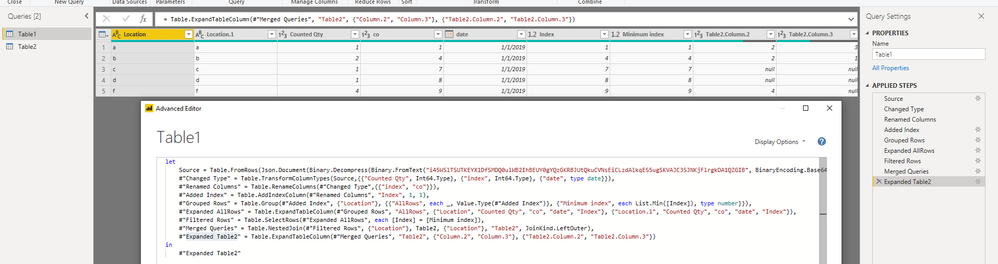
1. Copy the table 1 to get Table 2
2. In Table 2,
group table by "location"->Split Column by Delimiter->Remove first Columns after the "location"
3. In Table1
Add Index->
Grouped Rows by location, meanwhile add a minium index column based on each group->
Expand AllRows->
Filtered Rows where minium index column=index column->
Merged Queries for Table1 and Table 2 based on "location"->
Expand Table
Reference:
https://stackoverflow.com/questions/44058355/powerquery-how-can-i-concatenate-grouped-values
Best Regards
Maggie
Community Support Team _ Maggie Li
If this post helps, then please consider Accept it as the solution to help the other members find it more quickly.
Thanks Maggie,
i tried it yesterday by myself and i also came to the conclusion, that only a merge of that table with itself could help. My fault was, that i tried to achieve this whole thing in one query. But this way, i learned a lot 🙂
I did it slightly different than your solution, but i will try your way the next time. I also appreciate the links - very helpful.
Hi @msoehnchen
1. Copy the table 1 to get Table 2
2. In Table 2,
group table by "location"->Split Column by Delimiter->Remove first Columns after the "location"
3. In Table1
Add Index->
Grouped Rows by location, meanwhile add a minium index column based on each group->
Expand AllRows->
Filtered Rows where minium index column=index column->
Merged Queries for Table1 and Table 2 based on "location"->
Expand Table
Reference:
https://stackoverflow.com/questions/44058355/powerquery-how-can-i-concatenate-grouped-values
Best Regards
Maggie
Community Support Team _ Maggie Li
If this post helps, then please consider Accept it as the solution to help the other members find it more quickly.
Thanks Maggie,
i tried it yesterday by myself and i also came to the conclusion, that only a merge of that table with itself could help. My fault was, that i tried to achieve this whole thing in one query. But this way, i learned a lot 🙂
I did it slightly different than your solution, but i will try your way the next time. I also appreciate the links - very helpful.
The Power BI Data Visualization World Championships is back! Get ahead of the game and start preparing now!