cancel
Showing results for 
Search instead for 
Did you mean: 

The Power BI Data Visualization World Championships is back! Get ahead of the game and start preparing now! Learn more

Reply
Jacklyn
Frequent Visitor

How do I SUM total production by month when i have hundreds of rows of production by daily date?

I have monthly budget production data, actual daily production data, prod category and prod location. I'm trying to compare budget vs actual production. The budget prod figure is in months whereas Actual production data is daily. 1) How do I sum up actual production by month so I can compare to budget prod figure?  2) Also I need to compare monthly budget to monthly actual by product category and also product factory (multiple locations). I'm 1 month-old new to Power Bi, and i'm struggling to produce a report for work. All help is appreciated!

1 ACCEPTED SOLUTION
Anonymous
Not applicable

Hi @Jacklyn ,


I have built a data sample:

Eyelyn9_0-1654656073000.png

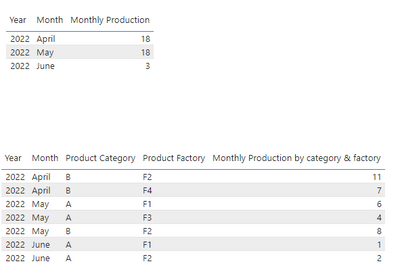
1. Production by each month:

Monthly Production = CALCULATE(SUM('Table'[Actual production]),ALLEXCEPT('Table','Table'[Date].[Year],'Table'[Date].[Month]))

2. Production by each month , each category and each factory:

Monthly Production by category & factory = CALCULATE(SUM('Table'[Actual production]),ALLEXCEPT('Table','Table'[Date].[Year],'Table'[Date].[Month],'Table'[Product Category],'Table'[Product Factory]))

Eyelyn9_1-1654656119360.png


Best Regards,
Eyelyn Qin
If this post helps, then please consider Accept it as the solution to help the other members find it more quickly.

View solution in original post

4 REPLIES 4
Anonymous
Not applicable

Hi @Jacklyn ,


I have built a data sample:

Eyelyn9_0-1654656073000.png

1. Production by each month:

Monthly Production = CALCULATE(SUM('Table'[Actual production]),ALLEXCEPT('Table','Table'[Date].[Year],'Table'[Date].[Month]))

2. Production by each month , each category and each factory:

Monthly Production by category & factory = CALCULATE(SUM('Table'[Actual production]),ALLEXCEPT('Table','Table'[Date].[Year],'Table'[Date].[Month],'Table'[Product Category],'Table'[Product Factory]))

Eyelyn9_1-1654656119360.png


Best Regards,
Eyelyn Qin
If this post helps, then please consider Accept it as the solution to help the other members find it more quickly.

Thank you heaps Eyelyn!

ronrsnfld
Super User
Super User

In Power Query (Home=>Transform),

  • Add a column that returns the first day of each month from your date column
    • eg "=Date.StartOfMonth([Date])"
  • Group By that custom column and use the aggregations to return what you need.

Thank you too for this solution 😃

Helpful resources

Announcements
Power BI DataViz World Championships

Power BI Dataviz World Championships

The Power BI Data Visualization World Championships is back! Get ahead of the game and start preparing now!

December 2025 Power BI Update Carousel

Power BI Monthly Update - December 2025

Check out the December 2025 Power BI Holiday Recap!

FabCon Atlanta 2026 carousel

FabCon Atlanta 2026

Join us at FabCon Atlanta, March 16-20, for the ultimate Fabric, Power BI, AI and SQL community-led event. Save $200 with code FABCOMM.