cancel
Showing results for 
Search instead for 
Did you mean: 

The Power BI Data Visualization World Championships is back! Get ahead of the game and start preparing now! Learn more

Reply
arpost
Post Prodigy
Post Prodigy

How can I get the length of the longest word in a value in Power Query?

I have a scenario where I am wanting to determine what is the length of the longest word in a value.


ValueLongest Word
A T & T1
P B I1
U S A United6


I'm sure it involves using the Text.Split and then somehow using Text.Length inside a List.Max, but I cannot for the life of me figure out how to achieve this. I'd love it if this were all performed in a single step rather than having multiple steps as the dataset Is quite large (300k+ records).


Any ideas?

2 ACCEPTED SOLUTIONS
KNP
Super User
Super User

Paste the below into a blank query in the advanced editor to see the steps.

You were definitely on the right track.

I don't think you need to worry too much about having it as a single step, having one line of code doesn't always make it perform better, the optimisations in the background take care a lot of that for you but I'm sure you could rework these steps to a single step if you wish.


let
  Source = Table.FromRows(
    Json.Document(
      Binary.Decompress(
        Binary.FromText(
          "i45WclQIUYgpNTAwMlMIUYrViVYKUHBS8ASzQhWCFRwVQvMyS1JTlGJjAQ==",
          BinaryEncoding.Base64
        ),
        Compression.Deflate
      )
    ),
    let
      _t = ((type nullable text) meta [Serialized.Text = true])
    in
      type table [Value = _t]
  ),
  Duplicate = Table.DuplicateColumn(Source, "Value", "Value - Copy"),
  Split = Table.SplitColumn(
    Duplicate,
    "Value - Copy",
    Splitter.SplitTextByDelimiter(" ", QuoteStyle.Csv),
    {"Value - Copy.1", "Value - Copy.2", "Value - Copy.3", "Value - Copy.4"}
  ),
  Unpivot = Table.UnpivotOtherColumns(Split, {"Value"}, "Attribute", "Values"),
  Group = Table.Group(Unpivot, {"Value"}, {{"MaxWord", each List.Max([Values]), type text}}),
  AddLength = Table.AddColumn(Group, "Length", each Text.Length([MaxWord]), Int64.Type)
in
  AddLength

 Hope this helps.


Have I solved your problem?
Please click Accept as Solution so I don't keep coming back to this post, oh yeah, others may find it useful also ;).
xOIEmaj

If you found this post helpful, please give Kudos.
It gives me a sense of instant gratification and, if you give me Kudos enough times, magical unicorns will appear on your screen.
If you find my signature vaguely amusing, please give Kudos.
image
fabric-SUbadge
Proud to be a Super User!

View solution in original post

AlexisOlson
Super User
Super User

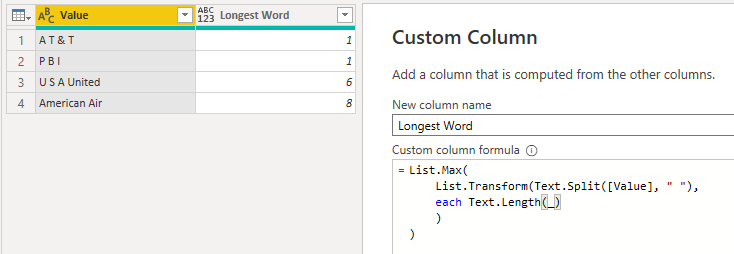
@KNP has a good solution but I'd like to suggest a single-step solution too.


Create a new custom column with this formula:

List.Max(List.Transform(Text.Split([Value], " "), each Text.Length(_)))


AlexisOlson_0-1637698250816.png


View solution in original post

3 REPLIES 3
AlexisOlson
Super User
Super User

@KNP has a good solution but I'd like to suggest a single-step solution too.


Create a new custom column with this formula:

List.Max(List.Transform(Text.Split([Value], " "), each Text.Length(_)))


AlexisOlson_0-1637698250816.png


KNP
Super User
Super User

Paste the below into a blank query in the advanced editor to see the steps.

You were definitely on the right track.

I don't think you need to worry too much about having it as a single step, having one line of code doesn't always make it perform better, the optimisations in the background take care a lot of that for you but I'm sure you could rework these steps to a single step if you wish.


let
  Source = Table.FromRows(
    Json.Document(
      Binary.Decompress(
        Binary.FromText(
          "i45WclQIUYgpNTAwMlMIUYrViVYKUHBS8ASzQhWCFRwVQvMyS1JTlGJjAQ==",
          BinaryEncoding.Base64
        ),
        Compression.Deflate
      )
    ),
    let
      _t = ((type nullable text) meta [Serialized.Text = true])
    in
      type table [Value = _t]
  ),
  Duplicate = Table.DuplicateColumn(Source, "Value", "Value - Copy"),
  Split = Table.SplitColumn(
    Duplicate,
    "Value - Copy",
    Splitter.SplitTextByDelimiter(" ", QuoteStyle.Csv),
    {"Value - Copy.1", "Value - Copy.2", "Value - Copy.3", "Value - Copy.4"}
  ),
  Unpivot = Table.UnpivotOtherColumns(Split, {"Value"}, "Attribute", "Values"),
  Group = Table.Group(Unpivot, {"Value"}, {{"MaxWord", each List.Max([Values]), type text}}),
  AddLength = Table.AddColumn(Group, "Length", each Text.Length([MaxWord]), Int64.Type)
in
  AddLength

 Hope this helps.


Have I solved your problem?
Please click Accept as Solution so I don't keep coming back to this post, oh yeah, others may find it useful also ;).
xOIEmaj

If you found this post helpful, please give Kudos.
It gives me a sense of instant gratification and, if you give me Kudos enough times, magical unicorns will appear on your screen.
If you find my signature vaguely amusing, please give Kudos.
image
fabric-SUbadge
Proud to be a Super User!

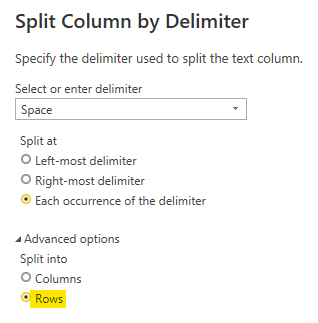
This is good but I'd like to offer a suggestion to make it a bit better.


You can split into rows instead of columns to avoid the unpivot step and make the query more robust against new data that would need to be split into more columns.


AlexisOlson_0-1637697956162.png


Helpful resources

Announcements
Power BI DataViz World Championships

Power BI Dataviz World Championships

The Power BI Data Visualization World Championships is back! Get ahead of the game and start preparing now!

November Power BI Update Carousel

Power BI Monthly Update - November 2025

Check out the November 2025 Power BI update to learn about new features.

FabCon Atlanta 2026 carousel

FabCon Atlanta 2026

Join us at FabCon Atlanta, March 16-20, for the ultimate Fabric, Power BI, AI and SQL community-led event. Save $200 with code FABCOMM.