cancel
Showing results for 
Search instead for 
Did you mean: 

Next up in the FabCon + SQLCon recap series: The roadmap for Microsoft SQL and Maximizing Developer experiences in Fabric. All sessions are available on-demand after the live show. Register now

Reply
renatopnovaes
Helper I
Helper I

How Remove duplicates value according other column values

Hi, I have the following table with the code column and product group.

Product
Group
CODE
A100
A101
B102
B103
C101
C104

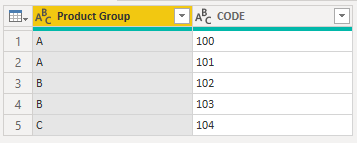
 In group A and C, I have the same code. I want to remove duplicity, but I want to keep the code in group A.

I want to hit the target below

Product
Group
CODE
A100
A101
B102
B103
C104
2 ACCEPTED SOLUTIONS
CNENFRNL
Community Champion
Community Champion


let
    Source = Table.FromRows(Json.Document(Binary.Decompress(Binary.FromText("i45WclTSUTI0MFCK1YGxDcFsJzDbCIltDGY7I6mBsE2UYmMB", BinaryEncoding.Base64), Compression.Deflate)), let _t = ((type nullable text) meta [Serialized.Text = true]) in type table [#"Product Group" = _t, CODE = _t]),
    #"Grouped Rows" = Table.Group(Source, {"Product Group"}, {{"Value", each _}}),
    #"Renamed Columns" = Table.RenameColumns(#"Grouped Rows",{{"Product Group", "Name"}}),
    #"Split Tables" = Record.FromTable(#"Renamed Columns"),
    #"Transformed C" = Table.SelectRows(#"Split Tables"[C], let Code_A = #"Split Tables"[A][CODE] in each not List.Contains(Code_A, [CODE])),
    Custom = Table.Combine(Record.ToList(Record.TransformFields(#"Split Tables", {"C", each #"Transformed C"})))
in
    Custom


Screenshot 2021-06-08 115909.png


Thanks to the great efforts by MS engineers to simplify syntax of DAX! Most beginners are SUCCESSFULLY MISLED to think that they could easily master DAX; but it turns out that the intricacy of the most frequently used RANKX() is still way beyond their comprehension!

DAX is simple, but NOT EASY!

View solution in original post

AlB
Community Champion
Community Champion

Hi @renatopnovaes 

Place the following M code in a blank query to see the steps. Grouped Rows is the important step

let
    Source = Table.FromRows(Json.Document(Binary.Decompress(Binary.FromText("i45WclTSUTI0MFCK1YGxDcFsJzDbCIltDGY7I6mBsE2UYmMB", BinaryEncoding.Base64), Compression.Deflate)), let _t = ((type nullable text) meta [Serialized.Text = true]) in type table [#"Product Group" = _t, CODE = _t]),
    #"Changed Type" = Table.TransformColumnTypes(Source,{{"Product Group", type text}, {"CODE", Int64.Type}}),

    #"Grouped Rows" = Table.Group(#"Changed Type", {"CODE"}, {{"Product Group", each if List.Count(List.Intersect({[Product Group], {"A", "C"}})) = 2 then List.Select([Product Group], each _ <> "C") else [Product Group] }}),

    #"Expanded Product Group" = Table.ExpandListColumn(#"Grouped Rows", "Product Group"),
    #"Reordered Columns" = Table.ReorderColumns(#"Expanded Product Group",{"Product Group", "CODE"}),
    #"Changed Type1" = Table.TransformColumnTypes(#"Reordered Columns",{{"Product Group", type text}})
in
    #"Changed Type1"


SU18_powerbi_badge

Please accept the solution when done and consider giving a thumbs up if posts are helpful. 

Contact me privately for support with any larger-scale BI needs, tutoring, etc.


View solution in original post

3 REPLIES 3
v-jingzhang
Community Support
Community Support

Hi @renatopnovaes 


Has the problem been solved? If so, you may accept the appropriate post as the solution or post your own solution to help other members find it quickly. If not, please provide more details about your problem. Thanks.


Regards,
Community Support Team _ Jing

AlB
Community Champion
Community Champion

Hi @renatopnovaes 

Place the following M code in a blank query to see the steps. Grouped Rows is the important step

let
    Source = Table.FromRows(Json.Document(Binary.Decompress(Binary.FromText("i45WclTSUTI0MFCK1YGxDcFsJzDbCIltDGY7I6mBsE2UYmMB", BinaryEncoding.Base64), Compression.Deflate)), let _t = ((type nullable text) meta [Serialized.Text = true]) in type table [#"Product Group" = _t, CODE = _t]),
    #"Changed Type" = Table.TransformColumnTypes(Source,{{"Product Group", type text}, {"CODE", Int64.Type}}),

    #"Grouped Rows" = Table.Group(#"Changed Type", {"CODE"}, {{"Product Group", each if List.Count(List.Intersect({[Product Group], {"A", "C"}})) = 2 then List.Select([Product Group], each _ <> "C") else [Product Group] }}),

    #"Expanded Product Group" = Table.ExpandListColumn(#"Grouped Rows", "Product Group"),
    #"Reordered Columns" = Table.ReorderColumns(#"Expanded Product Group",{"Product Group", "CODE"}),
    #"Changed Type1" = Table.TransformColumnTypes(#"Reordered Columns",{{"Product Group", type text}})
in
    #"Changed Type1"


SU18_powerbi_badge

Please accept the solution when done and consider giving a thumbs up if posts are helpful. 

Contact me privately for support with any larger-scale BI needs, tutoring, etc.


CNENFRNL
Community Champion
Community Champion


let
    Source = Table.FromRows(Json.Document(Binary.Decompress(Binary.FromText("i45WclTSUTI0MFCK1YGxDcFsJzDbCIltDGY7I6mBsE2UYmMB", BinaryEncoding.Base64), Compression.Deflate)), let _t = ((type nullable text) meta [Serialized.Text = true]) in type table [#"Product Group" = _t, CODE = _t]),
    #"Grouped Rows" = Table.Group(Source, {"Product Group"}, {{"Value", each _}}),
    #"Renamed Columns" = Table.RenameColumns(#"Grouped Rows",{{"Product Group", "Name"}}),
    #"Split Tables" = Record.FromTable(#"Renamed Columns"),
    #"Transformed C" = Table.SelectRows(#"Split Tables"[C], let Code_A = #"Split Tables"[A][CODE] in each not List.Contains(Code_A, [CODE])),
    Custom = Table.Combine(Record.ToList(Record.TransformFields(#"Split Tables", {"C", each #"Transformed C"})))
in
    Custom


Screenshot 2021-06-08 115909.png


Thanks to the great efforts by MS engineers to simplify syntax of DAX! Most beginners are SUCCESSFULLY MISLED to think that they could easily master DAX; but it turns out that the intricacy of the most frequently used RANKX() is still way beyond their comprehension!

DAX is simple, but NOT EASY!

Helpful resources

Announcements
New to Fabric survey Carousel

New to Fabric Survey

If you have recently started exploring Fabric, we'd love to hear how it's going. Your feedback can help with product improvements.

Power BI DataViz World Championships carousel

Power BI DataViz World Championships - June 2026

A new Power BI DataViz World Championship is coming this June! Don't miss out on submitting your entry.

Join our Fabric User Panel

Join our Fabric User Panel

Share feedback directly with Fabric product managers, participate in targeted research studies and influence the Fabric roadmap.

March Power BI Update Carousel

Power BI Community Update - March 2026

Check out the March 2026 Power BI update to learn about new features.

Users online (4,397)