cancel
Showing results for 
Search instead for 
Did you mean: 

The Power BI Data Visualization World Championships is back! Get ahead of the game and start preparing now! Learn more

Reply
thomasreick
Resolver I
Resolver I

Hint needed to reshape input data with bad data maintenance and data quality

Hi all,

can you please give a hint on the following:

My XLSX-source file contains, amongst other columns ,two columns representing "from" and "until"- information.

Unfortunately the way of entering data is not governed, so there is a mix of real date-entries (e.g. "19.10.2021")  and text-like-entries (e.g. "October 2021"). the columns are recognised in PQ as alphanumeric (123/abc).


I want to work on these cases in PQ, but I do not find a keyword to search with ("data entered by unexpierienced users" isn't a suitable ...).


Can you please provide a link to a tutorial or sth similars or even better a source where problems of these kind are handled?


thank you in advance

Thomas

2 ACCEPTED SOLUTIONS
mahoneypat
Microsoft Employee
Microsoft Employee

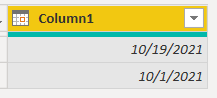
I put your two values in and converted it to a Date column (click on the abc123 and choose Date), and it worked.  Have you tried that already?  When you do that, any that don't work will show as "Error".  Please share those values  (click to the right of the word Error to see the original value below the preview), to get specific suggestions.


For now, I would work toward improving the data validation on your source, if possible.


Pat


mahoneypat_0-1634644637238.png


Did I answer your question? Mark my post as a solution! Kudos are also appreciated!

To learn more about Power BI, follow me on Twitter or subscribe on YouTube.


@mahoneypa HoosierBI on YouTube


View solution in original post

Hi mahoneypa,

thank you for this suggestion, it worked perfectly

(Note to myself: Being more "experimental" helps!)


Nevertheless the way of data-maintenance and -governance is still to discuss with responsible departments...

Once againt

hank you very much!

Thomas

View solution in original post

2 REPLIES 2
mahoneypat
Microsoft Employee
Microsoft Employee

I put your two values in and converted it to a Date column (click on the abc123 and choose Date), and it worked.  Have you tried that already?  When you do that, any that don't work will show as "Error".  Please share those values  (click to the right of the word Error to see the original value below the preview), to get specific suggestions.


For now, I would work toward improving the data validation on your source, if possible.


Pat


mahoneypat_0-1634644637238.png


Did I answer your question? Mark my post as a solution! Kudos are also appreciated!

To learn more about Power BI, follow me on Twitter or subscribe on YouTube.


@mahoneypa HoosierBI on YouTube


Hi mahoneypa,

thank you for this suggestion, it worked perfectly

(Note to myself: Being more "experimental" helps!)


Nevertheless the way of data-maintenance and -governance is still to discuss with responsible departments...

Once againt

hank you very much!

Thomas

Helpful resources

Announcements
Power BI DataViz World Championships

Power BI Dataviz World Championships

The Power BI Data Visualization World Championships is back! Get ahead of the game and start preparing now!

December 2025 Power BI Update Carousel

Power BI Monthly Update - December 2025

Check out the December 2025 Power BI Holiday Recap!

FabCon Atlanta 2026 carousel

FabCon Atlanta 2026

Join us at FabCon Atlanta, March 16-20, for the ultimate Fabric, Power BI, AI and SQL community-led event. Save $200 with code FABCOMM.