This is best Fabric, Power BI, SQL and AI community event. How do we know? The last event sold out! Save €200 with code FABCMTY200.
Register nowA new Data Days event is coming soon! This time we’re going bigger than ever. Fabric, Power BI, SQL, AI and more. Don't miss out.
Hi,
I have created blank column in Power Query by using the following step.
#"Added Custom" = Table.AddColumn(#"Sorted Rows", " ", each "")
However, I don't want this column to appear in the final results. Is there a way to hide the column when the data is closed and loaded?
Transpose option doesn't help to hide the column. Thank you!
Solved! Go to Solution.
Hi @vineshparekh, if you do not need this column in final result, just delete it.
hi @vineshparekh ,
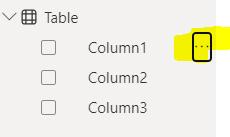
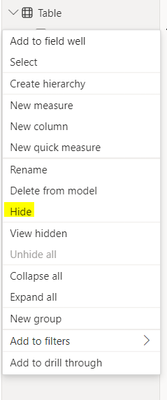
to hide a column once loaded into the model:
1. select the elipsis:
2. hide
regardless, i agree with @dufoq3 , if you don't need the column, might as well remove it in power query before loading.
hi @vineshparekh ,
to hide a column once loaded into the model:
1. select the elipsis:
2. hide
regardless, i agree with @dufoq3 , if you don't need the column, might as well remove it in power query before loading.
Hi @vineshparekh, if you do not need this column in final result, just delete it.
Hi @dufoq3
I have PDFs coming each month and this query adds a column for the current month invoices.
For example,
Feb/24 and the next month it will add a column automatically with Mar/24 based on invoice. After the last column, I have few columns in Excel (Not connected to query) where it shows formula. Since there is a division between two sets of data, the query doesn't use the same format I provided for the table to the new column. (Mar/24). I have to do the same formatting for the newly added column. Where as, if I have a blank column, the query applies the format to the new column keeping blank column at last.
Check out the May 2026 Power BI update to learn about new features.
Sign up to receive a private message when registration opens and key events begin.
If you have recently started exploring Fabric, we'd love to hear how it's going. Your feedback can help with product improvements.
| User | Count |
|---|---|
| 3 | |
| 3 | |
| 2 | |
| 2 | |
| 1 |