Get certified for free when you join Fabric Data Days 2026 and dive into Fabric, Power BI, SQL, AI, and other essential data skills.
Join nowJuly 7 - July 17 | Round 2 of the Power BI Dataviz World Championships. Don't miss your chance! Learn more
hy there,
I have an SSAS cube with attributes. Through Power BI, I've established a direct query to the cube, and I can see these attributes in the data model. However, they are hidden, and I cannot turn them to visible in order to use them. What could be the reason for this?
thanks for your helps
Hi @Power-Central ,
If I understand correctly, your issue is that you want to use the attributes but they are hidden. To solve the issue, you can follow these steps:
1.Select the attribute and check whether the Hidden property of the attributes is set to false.
2.Look for the AttributeHierarchyVisible property and ensure it is set to “True”. This will make the attribute visible in the Power BI.
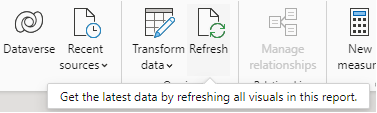
3.Refresh data in Power BI Desktop. Go the Home tab and click on Refresh.
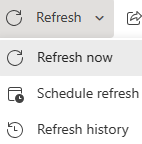
4.Check Power BI Service. Ensure that the dataset is refreshed after making changes in AS. Going to the dataset settings in Power BI Service and selecting a manual refresh or adjusting the refresh schedule.
5.If the above one can't help you, could you please provide sample data and screenshots? It would be helpful to find out the solution.
Looking forward to your replay.
Join us in Barcelona for FabCon and SQLCon, the Fabric, Power BI, SQL, and AI community event. Save €200 with code FABCMTY200.
Join Fabric Data Days 2026: 60 days of free live/on-demand sessions, challenges, study groups, and certification opportunities.