cancel
Showing results for 
Search instead for 
Did you mean: 

Learn from the best! Meet the four finalists headed to the FINALS of the Power BI Dataviz World Championships! Register now

Reply
sameergupta60
Helper IV
Helper IV

Help

=IF(M4>0, "P",IF((L4-M4)>0, "AP", [@[Fin Year]])) in excel is working but BI it is not working the formula


IMC 1 = IF('bar-1'[PPCJUl]>0,"P",if('bar-1'[PPCYTD]-'bar-1'[PPCJUl]>0,"AP", 'bar-1'[Fin year]))
 
getting an error :-Expressions that yield variant data-type cannot be used to define calculated columns.
please guide
 
1 ACCEPTED SOLUTION
v-alq-msft
Community Support
Community Support

Hi, @sameergupta60 


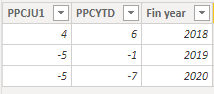
Based on your description, I created data to reproduce your scenario. The pbix file is attached in the end.


bar-1:

e1.png


If you want to create a calculated column with dax, you may try the following codes.

Result = 
IF(
    'bar-1'[PPCJU1]>0,
    "P",
    IF(
        'bar-1'[PPCYTD]-'bar-1'[PPCJU1]>0,
        "AP",
        CONCATENATE('bar-1'[Fin year],"")
    )
)


If you want to create a custom column in Power Query, you may create a custom column with the following codes.

=if [PPCJU1]>0 then "P" else if ([PPCYTD]-[PPCJU1])>0 then "AP" else Text.From([Fin year])


e2.png


Result:

e3.png


Best Regards

Allan


If this post helps, then please consider Accept it as the solution to help the other members find it more quickly.


View solution in original post

5 REPLIES 5
v-alq-msft
Community Support
Community Support

Hi, @sameergupta60 


Based on your description, I created data to reproduce your scenario. The pbix file is attached in the end.


bar-1:

e1.png


If you want to create a calculated column with dax, you may try the following codes.

Result = 
IF(
    'bar-1'[PPCJU1]>0,
    "P",
    IF(
        'bar-1'[PPCYTD]-'bar-1'[PPCJU1]>0,
        "AP",
        CONCATENATE('bar-1'[Fin year],"")
    )
)


If you want to create a custom column in Power Query, you may create a custom column with the following codes.

=if [PPCJU1]>0 then "P" else if ([PPCYTD]-[PPCJU1])>0 then "AP" else Text.From([Fin year])


e2.png


Result:

e3.png


Best Regards

Allan


If this post helps, then please consider Accept it as the solution to help the other members find it more quickly.


thank you so much for the help.


i have one more query can you guide us.


Colour Project1 =
VAR Dept =
SELECTEDVALUE( 'bar-1'[Slab Data] )
RETURN
Switch(True(),
Dept = "P", "#FFFFFF",
Dept = "-" , "#89de21",
Dept >"0-" , "#89de21",
Dept = "`", "#FFE12D",
Dept = ".","#d9dedd",
Dept = ",","#f56342"
)


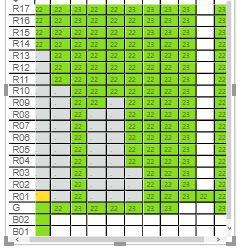
in that, I have a colour cell but unable to colour the number 22,23 in a different colour can help us.


sameergupta60_0-1594101206111.png


Greg_Deckler
Community Champion
Community Champion

So you will likely need something like:

IF(M4>0, "P",IF((L4-M4)>0, "AP", [@[Fin Year]] & ""))

That assumes you want a DAX solution. If you want Power Query that is entirely different syntax


Follow on LinkedIn
@ me in replies or I'll lose your thread!!!
Instead of a Kudo, please vote for this idea
Become an expert!: Enterprise DNA
External Tools: MSHGQM
YouTube Channel!: Microsoft Hates Greg
Latest book!:
DAX For Humans

DAX is easy, CALCULATE makes DAX hard...

yes, I want a power query.

Please help on above daxPlease help on above dax


Can you please guide on above Dax issue

Helpful resources

Announcements
Join our Fabric User Panel

Join our Fabric User Panel

Share feedback directly with Fabric product managers, participate in targeted research studies and influence the Fabric roadmap.

February Power BI Update Carousel

Power BI Monthly Update - February 2026

Check out the February 2026 Power BI update to learn about new features.

FabCon Atlanta 2026 carousel

FabCon Atlanta 2026

Join us at FabCon Atlanta, March 16-20, for the ultimate Fabric, Power BI, AI and SQL community-led event. Save $200 with code FABCOMM.

Top Solution Authors