cancel
Showing results for 
Search instead for 
Did you mean: 

We've captured the moments from FabCon & SQLCon that everyone is talking about, and we are bringing them to the community, live and on-demand. Starts on April 14th. Register now

Reply
Anonymous
Not applicable

Help with local maximums

Hi all,


I would need some help with Power Query.


The point is that I have an Excel file with the data from 2 machines. I have joined both tables in a new one to have the data of both machines with different or simmilar NumOP (Operation number).


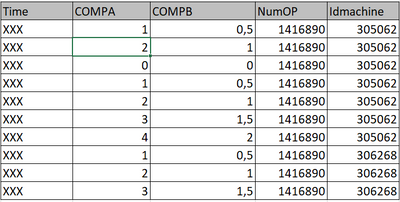
As you´ll see in the PBI attached, the column structure is: TIME, COMPA (component A), COMPB (component B), NumOP, IDmachine.


I would like to take the maximum values of COMPA and COMPB (same line) according to the Operation number (NumOP).


The main problem is that a machine could shutdown and restart  in 0 position (see the example), so the program should be able to give us an output like this:

DBB99_1-1624614331219.png


DBB99_0-1624614016921.png


So the final result would be:

DBB99_2-1624614379268.png


Could you please help me on this topic??


Thank you so much for your support.


In this link you will find the Excel file and the PBI file


https://we.tl/t-jvPEDVGj1i


2 ACCEPTED SOLUTIONS
AlB
Community Champion
Community Champion

Hi @Anonymous 

Place the following M code in a blank query to see the steps of a possible solution

let
    Source = Table.FromRows(Json.Document(Binary.Decompress(Binary.FromText("lY67DcAgDAVXiVwj4Q82kFWQ918jISJVUuDiJBf3rBsDWDJxZmQ8SE7skIBeClnreF+Cisbg6dfnxa6Pi11fgj0l2KPB/9H+MoNUI0VTNgssHrnW76KB+wU=", BinaryEncoding.Base64), Compression.Deflate)), let _t = ((type nullable text) meta [Serialized.Text = true]) in type table [Time = _t, COMPA = _t, COMPB = _t, NumOP = _t, MachineId = _t]),
    #"Changed Type1" = Table.TransformColumnTypes(Source,{{"COMPB", type number}, {"COMPA", type number}}),
    #"Grouped Rows" = Table.Group(#"Changed Type1", {"MachineId"}, {{"GroupCol", each let s1_ = Table.AddIndexColumn(_,"Index", 1,1), s2_ = Table.Sort(s1_,{{"Index", Order.Ascending}}),
    list_ = List.Transform(List.Zip({s2_[COMPA], s2_[COMPB]}), each _{0}+_{1}),
    s3_ = Table.AddColumn(s2_, "Custom2", each List.Count(List.PositionOf(List.Range(list_,0,[Index]), 0, Occurrence.All)), Int64.Type) in s3_  }}),
    #"Expanded GroupCol" = Table.ExpandTableColumn(#"Grouped Rows", "GroupCol", {"Time", "COMPA", "COMPB", "NumOP", "Index", "Custom2"}, {"Time", "COMPA", "COMPB", "NumOP", "Index", "Custom2"}),
    #"Grouped Rows1" = Table.Group(#"Expanded GroupCol", {"MachineId", "Custom2"}, {{"COMPA", each List.Max([COMPA])}, {"COMPB", each List.Max([COMPB])}, {"NumOP", each [NumOP]{0}}}),
    #"Removed Columns" = Table.RemoveColumns(#"Grouped Rows1",{"Custom2"})
in
    #"Removed Columns"


SU18_powerbi_badge

Please accept the solution when done and consider giving a thumbs up if posts are helpful. 

Contact me privately for support with any larger-scale BI needs, tutoring, etc.


View solution in original post

Syndicate_Admin
Administrator
Administrator

Hi @DBB99 

Place the following M code in a blank query to see the steps of a possible solution

let
    Source = Table.FromRows(Json.Document(Binary.Decompress(Binary.FromText("lY67DcAgDAVXiVwj4Q82kFWQ918jISJVUuDiJBf3rBsDWDJxZmQ8SE7skIBeClnreF+Cisbg6dfnxa6Pi11fgj0l2KPB/9H+MoNUI0VTNgssHrnW76KB+wU=", BinaryEncoding.Base64), Compression.Deflate)), let _t = ((type nullable text) meta [Serialized.Text = true]) in type table [Time = _t, COMPA = _t, COMPB = _t, NumOP = _t, MachineId = _t]),
    #"Changed Type1" = Table.TransformColumnTypes(Source,{{"COMPB", type number}, {"COMPA", type number}}),
    #"Grouped Rows" = Table.Group(#"Changed Type1", {"MachineId"}, {{"GroupCol", each let s1_ = Table.AddIndexColumn(_,"Index", 1,1), s2_ = Table.Sort(s1_,{{"Index", Order.Ascending}}),
    list_ = List.Transform(List.Zip({s2_[COMPA], s2_[COMPB]}), each _{0}+_{1}),
    s3_ = Table.AddColumn(s2_, "Custom2", each List.Count(List.PositionOf(List.Range(list_,0,[Index]), 0, Occurrence.All)), Int64.Type) in s3_  }}),
    #"Expanded GroupCol" = Table.ExpandTableColumn(#"Grouped Rows", "GroupCol", {"Time", "COMPA", "COMPB", "NumOP", "Index", "Custom2"}, {"Time", "COMPA", "COMPB", "NumOP", "Index", "Custom2"}),
    #"Grouped Rows1" = Table.Group(#"Expanded GroupCol", {"MachineId", "Custom2"}, {{"COMPA", each List.Max([COMPA])}, {"COMPB", each List.Max([COMPB])}, {"NumOP", each [NumOP]{0}}}),
    #"Removed Columns" = Table.RemoveColumns(#"Grouped Rows1",{"Custom2"})
in
    #"Removed Columns"


SU18_powerbi_badge

Please accept the solution when done and consider giving a thumbs up if posts are helpful. 

Contact me privately for support with any larger-scale BI needs, tutoring, etc.


View solution in original post

2 REPLIES 2
Syndicate_Admin
Administrator
Administrator

Hi @DBB99 

Place the following M code in a blank query to see the steps of a possible solution

let
    Source = Table.FromRows(Json.Document(Binary.Decompress(Binary.FromText("lY67DcAgDAVXiVwj4Q82kFWQ918jISJVUuDiJBf3rBsDWDJxZmQ8SE7skIBeClnreF+Cisbg6dfnxa6Pi11fgj0l2KPB/9H+MoNUI0VTNgssHrnW76KB+wU=", BinaryEncoding.Base64), Compression.Deflate)), let _t = ((type nullable text) meta [Serialized.Text = true]) in type table [Time = _t, COMPA = _t, COMPB = _t, NumOP = _t, MachineId = _t]),
    #"Changed Type1" = Table.TransformColumnTypes(Source,{{"COMPB", type number}, {"COMPA", type number}}),
    #"Grouped Rows" = Table.Group(#"Changed Type1", {"MachineId"}, {{"GroupCol", each let s1_ = Table.AddIndexColumn(_,"Index", 1,1), s2_ = Table.Sort(s1_,{{"Index", Order.Ascending}}),
    list_ = List.Transform(List.Zip({s2_[COMPA], s2_[COMPB]}), each _{0}+_{1}),
    s3_ = Table.AddColumn(s2_, "Custom2", each List.Count(List.PositionOf(List.Range(list_,0,[Index]), 0, Occurrence.All)), Int64.Type) in s3_  }}),
    #"Expanded GroupCol" = Table.ExpandTableColumn(#"Grouped Rows", "GroupCol", {"Time", "COMPA", "COMPB", "NumOP", "Index", "Custom2"}, {"Time", "COMPA", "COMPB", "NumOP", "Index", "Custom2"}),
    #"Grouped Rows1" = Table.Group(#"Expanded GroupCol", {"MachineId", "Custom2"}, {{"COMPA", each List.Max([COMPA])}, {"COMPB", each List.Max([COMPB])}, {"NumOP", each [NumOP]{0}}}),
    #"Removed Columns" = Table.RemoveColumns(#"Grouped Rows1",{"Custom2"})
in
    #"Removed Columns"


SU18_powerbi_badge

Please accept the solution when done and consider giving a thumbs up if posts are helpful. 

Contact me privately for support with any larger-scale BI needs, tutoring, etc.


AlB
Community Champion
Community Champion

Hi @Anonymous 

Place the following M code in a blank query to see the steps of a possible solution

let
    Source = Table.FromRows(Json.Document(Binary.Decompress(Binary.FromText("lY67DcAgDAVXiVwj4Q82kFWQ918jISJVUuDiJBf3rBsDWDJxZmQ8SE7skIBeClnreF+Cisbg6dfnxa6Pi11fgj0l2KPB/9H+MoNUI0VTNgssHrnW76KB+wU=", BinaryEncoding.Base64), Compression.Deflate)), let _t = ((type nullable text) meta [Serialized.Text = true]) in type table [Time = _t, COMPA = _t, COMPB = _t, NumOP = _t, MachineId = _t]),
    #"Changed Type1" = Table.TransformColumnTypes(Source,{{"COMPB", type number}, {"COMPA", type number}}),
    #"Grouped Rows" = Table.Group(#"Changed Type1", {"MachineId"}, {{"GroupCol", each let s1_ = Table.AddIndexColumn(_,"Index", 1,1), s2_ = Table.Sort(s1_,{{"Index", Order.Ascending}}),
    list_ = List.Transform(List.Zip({s2_[COMPA], s2_[COMPB]}), each _{0}+_{1}),
    s3_ = Table.AddColumn(s2_, "Custom2", each List.Count(List.PositionOf(List.Range(list_,0,[Index]), 0, Occurrence.All)), Int64.Type) in s3_  }}),
    #"Expanded GroupCol" = Table.ExpandTableColumn(#"Grouped Rows", "GroupCol", {"Time", "COMPA", "COMPB", "NumOP", "Index", "Custom2"}, {"Time", "COMPA", "COMPB", "NumOP", "Index", "Custom2"}),
    #"Grouped Rows1" = Table.Group(#"Expanded GroupCol", {"MachineId", "Custom2"}, {{"COMPA", each List.Max([COMPA])}, {"COMPB", each List.Max([COMPB])}, {"NumOP", each [NumOP]{0}}}),
    #"Removed Columns" = Table.RemoveColumns(#"Grouped Rows1",{"Custom2"})
in
    #"Removed Columns"


SU18_powerbi_badge

Please accept the solution when done and consider giving a thumbs up if posts are helpful. 

Contact me privately for support with any larger-scale BI needs, tutoring, etc.


Helpful resources

Announcements
New to Fabric survey Carousel

New to Fabric Survey

If you have recently started exploring Fabric, we'd love to hear how it's going. Your feedback can help with product improvements.

Power BI DataViz World Championships carousel

Power BI DataViz World Championships - June 2026

A new Power BI DataViz World Championship is coming this June! Don't miss out on submitting your entry.

Join our Fabric User Panel

Join our Fabric User Panel

Share feedback directly with Fabric product managers, participate in targeted research studies and influence the Fabric roadmap.

March Power BI Update Carousel

Power BI Community Update - March 2026

Check out the March 2026 Power BI update to learn about new features.