cancel
Showing results for 
Search instead for 
Did you mean: 

July 7 - July 17 | Round 2 of the Power BI Dataviz World Championships. Don't miss your chance! Learn more

Reply
Anonymous
Not applicable

Help with RANX formula and date buckets

Hi all, 


I have a table containing complaints recieved. These have a date attached to them which has been broken down in the table in a heirarchical structure. 


I am trying to bucket these dates into the following buckets :


0 - 4 weeks 

4 - 8 weeks 

8 + Weeks 


I have taken the month number and Ranked them using the following formula : 

 
T_Date = RANKX(DateTable,[Month Num],,ASC,Dense)-1
 
From there, I have bucketed them using the following : 
 
Open Complaints Buckets = If(DateTable[T_Date]=1, "0 - 4 Weeks",
If(DateTable[T_Date]=2, "4 - 8 Weeks", "8+ Weeks"))
 
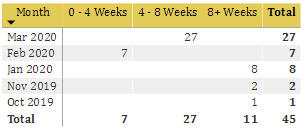
Unfortunately when doing the above, i get the following :


Capture.PNG


Please can you advise where I have gone wrong and how to correct this? 


Regards, 


Indy 

1 ACCEPTED SOLUTION
v-juanli-msft
Community Support
Community Support

Hi @Anonymous 

Please check If this result is expected.

Capture3.JPG

Create a new table

date =
ADDCOLUMNS (
    CALENDARAUTO (),
    "year", YEAR ( [Date] ),
    "month", MONTH ( [Date] ),
    "monthno", FORMAT (
        [Date],
        "yyyymm"
    ),
    "monthname", FORMAT (
        [Date],
        "Mmm yyyy"
    )
)

Add calculated columns

rank = RANKX(FILTER('date','date'[Date]<=TODAY()),[monthno],,DESC,Dense)-1

rank bucket = SWITCH([rank],1,"0~4 weeks",2,"4~8 weeks","8+weeks")


Best Regards
Maggie
Community Support Team _ Maggie Li
If this post helps, then please consider Accept it as the solution to help the other members find it more quickly.


View solution in original post

3 REPLIES 3
v-juanli-msft
Community Support
Community Support

Hi @Anonymous 

Please check If this result is expected.

Capture3.JPG

Create a new table

date =
ADDCOLUMNS (
    CALENDARAUTO (),
    "year", YEAR ( [Date] ),
    "month", MONTH ( [Date] ),
    "monthno", FORMAT (
        [Date],
        "yyyymm"
    ),
    "monthname", FORMAT (
        [Date],
        "Mmm yyyy"
    )
)

Add calculated columns

rank = RANKX(FILTER('date','date'[Date]<=TODAY()),[monthno],,DESC,Dense)-1

rank bucket = SWITCH([rank],1,"0~4 weeks",2,"4~8 weeks","8+weeks")


Best Regards
Maggie
Community Support Team _ Maggie Li
If this post helps, then please consider Accept it as the solution to help the other members find it more quickly.


Anonymous
Not applicable

Thank you so much @v-juanli-msft ! 


That worked for me! 

Greg_Deckler
Community Champion
Community Champion

Please see this post regarding How to Get Your Question Answered Quickly: https://community.powerbi.com/t5/Community-Blog/How-to-Get-Your-Question-Answered-Quickly/ba-p/38490


Follow on LinkedIn
@ me in replies or I'll lose your thread!!!
Instead of a Kudo, please vote for this idea
Become an expert!: Enterprise DNA
External Tools: MSHGQM
YouTube Channel!: Microsoft Hates Greg
Latest book!:
DAX For Humans

DAX is easy, CALCULATE makes DAX hard...

Helpful resources

Announcements
FabCon and SQLCon Barcelona 2026

FabCon & SQLCon – Barcelona 2026

Join us in Barcelona for FabCon and SQLCon, the Fabric, Power BI, SQL, and AI community event. Save €200 with code FABCMTY200.

60 days of Data Days Carousel

Data Days 2026

Join Fabric Data Days 2026: 60 days of free live/on-demand sessions, challenges, study groups, and certification opportunities.

Power BI DataViz World Championships carousel

Power BI DataViz World Championships - June 2026

A new Power BI DataViz World Championship is coming this June! Don't miss out on submitting your entry.