This is best Fabric, Power BI, SQL and AI community event. How do we know? The last event sold out! Save €200 with code FABCMTY200.
Register nowA new Data Days event is coming soon! This time we’re going bigger than ever. Fabric, Power BI, SQL, AI and more. Don't miss out.
Hello,
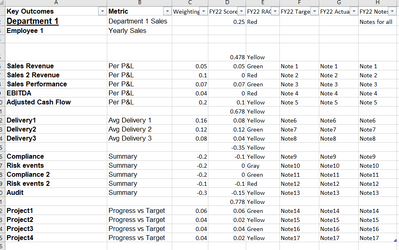
I am combining multiple tables, and I want to reflect the same financial layout in power bi. I tried building a custom map in excel to load in PQ, but not sure if it works. any help is greatly appreciated.
The sample file looks like the below:
@Vijay_A_Verma Any chance you can help please?
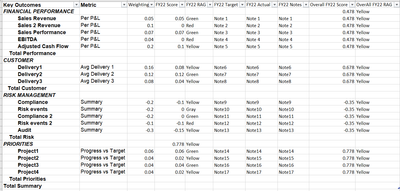
What values to populate in these rows - Total Performance, Total Customer, Total Risk, Total Priorities, Total Summary
Will these be blanks?
@Vijay_A_Verma Today I got the usual email from Microsoft to say "Did you get the answer you needed?". Do you have any updates? if you can't help, no problem and thanks for your time. In the end, this is a voluntarily help, but it's good to set expectations.
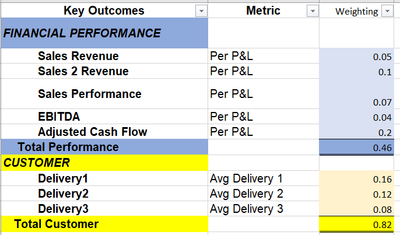
Values should be the total of Parents like below:
If that is extra work, please ignore it.
What is the layout of output expected?
Sign up to receive a private message when registration opens and key events begin.
If you have recently started exploring Fabric, we'd love to hear how it's going. Your feedback can help with product improvements.