cancel
Showing results for 
Search instead for 
Did you mean: 

Data Days is here! Join us now for 60+ days of learning, challenges, and connection. Learn more

Reply
Redraidas10
Frequent Visitor

Help needed with setting up a parameter for my API (To loop through multiple APIs)

Hi everyone! Basically, I'm trying to create a parameter for my API, where I could feed various IDs to it. The problem is that I get the following error when I try to feed ID to it:

Error:


An error occurred in the ‘’ query. Expression.Error: 3 arguments were passed to a function which expects between 1 and 2.

Details:

Pattern=

Arguments=[List]


Code used (I'm pretty sure it requires a slight tweak somewhere but I'm not sure where - it works if I remove the bit where I provide API token, however, without the token I cannot access the data, so I just need to figure out how to correctly specify the API key in my Power Query):


(ID as text) as table=>

let

Source = Json.Document(Web.Contents("---MY API ADDRESS---",

[RelativePath ="/api/data/"&(ID)&"/"],

[Headers=[#"X-API-KEY"="9999999999999999"]]

))

#"Converted to Table" = Record.ToTable(Source),

#"Pivoted Column" = Table.Pivot(#"Converted to Table", List.Distinct(#"Converted to Table"[Name]), "Name", "Value")

in

#"Pivoted Column"

1 ACCEPTED SOLUTION
Anonymous
Not applicable

Hi @Redraidas10 

1.May you can refet to the following code

e.g 

Source = Json.Document(Web.Contents(PARAM_API_BASE_URL, [RelativePath = "/project/testprj", Headers = [Authorization = "Basic " & Binary.ToText(Text.ToBinary(PARAM_API_USERNAME & ":" & PARAM_API_USER_PASSWORD), BinaryEncoding.Base64), #"APIKey" = PARAM_API_KEY]]))

And you can refer to the following link.

Accessing REST APIs with Basic Auth and API Key in Power Query | John Dalesandro

2.You can try to the following solution.

a.select "Web" in get data in Power BI Desktop.

b.input the URL in basic.

vxinruzhumsft_0-1694054081279.png


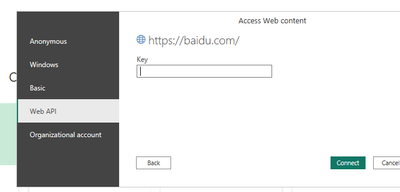
3.Select the "Web API" to access and input your key.

vxinruzhumsft_1-1694054125172.png


Best Regards!

Yolo Zhu

If this post helps, then please consider Accept it as the solution to help the other members find it more quickly.


View solution in original post

1 REPLY 1
Anonymous
Not applicable

Hi @Redraidas10 

1.May you can refet to the following code

e.g 

Source = Json.Document(Web.Contents(PARAM_API_BASE_URL, [RelativePath = "/project/testprj", Headers = [Authorization = "Basic " & Binary.ToText(Text.ToBinary(PARAM_API_USERNAME & ":" & PARAM_API_USER_PASSWORD), BinaryEncoding.Base64), #"APIKey" = PARAM_API_KEY]]))

And you can refer to the following link.

Accessing REST APIs with Basic Auth and API Key in Power Query | John Dalesandro

2.You can try to the following solution.

a.select "Web" in get data in Power BI Desktop.

b.input the URL in basic.

vxinruzhumsft_0-1694054081279.png


3.Select the "Web API" to access and input your key.

vxinruzhumsft_1-1694054125172.png


Best Regards!

Yolo Zhu

If this post helps, then please consider Accept it as the solution to help the other members find it more quickly.


Helpful resources

Announcements
Fabric Data Days is here Carousel

Fabric Data Days 2026

Don't miss out on Data Days, June 15 through August 7. Learn Fabric, Power BI, SQL, AI and more.

May Power BI Update Carousel

Power BI Monthly Update - May 2026

Check out the May 2026 Power BI update to learn about new features.

Power BI DataViz World Championships carousel

Power BI DataViz World Championships - June 2026

A new Power BI DataViz World Championship is coming this June! Don't miss out on submitting your entry.