Get certified for free when you join Fabric Data Days 2026 and dive into Fabric, Power BI, SQL, AI, and other essential data skills.
Join nowJuly 7 - July 17 | Round 2 of the Power BI Dataviz World Championships. Don't miss your chance! Learn more
Hi all,
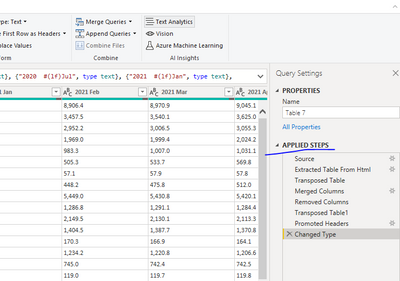
How can I create a header row based on data from Web Query on Fed data where table headers are inconsistent? Some fields import as a wrapped line :
2021
Jul
Others import as 2 different rows:
Week ending
Aug11
Fed site : https://www.federalreserve.gov/releases/h8/current/default.htm
Table 7
Thanks,
-w
Solved! Go to Solution.
@UncleLewis
You need to do a bit transformation in power query. Please check the power query steps in the following pbix.
Paul Zheng _ Community Support Team
If this post helps, please Accept it as the solution to help the other members find it more quickly.
@UncleLewis
You need to do a bit transformation in power query. Please check the power query steps in the following pbix.
Paul Zheng _ Community Support Team
If this post helps, please Accept it as the solution to help the other members find it more quickly.
See if this article helps @UncleLewis - Working With Multiple Row Headers From Excel in Power Query — ehansalytics
It specifically deals with double row headers in Excel, but should apply to any data source where you need to combine multiple rows into a single row for a clean header row before promoting to the header.
DAX is for Analysis. Power Query is for Data Modeling
Proud to be a Super User!
MCSA: BI Reporting