Join us in Barcelona for FabCon and SQLCon, September 28 - October 1, 2026.
This is best Fabric, Power BI, SQL and AI community event. How do we know? The last event sold out! Save €200 with code FABCMTY200.
Register now- Power BI forums
- Get Help with Power BI
- Desktop
- Service
- Report Server
- Power Query
- Mobile Apps
- Developer
- DAX Commands and Tips
- Custom Visuals Development Discussion
- Health and Life Sciences
- Power BI Spanish forums
- Translated Spanish Desktop
- Training and Consulting
- Instructor Led Training
- Dashboard in a Day for Women, by Women
- Galleries
- Data Stories Gallery
- Themes Gallery
- Contests Gallery
- QuickViz Gallery
- Quick Measures Gallery
- Visual Calculations Gallery
- Fabric Apps Gallery
- Notebook Gallery
- Translytical Task Flow Gallery
- TMDL Gallery
- R Script Showcase
- Webinars and Video Gallery
- Ideas
- Custom Visuals Ideas (read-only)
- Issues
- Issues
- Events
- Upcoming Events
The Fabric community is upgrading! Read all of the details including the timeline and what you can expect. Learn more
- Power BI forums
- Forums
- Get Help with Power BI
- Power Query
- Re: HTTP Post API request with Access and Client t...
- Subscribe to RSS Feed
- Mark Topic as New
- Mark Topic as Read
- Float this Topic for Current User
- Bookmark
- Subscribe
- Printer Friendly Page

- Mark as New
- Bookmark
- Subscribe
- Mute
- Subscribe to RSS Feed
- Permalink
- Report Inappropriate Content
HTTP Post API request with Access and Client token
Dear reader,
I am trying to access a datasource through an API with an access and client token that is certified to my property with a json format. The request follows the url - https://www.mews.li/api/connector/v1/accountingCategories/getAll and then I need to add a body that follows this:
{
"ClientToken": "E0D439EE522F44368DC78E1BFB03710C-D24FB11DBE31D4621C4817E028D9E1D",
"AccessToken": "C66EF7B239D24632943D115EDE9CB810-EA00F8FD8294692C940F6B5A8F9453D",
"StartUtc": "2020-01-15T00:00:00Z",
"EndUtc": "2020-02-31T00:00:00Z"
}
However, when I attempt to make a post request in the Power query I get empty lists. I use the following request:
let
body = {"CleintToken"="E0D439EE522F44368DC78E1BFB03710C-D24FB11DBE31D4621C4817E028D9E1D",
"AccessToken"="C66EF7B239D24632943D115EDE9CB810-EA00F8FD8294692C940F6B5A8F9453D",
"StartUtc"= "2020-01-15T00:00:00Z",
"EndUtc"= "2020-02-31T00:00:00Z"
},
Data= Web.Contents("https://www.mews.li/api/connector/v1/accountingCategories/getAll",
[Content=Text.ToBinary(body),
Headers=[#"Content-Type"="application/json"]]),
DataRecord = Json.Document(Data),
Source=DataRecord
in
Source
There is a website that explains how to use this API. This is the link - https://mews-systems.gitbook.io/connector-api/guidelines
Am I doing this right? Can someone help me out?


- Mark as New
- Bookmark
- Subscribe
- Mute
- Subscribe to RSS Feed
- Permalink
- Report Inappropriate Content
Hi @Anonymous,
you can try this code:
let
body="{""AccessToken"": ""E0D439EE522F44368DC78E1BFB03710C-D24FB11DBE31D4621C4817E028D9E1D"",
  ""ClientToken"": ""C66EF7B239D24632943D115EDE9CB810-EA00F8FD8294692C940F6B5A8F9453D""}",
    Data= Web.Contents("https://mews.li/api/connector/v1/accountingCategories/getAll",
[Headers=[#"Content-Type"="application/json"],
Content = Text.ToBinary(body)
]),
DataRecord = Table.AddColumn(Json.Document(Data)),
Source=DataRecord
in
Source
it's untested but should work.
-------------------------------------------------------------------
Did I answer your question? Mark my post as a solution!
It was useful? Press Thumbs Up!
- Mark as New
- Bookmark
- Subscribe
- Mute
- Subscribe to RSS Feed
- Permalink
- Report Inappropriate Content
Dear @rainer1,
When I put in the code you provided I get the following error:
DataSource.Error: The downloaded data is HTML, which isn't the expected type. The URL may be wrong or you might not have provided the right credentials to the server
When I go to the error it references me to the Datarecord step, but shows nothing further. I tried giving different functions such as WebMethod.Post and Web.BrowserContents but nothing works. The only time that I have had a response is when I use Web.Page but the query is showing this:
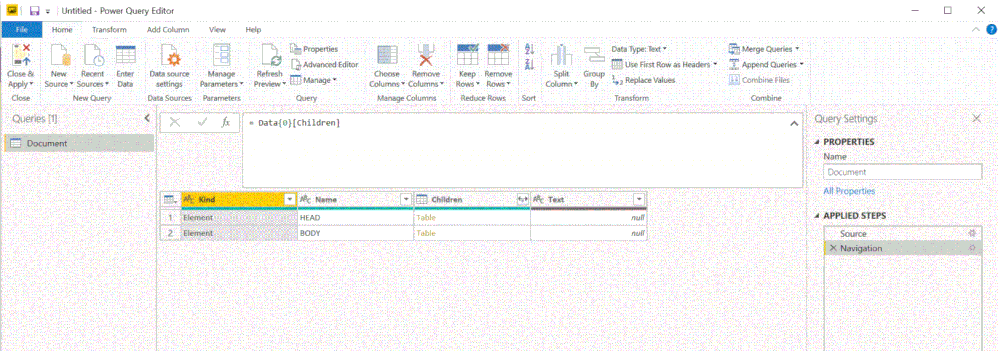
I look forward to further tips!


- Mark as New
- Bookmark
- Subscribe
- Mute
- Subscribe to RSS Feed
- Permalink
- Report Inappropriate Content
This works on the demo environment provided by the documentation:
let
    bodyRecord = [
        ClientToken = "E0D439EE522F44368DC78E1BFB03710C-D24FB11DBE31D4621C4817E028D9E1D",
        AccessToken = "C66EF7B239D24632943D115EDE9CB810-EA00F8FD8294692C940F6B5A8F9453D",
        Client = "Sample Client 1.0.0",
        LanguageCode = null,
        CultureCode = null
    ],
    contentBody = Json.FromValue(bodyRecord, 1252),
    request = Web.Contents(
        "https://demo.mews.li",
        [
            Headers = [
                #"Content-Type" = "application/json"
            ],
            Query = [],
            RelativePath = "/api/connector/v1/accountingCategories/getAll",
            Content = contentBody
        ]
    ),
    jsonResponse = Json.Document(request),
    AccountingCategories = jsonResponse[AccountingCategories]
in
    AccountingCategories
Substitute your `ClientToken` and `AccessToken` in the `bodyRecord` record above. You'll also need to subsititue the demo environment base domain ("https://demo.mews.li") with your production environment platform domain.
- Mark as New
- Bookmark
- Subscribe
- Mute
- Subscribe to RSS Feed
- Permalink
- Report Inappropriate Content
Thank you so much @tonmcg!
The query works! However, when I try to use your code as a foundation for other request from mews, it gives me the same error as before: (DataSource.Error: The downloaded data is HTML, which isn't the expected type. The URL may be wrong or you might not have provided the right credentials to the server.)
For example, I want to get data from this relative path - /api/connector/v1/accountingItems/getAll ; I have replaced the bodyrecord with the required properties but there is a StartUTC and EndUTC (ISO 8601), which I believe make the query not work. Here is an example of the code that I use:
*Note that I am using the demo keys for this example
let
bodyRecord = [
ClientToken = "E0D439EE522F44368DC78E1BFB03710C-D24FB11DBE31D4621C4817E028D9E1D",
AccessToken = "C66EF7B239D24632943D115EDE9CB810-EA00F8FD8294692C940F6B5A8F9453D",
Client = "Sample Client 1.0.0",
StartUtc = "2019-01-01T00:00:00Z",
EndUtc = "2021-01-01T00:00:00Z"
],
contentBody = Json.FromValue(bodyRecord, 1252),
request = Web.Contents(
"https://mews.li",
[
Headers = [
#"Content-Type" = "application/json"
],
Query = [],
RelativePath = "/api/connector/v1/accountingItems/getAll",
Content = contentBody
]
),
jsonResponse = Json.Document(request)
in
jsonResponse
I want to be able to get other request such as /api/connector/v1/reservations/getAll and /api/connector/v1/outletItems/getAll but I want to know where the issue is.
I look forward to your reply!
- Mark as New
- Bookmark
- Subscribe
- Mute
- Subscribe to RSS Feed
- Permalink
- Report Inappropriate Content
Two things:
- the domain in your sample request is incorrect. It should be `https://demo.mews.li`.
- your request is calling more than two years of data. In my tests, I received a `400` status code any time I requested more than 1 year of data. Change your `startUtc` and `endUtc` values so that no more than 1 year of data is requested. The documentation isn't explicit about this limitation, but this page does provide guidelines on how much data should be called per request.
In the example below, I show a request to the `accountingItems` endpoint (this will also work for the `outletItems` endpoint if you change the relative path to the corresponding endpoint):
let
    bodyRecord = [
        ClientToken = "E0D439EE522F44368DC78E1BFB03710C-D24FB11DBE31D4621C4817E028D9E1D",
        AccessToken = "C66EF7B239D24632943D115EDE9CB810-EA00F8FD8294692C940F6B5A8F9453D",
        Client = "Sample Client 1.0.0",
        StartUtc = "2020-01-01T00:00:00Z",
        EndUtc = "2021-01-01T00:00:00Z"
    ],
    contentBody = Json.FromValue(bodyRecord, 1252),
    request = Web.Contents(
        "https://demo.mews.li",
        [
            Headers = [
                #"Content-Type" = "application/json"
            ],
            Query = [],
            RelativePath = "/api/connector/v1/accountingItems/getAll",
            Content = contentBody
        ]
    ),
    jsonResponse = Json.Document(request)
in
    jsonResponse


- Mark as New
- Bookmark
- Subscribe
- Mute
- Subscribe to RSS Feed
- Permalink
- Report Inappropriate Content
Hi @Anonymous
References:
https://chris.koester.io/index.php/2015/07/16/get-data-from-twitter-api-with-power-query/
https://blog.crossjoin.co.uk/2014/03/26/working-with-web-services-in-power-query/
For your code, it seems "StartUtc" and "EndUtc" should not be included here.
They can be written as parameters.
Helpful resources

FabCon & SQLCon – Barcelona 2026
Join us in Barcelona for FabCon and SQLCon, the Fabric, Power BI, SQL, and AI community event. Save €200 with code FABCMTY200.

Power BI DataViz World Championships - June 2026
A new Power BI DataViz World Championship is coming this June! Don't miss out on submitting your entry.


