Get certified for free when you join Fabric Data Days 2026 and dive into Fabric, Power BI, SQL, AI, and other essential data skills.
Join nowJuly 7 - July 17 | Round 2 of the Power BI Dataviz World Championships. Don't miss your chance! Learn more
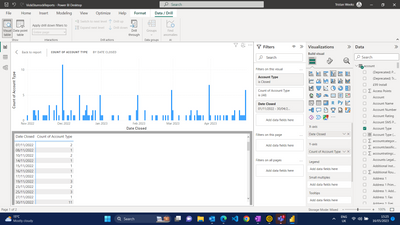
Hello, so i have used directQuery to import data. I want to see Closed Accounts per month. As you can see i am seeing a bar for each individual day during said months. I want to group all of november into one bar, all december into one bar, ect. I have to use Power Query. The filters i have on are Account Type = Closed & Date Closed = last 6 calendar months. So i would like to see 6 bars in my chart not the multiple like below. If anyone has any advice or a solution to this it would be very much appreciatted. Any further info or dat you require can be sent to you. Thank you
Solved! Go to Solution.
You can add a custom column in the "account" table with below M code to have "YYYYMM" format YearMonth values from [Date Closed] column. Apply the change to Power BI Desktop. Then use this new YearMonth column on X-axis of the column chart to replace the current Date Closed column.
Date.Year([Date Closed])*100+Date.Month([Date Closed])
Best Regards,
Community Support Team _ Jing
If this post helps, please Accept it as Solution to help other members find it.
You can add a custom column in the "account" table with below M code to have "YYYYMM" format YearMonth values from [Date Closed] column. Apply the change to Power BI Desktop. Then use this new YearMonth column on X-axis of the column chart to replace the current Date Closed column.
Date.Year([Date Closed])*100+Date.Month([Date Closed])
Best Regards,
Community Support Team _ Jing
If this post helps, please Accept it as Solution to help other members find it.
Join us in Barcelona for FabCon and SQLCon, the Fabric, Power BI, SQL, and AI community event. Save €200 with code FABCMTY200.
Join Fabric Data Days 2026: 60 days of free live/on-demand sessions, challenges, study groups, and certification opportunities.