
Join us at FabCon Atlanta from March 16 - 20, 2026, for the ultimate Fabric, Power BI, AI and SQL community-led event. Save $200 with code FABCOMM.
Register now!The Power BI Data Visualization World Championships is back! It's time to submit your entry. Live now!
Hello to every one,
I've been trying to group certain columns depending on a value.
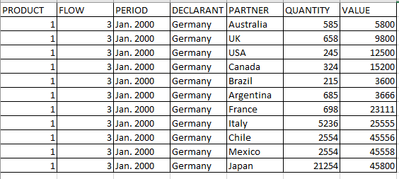
I have this table:
| PRODUCT | FLOW | PERIOD | DECLARANT | PARTNER | QUANTITY | VALUE |
| 1 | 3 | Jan. 2000 | Germany | Australia | 585 | 5800 |
| 1 | 3 | Jan. 2000 | Germany | UK | 658 | 9800 |
| 1 | 3 | Jan. 2000 | Germany | USA | 245 | 12500 |
| 1 | 3 | Jan. 2000 | Germany | Canada | 324 | 15200 |
| 1 | 3 | Jan. 2000 | Germany | Brazil | 215 | 3600 |
| 1 | 3 | Jan. 2000 | Germany | Argentina | 685 | 3666 |
| 1 | 3 | Jan. 2000 | Germany | France | 698 | 23111 |
| 1 | 3 | Jan. 2000 | Germany | Italy | 5236 | 25555 |
| 1 | 3 | Jan. 2000 | Germany | Chile | 2554 | 45556 |
| 1 | 3 | Jan. 2000 | Germany | Mexico | 2554 | 45558 |
| 1 | 3 | Jan. 2000 | Germany | Japan | 21254 | 45800 |
I've created a pivot table, all partners/countries are shown, but I want to group certain countries into a "column" inside the pivot table as "others".
This is what I'm trying to get:
| PARTNER | AUSTRALIA | BRAZIL | USA | CANADA | OTHERS | |||||
| PERIOD | QTY | VALUE | QTY | VALUE | QTY | VALUE | QTY | VALUE | QTY | VALUE |
| Jan. 2000 | 585 | 5800 | 215 | 3600 | 245 | 12500 | 324 | 15200 |
The column other should be the sum of the countries which are not shown, those countries will be always the same ones, does not depend on a certain value of qty or value.
Many thanks in advance!
Solved! Go to Solution.
Hi @ciervax
I tried @JW_van_Holst 's solution and create a pivot table like below. The output is the same as your expected result. Is this what you want?
Regards,
Community Support Team _ Jing
If this post helps, please Accept it as the solution to help other members find it.
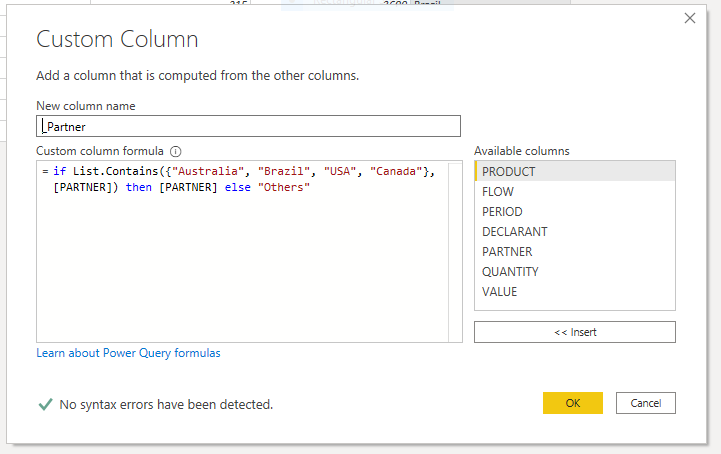
In power query add an column:
In your pivot table select _Partner in stead of Partner and it should do the job.
Good luck,
//JW
Thank you for your help.
The problem I see, is the new column _Partner is marking all fields as others, even if the country in partner is not listed as "Australia", "etc"
Then if I select _Partner as a column instead of Partner, is showing only the column Others cause the column is containing all countries.
I don't know why it is not reading the list properly, and all rows are "Others".
Hi @ciervax
I tried @JW_van_Holst 's solution and create a pivot table like below. The output is the same as your expected result. Is this what you want?
Regards,
Community Support Team _ Jing
If this post helps, please Accept it as the solution to help other members find it.
if you upload a copiable table, could, perhaps, get you a quicker response.
Sure, I've edited the post, I tried the first time to do it, but the second table was not showing properly, cause some fields are combined, I don't know if there is any other option.
The Power BI Data Visualization World Championships is back! It's time to submit your entry.
Check out the January 2026 Power BI update to learn about new features.
| User | Count |
|---|---|
| 16 | |
| 14 | |
| 9 | |
| 8 | |
| 7 |