cancel
Showing results for 
Search instead for 
Did you mean: 

July 7 - July 17 | Round 2 of the Power BI Dataviz World Championships. Don't miss your chance! Learn more

Reply
Anonymous
Not applicable

Group by

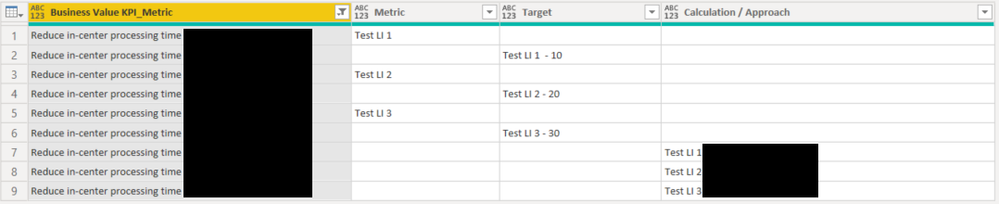
I would like to consolidate the number of Business Value KPI_Metric rows below from 9 to 3 by having the values within the Metric, Target, and Calculation / Approach columns in the same row. For example; row 1 would have Reduce in-center processing, Test LI1, Test LI1 - 10, and Test LI 1. Does anyone know if this can be done in the query editor?

Thanks in advance to anyone who can assist.


bchager6_0-1636501003748.png


1 ACCEPTED SOLUTION
ronrsnfld
Super User
Super User

You can do it within the Table.Group function.

Then just expand the resulting table


  • Group by the BV Metric
  • Create a new table by combining the columns of the old table as Lists from which you've removed the nulls:  Table.FromColumns
    • You may want to replace any blanks or spaces with nulls before doing the group, depending on your data
  • Then filter out the nulls with Table.SelectRows
  • In the next step, you can expand this newly created table.


   #"Grouped Rows" = Table.Group(#"Replaced Value", {"Business Value KPI_Metric"}, {
        {"Collapsed", each 
            Table.SelectRows(
                Table.FromColumns(
                    {[Business Value KPI_Metric],List.RemoveNulls([Metric]),List.RemoveNulls([Target]),List.RemoveNulls([#"Calculation/Approach"])},
                    type table [Business Value KPI_Metric=nullable text, 
                                Metric=nullable text, 
                                Target=nullable number, 
                                #"Calculation/Approach"=nullable text]),
            each [Metric]<> null)}}),


Replace #"Previous Step" with the actual name of the previous step in your code.


View solution in original post

2 REPLIES 2
ronrsnfld
Super User
Super User

You can do it within the Table.Group function.

Then just expand the resulting table


  • Group by the BV Metric
  • Create a new table by combining the columns of the old table as Lists from which you've removed the nulls:  Table.FromColumns
    • You may want to replace any blanks or spaces with nulls before doing the group, depending on your data
  • Then filter out the nulls with Table.SelectRows
  • In the next step, you can expand this newly created table.


   #"Grouped Rows" = Table.Group(#"Replaced Value", {"Business Value KPI_Metric"}, {
        {"Collapsed", each 
            Table.SelectRows(
                Table.FromColumns(
                    {[Business Value KPI_Metric],List.RemoveNulls([Metric]),List.RemoveNulls([Target]),List.RemoveNulls([#"Calculation/Approach"])},
                    type table [Business Value KPI_Metric=nullable text, 
                                Metric=nullable text, 
                                Target=nullable number, 
                                #"Calculation/Approach"=nullable text]),
            each [Metric]<> null)}}),


Replace #"Previous Step" with the actual name of the previous step in your code.


Anonymous
Not applicable

Brilliant. Thank you!

Helpful resources

Announcements
FabCon and SQLCon Barcelona 2026

FabCon & SQLCon – Barcelona 2026

Join us in Barcelona for FabCon and SQLCon, the Fabric, Power BI, SQL, and AI community event. Save €200 with code FABCMTY200.

60 days of Data Days Carousel

Data Days 2026

Join Fabric Data Days 2026: 60 days of free live/on-demand sessions, challenges, study groups, and certification opportunities.

Power BI DataViz World Championships carousel

Power BI DataViz World Championships - June 2026

A new Power BI DataViz World Championship is coming this June! Don't miss out on submitting your entry.