cancel
Showing results for 
Search instead for 
Did you mean: 

The Power BI Data Visualization World Championships is back! Get ahead of the game and start preparing now! Learn more

Reply
Anonymous
Not applicable

Group by

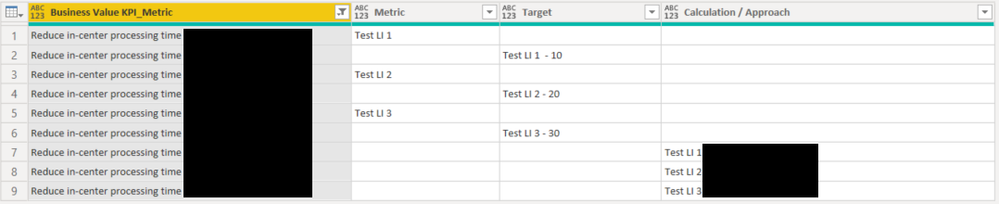
I would like to consolidate the number of Business Value KPI_Metric rows below from 9 to 3 by having the values within the Metric, Target, and Calculation / Approach columns in the same row. For example; row 1 would have Reduce in-center processing, Test LI1, Test LI1 - 10, and Test LI 1. Does anyone know if this can be done in the query editor?

Thanks in advance to anyone who can assist.


bchager6_0-1636501003748.png


1 ACCEPTED SOLUTION
ronrsnfld
Super User
Super User

You can do it within the Table.Group function.

Then just expand the resulting table


  • Group by the BV Metric
  • Create a new table by combining the columns of the old table as Lists from which you've removed the nulls:  Table.FromColumns
    • You may want to replace any blanks or spaces with nulls before doing the group, depending on your data
  • Then filter out the nulls with Table.SelectRows
  • In the next step, you can expand this newly created table.


   #"Grouped Rows" = Table.Group(#"Replaced Value", {"Business Value KPI_Metric"}, {
        {"Collapsed", each 
            Table.SelectRows(
                Table.FromColumns(
                    {[Business Value KPI_Metric],List.RemoveNulls([Metric]),List.RemoveNulls([Target]),List.RemoveNulls([#"Calculation/Approach"])},
                    type table [Business Value KPI_Metric=nullable text, 
                                Metric=nullable text, 
                                Target=nullable number, 
                                #"Calculation/Approach"=nullable text]),
            each [Metric]<> null)}}),


Replace #"Previous Step" with the actual name of the previous step in your code.


View solution in original post

2 REPLIES 2
ronrsnfld
Super User
Super User

You can do it within the Table.Group function.

Then just expand the resulting table


  • Group by the BV Metric
  • Create a new table by combining the columns of the old table as Lists from which you've removed the nulls:  Table.FromColumns
    • You may want to replace any blanks or spaces with nulls before doing the group, depending on your data
  • Then filter out the nulls with Table.SelectRows
  • In the next step, you can expand this newly created table.


   #"Grouped Rows" = Table.Group(#"Replaced Value", {"Business Value KPI_Metric"}, {
        {"Collapsed", each 
            Table.SelectRows(
                Table.FromColumns(
                    {[Business Value KPI_Metric],List.RemoveNulls([Metric]),List.RemoveNulls([Target]),List.RemoveNulls([#"Calculation/Approach"])},
                    type table [Business Value KPI_Metric=nullable text, 
                                Metric=nullable text, 
                                Target=nullable number, 
                                #"Calculation/Approach"=nullable text]),
            each [Metric]<> null)}}),


Replace #"Previous Step" with the actual name of the previous step in your code.


Anonymous
Not applicable

Brilliant. Thank you!

Helpful resources

Announcements
Power BI DataViz World Championships

Power BI Dataviz World Championships

The Power BI Data Visualization World Championships is back! Get ahead of the game and start preparing now!

December 2025 Power BI Update Carousel

Power BI Monthly Update - December 2025

Check out the December 2025 Power BI Holiday Recap!

FabCon Atlanta 2026 carousel

FabCon Atlanta 2026

Join us at FabCon Atlanta, March 16-20, for the ultimate Fabric, Power BI, AI and SQL community-led event. Save $200 with code FABCOMM.

Top Solution Authors